Posts Tagged ‘firefox’
Posted on July 8, 2008 - by snipe
Firefox Add-On ErrorZilla breaks FF3 SSL error page
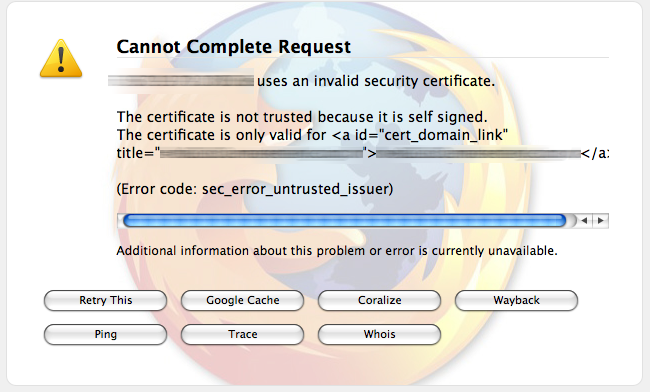
If you use the Firefox add-on ErrorZilla, which conveniently displays additional options (Try Again, Google Cache, Coralize, Wayback, Ping, Trace, and Whois buttons) when Firefox hits an error page, you may notice something frustrating happening in Firefox 3. (more…)
Posted on July 2, 2008 - by snipe
Sync Your Browsers Across Multiple Computers with Mozilla Weave
Those of you who have upgraded to Firefox 3 may be feeling the loss of Google Browser Sync, Google’s free Firefox addon that previously allowed you to sync bookmarks, stored password, cookies and more across multiple computers. For folks like me, who work on multiple computers throughout the course of the day, this was an invaluable tool for keeping track of passwords at the very least.
I was heartbroken to discover that Google had effectively abandoned the project around the time that Firefox 3 came out - so much so that I delayed upgrading Firefox for a while. I was hoping they’d change their mind, or get around to updating it - but eventually I realized that Google Browser Sync has been discontinued, and the download has been replaced with the following text:
Google Browser Sync is no longer available for download. Instead, to get similar functionality, we suggest using Mozilla Weave, Google Toolbar for Firefox, or Foxmarks. Support for current Google Browser Sync users will continue through 2008. We’ve also posted the code to Google Code in hopes that someone will use it to develop something cool.
As such, it will not be updated for Firefox 3. However, the code has been made available to the public
Fortunately, the folks at Mozilla Labs came to the rescue, with their new project, Mozilla Weave. Mozilla Weave syncs forms, history, cookies, passwords, tabs and bookmarks - and even has support for Weave add-ins. Plus, you can mount your storage slot using WebDAV - although Mozilla strongly warns against using this space for general storage, as they may delete the contents
at any time.
I’ve installed it so far on Win XP and Mac OSX (Leopard), and it’s working smashingly. Learn more about the Weave project, including the basics of how it works and the fundamental principles, at the Mozilla Labs Weave page, or try it out by downloading it today!
Posted on June 23, 2008 - by snipe
Hacking Firefox
Excellent (and long) article here that covers most of the frequently-asked-for tweaks and hacks to about:config in Firefox.
I had originally found it while trying to remember how to tweak my Firefox so that when I type in a keyword string into the address bar, it would send me to Google search results, instead of Google’s “I’m feeling lucky”. And sure enough, I found exactly what I was looking for - and tons more - in this article:
You may have noticed that if you type something into Firefox’s address bar that’s not an address (a “keyword”), Firefox typically passes it on to Google as an “I’m Feeling Lucky” search term. The exact search engine string to use is defined in the string preference keyword.URL; if you want to change it to something else, you can simply edit this string.
So I changed it to a normal Google search results string, and voila.
Even though this article was written in 2007, most of the info still applies, so its still a worthwhile article to check out. Computer World: Hacking Firefox: The Secrets of about:config
Posted on June 22, 2008 - by snipe
Tweak Firefox 3 to Display Richer Colors
If the digital photo you just uploaded looks more washed out in Flickr than it does in your desktop image editor, that’s because Firefox 3’s advanced color management capability isn’t turned on by default. To turn it on, type about:config in Firefox 3’s address bar, then click the “I’ll be careful, I promise!” button. Then, in the Filter field, type gfx.color_management.enabled and set that value to true (its default value is false). Restart Firefox. From there on in, your photo colors will be richer than they were. Why isn’t this value true by default? Well, according to Mozilla, you’ll see a 10-15% performance hit using this setting, but if you’ve got a reasonably fast machine, it’ll be worth the better-looking photos. Hit this link for an extended explanation of Firefox’s color profile support.
Posted on January 15, 2007 - by snipe
Firefox extensions I can’t live without
All of these work with FF 2, and many work with older versions. All but one or two have also been updated to work with FF 3. (List last updated Aug 26, 2008.)
General Browsing:
URL Fixer
Seamlessly fixes the fat-fingered “.con” typos in a domain name. (Other similar extensions only suggest the alternates after the page has failed to load)
Copy Plain Text
Allows you to copy without formatting
AdBlock Plus
Blocks out inline ads, such as banner ads, Google Adwords, etc. (Note, if you’re a regular at the IWG site, please consider disabling this plugin while there. The ad revenue actually does help keep it running. Its not a lot, but its enough.)
Link Alert
Pops up a teenie icon when you mouseover a link, indicating the type of file a hyperlink goes to (.doc, .pdf, etc). This is particularly handy if you (like me) hate clicking on a link and then waiting 10 for Adobe Acrobat to open. Obviously, yes, you can look at the status bar and find out where it’s going - but this extension makes it much more intuitive.
URL Link
Reconnects broken links that are only broken because web-based email wrapped them, etc. Also has some other neat features.
PDF Download
Makes FF ask you what you want to do with a PDF file, rather than automatically opening it in a browser window. I’m on a lot of law and court websites often, and many of them offer PDFs, so this is a nice one for me.
Resizable textarea
Just what it sounds like - it lets you make a textarea box bigger for more room to type.
Aging Tabs
Changes the color of the tabs in FF based on how long they have been idle. This isn’t a critical one, but its helpful to me, since I switch back and forth from tabs so often. At a glance, I can see which are the most active, so I know which ones to click on.
Foxmarks Synchronizer
Syncs all of your Firefox bookmarks across multiple computers. Requires you to sign up for an account at Foxmarks, but the account sign-up is built in to the initial setup, and it literally took less than 30 seconds. As of October 2008, Foxmarks now supports browser password syncing.
Download Helper
Grab images and video from YouTube, MySpace, etc.
FavLoc
Allows you to set specific favorite folders to save your downloads.
Background Image Saver
More and more sites are utilizing a transparent gif overlay to prevent their images from being saved via the right+click “save image as”. Since Firefox doesn’t have a “Save background image as…”. this extension gives it back to you.
Google Adsense Notifier
Shows you how much you’ve earned in the status bar. I have found a bit of a glitch with this since the last update, where I can no longer view the amount from last payment (it shows the amount for all time instead), but I am hopeful that this will get fixed soon, since I really like this extension.
Gutil!
Just a quick shortcut to Google services (mail, news, etc.) Simple, but nice.
Read it Later
This is a handy little addon that lets you flag a page to read later. If you’re like me, you constantly find interesting pages that you want to delve into, but don’t always have time, the very moment you find them. While you could certainly just set up a Bookmarks folder for stuff you want to get to later, Read it Later adds a spiffy icon in your address bar. One click and its saved for later.
Google Preview
Provides a thumbnail screenshot next to the site link and summary in Google search results. I wouldn’t have thought I needed this when I first heard about it, but its become one of my favorites.
Web Development:
IE Tab
This is perhaps more important as a web developer, but there are times when a page won’t render correctly in FF, so it’s nice to have an alternate way of viewing it. There is also a trimmed down version of this extension available as IE Lite. Alas, for PC only.
Aardvark
This one is a must-have for all web developers. It allows you to quickly and easily view and select distinct elements of a webpage, displaying their characteristics, including id. Great for troubleshooting HTML and CSS.
Web Developer Toolbar
This is THE first extension I go for when setting up a new computer. Tons of web dev tools, including viewing submitted headers, debugging tools, and so on.
Firebug
This is the SECOND extension I go for when setting up a new computer. If I ever get to meet the people who came up with this, I’m going to march right up to them and plant a wet one on their face. This extension has saved me so much time and aggravation - I can’t imagine being a web developer without it. How did I do it before Firebug? Firebug gives you easy access to CSS styles, HTML attributes, even network calls for external files.
User Agent Switcher
Helps debug any weird encoding issues you might run across.
ShowIP
Shows the IP address of the website host. Useful if you’re working with a site that does load-balancing, dev environments, and so on.
Server Spy
This addon lets you see what type of server the website you’re visiting is running, similar to Netcraft’s “What that site running” lookup.
Character Identifier
This extension adds a context menu item for selected text that provides more information (from the Unicode database) about the characters selected.
Server Switcher
If you work with a dev and live server environment, such as dev.yoursite.com and www.yoursite.com, this extension allows you to easily switch between the two servers from any page on either server. It would have been nice if you could add one more version, such as staging, but overall its really quite handy.
Fireshot
A very slick, lightweight screenshot addon that allows simple annotations and highlight boxes. Very handy for explaining elements to clients, helping non-techy people understand what and where to click, and so on. There is a free version and a paid version, but I’ve found that the free version is more than adequate for most use. Only available for Windows… *sniffle*
Colorzilla
Great little addon that gives you the power of a color eyedropper in your browser. Need to grab a color from a website to make additional graphics? No problem. Two clicks later, you’ve got the RGB or hex color code copied to your clipboard. This addon has saved me a ton of time.
MeasureIt
Handy little addon that lets you whip out a ruler and measure the size of anything in your browser, in pixels.
HttpFox
Lets you see the headers being sent through the browser - can be helpful for debugging scripts.
The Pencil Project
Great addon that lets you plan and tweak GUI interfaces right in your browser. Click here to read more about the Pencil Project in a previous Snipe.Net article.
Social
Twitterfox
Simply THE easiest way to Twitter. There isn’t a time when I’m on the computer without a browser window open, so this slim Twitter client makes it unbelievably easy to post to and read Twitter updates. Don’t use Twitter? Click here to learn why you should!
Not at All Useful, But Still Fun
Bork Bork Bork!
Translates webpage text into Swedish Chef