Snipe.Net - Geeky Stuff
Twitter
Currently: @egyp7 dude, you'd better not fuck with those disc golfers. in reply to egyp7 4 hrs ago

Taking Your Static FBML Microsite to the Next Level

closeThis post was published 1 year 11 months 30 days ago. There is a chance that some APIs or software versions discussed have changed since this article was written.

In a previous tutorial, you learned how to Extend Facebook Static FBML Tabs with Dynamic Content, and now we’re back to show you how to take it even further by creating sub-nav tab navigation within your Static FBML microsite using only DynamicFBML.

The previous tutorial, I walked you through how to use clicktohide and clicktoshow to enhance your Facebook Fan Page tab. By utilizing these built-in Facebook functions, we can get creative and make image galleries, slide shows, or micro-sites within a single Facebook Fan Page tab. This is especially handy if you’re trying to fit a lot of content into a single tab, but don’t want to have one long scrolling mess of a tab. While hand-written FBJS is always an option, Facebook makes it really easy to accomplish this with only the most basic coding skills.

(That said, if you haven’t read the first tutorial, it will probably be helpful for you to read that one first before continuing with this one – I assume you understand the concept of clicktohide and clicktoshow here.)

So what you’ll end up with is a single Facebook Fan Page tab that has a “main” navigation that switches content within that single tab, and an additional subnavigation menu that switches content within that one section of the tabbed content. It sounds more confusing than it actually is – click here for a demo.

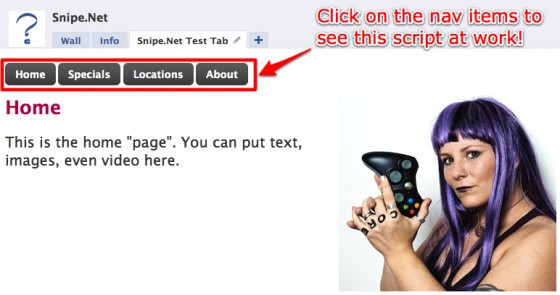
This is what we created in the previous tutorial:
And this is what we’re going to create in this one:
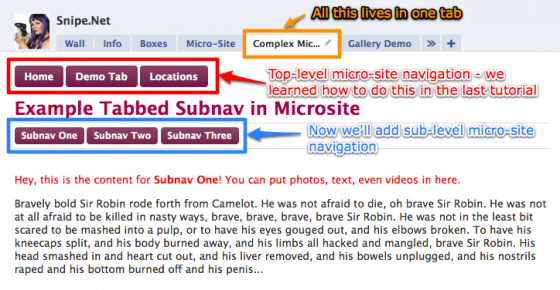
Similar to the example in the first tutorial, we’re going to do all of this magic simply by using CSS, HTML and the clicktohide and clicktoshow functions. In fact, what we’re doing here isn’t that different at all from what we did the first time, but I get a metric-assload of emails asking me how to to it, so here it is.

<!-- Now set the main tab navigation -->
<a href="#" clicktoshow="nav1" clicktohide="nav2,nav3">Home</a>
<a href="#" clicktoshow="nav2" clicktohide="nav1,nav3">Demo Tab</a>
<a href="#" clicktoshow="nav3" clicktohide="nav1,nav2">Locations</a>
<br />
<br />

<!-- start the div for the first main nav tab - nav1 -->
<div id="nav1">
	<p>Home content</p>
</div>
<!-- end the div for the first main nav tab - nav1 -->

<!-- start the div for the second main nav tab - nav2 -->
<div id="nav2" style="display: none;">
	<h1>Example Tabbed Subnav in Microsite</h1>
	<hr />
	<a href="#" clicktoshow="tab2subnav1" clicktohide="tab2subnav2,tab2subnav3">Subnav One</a>
	<a href="#" clicktoshow="tab2subnav2" clicktohide="tab2subnav1,tab2subnav3">Subnav Two</a>
	<a href="#" clicktoshow="tab2subnav3" clicktohide="tab2subnav1,tab2subnav2">Subnav Three</a>
	<hr />
	<br />

	<!-- start the div for the first subnav tab - tab2subnav1 -->
	<div id="tab2subnav1">
		<p>Subnav one content</p>
	</div>
	<!-- end the div for the first subnav tab - tab2subnav1 -->

	<!-- start the div for the second subnav tab - tab2subnav2 -->
	<div id="tab2subnav2" style="display: none;">
		<p>Subnav two content</p>
	</div>
	<!-- end the div for the second subnav tab - tab2subnav2 -->

	<!-- start the div for the third subnav tab - tab2subnav3 -->
	<div id="tab2subnav3" style="display: none;">
		<p>Subnav three content</p>
	</div>
	<!-- end the div for the third subnav tab - tab2subnav3 -->
</div>
<!-- end the div for the second main nav tab - nav2 -->

<!-- start the div for the third main nav tab - nav3 -->
<div id="nav3" style="display: none;">
	<h1>Locations</h1>
	<p>Locations content</p>
</div>
<!-- end the div for the third main nav tab - nav3 -->

And that’s it. That’s the whole code snippet. For clarity, I have stripped out all of the extra styling, text and fancy button treatments. If you want the exact code used for the demo, scroll down further in the page – I’ve included that as well.

I’ve commented the code pretty liberally, but just to recap what we’ve done, we created the normal main microsite divs, nav1, nav2, and nav3. These are the “buckets” that contain the top-level “tabs”, same as we did in the first tutorial. What we’ve added is a second, smaller set of buckets and corresponding nav. We use the exact same method of clicktohide and clicktoshow – the only different is what we’ve name the smaller bucket divs, and where they live. The div structure works out to be something like this:

[nav1 div]
– nav 1 content
[/nav1 div]

[nav 2 div]
– [subnav 1 div]
– subnav 1 content
– [/subnav 1 div]

– [subnav 2 div]
– subnav 2 content
– [/subnav 2 div]

– [subnav 3 div]
– subnav 3 content
– [/subnav 3 div]

[nav3 div]
– nav 3 content
[/nav3 div]

As promised, here’s the exact code snippet, line by line, that was used to create the demo page.

<!-- let's set the style for those fancy buttons -->
<style type="text/css">
.awesome, .awesome:visited {
	background: #222 url(http://www.snipe.net/wp-content/uploads/2009/10/alert-overlay.png) repeat-x;
	display: inline-block;
	padding: 5px 10px 6px;
	color: #fff;
	text-decoration: none;
	-moz-border-radius: 5px;
	-webkit-border-radius: 5px;
	-moz-box-shadow: 0 1px 3px rgba(0,0,0,0.5);
	-webkit-box-shadow: 0 1px 3px rgba(0,0,0,0.5);
	text-shadow: 0 -1px 1px rgba(0,0,0,0.25);
	border-bottom: 1px solid rgba(0,0,0,0.25);
	position: relative;
	cursor: pointer;
}

.awesome:hover {
background-color: #111; color: #fff;
}

.awesome:active {
top: 1px;
}

.awesome, .awesome:visited, .medium.awesome, .medium.awesome:visited {
font-size: 13px;
font-weight: bold;
line-height: 1;
text-shadow: 0 -1px 1px rgba(0,0,0,0.25);
background-color: #630030;
}

.large.awesome, .large.awesome:visited {
font-size: 14px;
padding: 8px 14px 9px;
}

h1 {
color: #a9014b; font-size: 26px;
}

p {
font-size: 15px;
}
</style>

<!-- Now set the main tab navigation -->
<strong><a href="#" clicktoshow="nav1" clicktohide="nav2,nav3" class="large awesome">Home</a></strong>
<strong><a href="#" clicktoshow="nav2" clicktohide="nav1,nav3" class="large awesome">Demo Tab</a></strong>
<strong><a href="#" clicktoshow="nav3" clicktohide="nav1,nav2" class="large awesome">Locations</a></strong>
<br />
<br />

<!-- start the div for the first main nav tab - nav1 -->
<div id="nav1">
	<img src="http://www.snipe.net/wp-content/uploads/2009/10/alison-fixed1.jpg" align="right"/>
	<h1>Default Content </h1>
	<p>Click on the "Demo Tab" above  to see an example of
	multi-level tabbing in a purely FBML microsite.
	With a little practice and patience, you could
	recreate a fairly large website using this method.
	(The content of these subnavs are quotes from
	Monty Python and the Holy Grail, for your entertainment.)</p>
</div>
<!-- end the div for the first main nav tab - nav1 -->

<!-- start the div for the second main nav tab - nav2 -->
<div id="nav2" style="display: none;">
	<h1>Example Tabbed Subnav in Microsite</h1>
	<hr />
	<strong><a href="#" clicktoshow="tab2subnav1" clicktohide="tab2subnav2,tab2subnav3" class="medium awesome">Subnav One</a></strong>
	<strong><a href="#" clicktoshow="tab2subnav2" clicktohide="tab2subnav1,tab2subnav3" class="medium awesome">Subnav Two</a></strong>
	<strong><a href="#" clicktoshow="tab2subnav3" clicktohide="tab2subnav1,tab2subnav2" class="medium awesome">Subnav Three</a></strong>
	<hr />
	<br />

	<!-- start the div for the first subnav tab - tab2subnav1 -->
	<div id="tab2subnav1">
		<p style="color: red; text-weight: bold;">Hey, this
		is the content for <strong>Subnav One</strong>!
		You can put photos, text, even videos in here.</p>
		<p>Bravely bold Sir Robin rode forth from Camelot.
		He was not afraid to die, oh brave Sir Robin.
		He was not at all afraid to be killed in nasty ways,
		brave, brave, brave, brave Sir Robin.
		He was not in the least bit scared to be mashed
		into a pulp, or to have his eyes gouged out,
		and his elbows broken. To have his kneecaps
		split, and his body burned away, and his limbs
		all hacked and mangled, brave Sir Robin.
		His head smashed in and heart cut out, and his
		liver removed, and his bowels unplugged, and
		his nostrils raped and his bottom burned off and his penis... </p>
	</div>
	<!-- end the div for the first subnav tab - tab2subnav1 -->

	<!-- start the div for the second subnav tab - tab2subnav2 -->
	<div id="tab2subnav2" style="display: none;">
		<p style="color: blue; text-weight: bold;">Hey,
		this is the content for <strong>Subnav Two</strong>!
		You can put photos, text, even videos in here.</p>
		<p>When I first came here, this was all swamp. Everyone
		said I was daft to build a castle on a swamp,
		but I built in all the same, just to show them. It sank
		into the swamp. So I built a second one.
		That sank into the swamp. So I built a third.
		That burned down, fell over, then sank into
		the swamp. But the fourth one stayed up. And that's
		what you're going to get, Lad, the strongest castle in
		all of England. </p>
	</div>
	<!-- end the div for the second subnav tab - tab2subnav2 -->

	<!-- start the div for the third subnav tab - tab2subnav3 -->
	<div id="tab2subnav3" style="display: none;">
		<p style="color: green; text-weight: bold;">Hey,
		this is the content for <strong>Subnav Three</strong>!
		You can put photos, text, even videos in here.</p>
		<p>Follow. But. Follow only if ye be men of valour,
		for the entrance to this cave is guarded by a
		creature so foul, so cruel that no man yet has fought
		with it and lived. Bones of full fifty men
		lie strewn about its lair. So, brave knights, if you
		do doubt your courage or your strength,
		come no further, for death awaits you all with
		nasty, big, pointy teeth. </p>
	</div>
	<!-- end the div for the third subnav tab - tab2subnav3 -->
</div>
<!-- end the div for the second main nav tab - nav2 -->

<!-- start the div for the third main nav tab - nav3 -->
<div id="nav3" style="display: none;">
	<img src="http://www.snipe.net/wp-content/uploads/2009/10/alison-grr.jpg" align="right"/>
	<h1>Locations</h1>
	<p>This is the locations "page". You can put text, images, even video here.</p>
</div>
<!-- end the div for the third main nav tab - nav3 -->

The above is the exact code snippet I used to create that demo page, specifically. (In other words, please don’t email or comment asking me for the source. This is ALL there is, including the yummy button styling.)

As long as you properly nest your divs (and use valid HTML with no wonky or open tags), this will work every single time. The names of the divs don’t matter, as long as they match the clicktohide/clicktoshow div names you’re specifying in the nav.

If it doesn’t work when you try it, and you’re 100% sure you copy+pasted exactly from this tutorial, try again later. Sometimes Facebook has issues, and the only way to work around it is to wait until they’re not having issues.

I’d like to once again remind you that you’re not at all restricted to using the clicktohide and clicktoshow functions in the way I’ve outlined them here. My goal isn’t to show you the only things that are possible , but rather to get you familiar with the concepts so that you can use your own imagination and apply them in unique and exciting ways.

If you’ve done something cool with clcicktohide/clicktoshow (and let’s not forget clicktotoggle from the last tutorial), make sure you drop a link in the comments. I love to see what other people are working on. It makes my own raging Facebook development Hell a little easier to bear.

Also check out:

If you think this article kicked ass, subscribe to the RSS feed or follow me on Twitter! Share with your friends, or leave a comment below (or better still, do both!) My entire concept of self-worth is in your hands, so that makes you kind of a big deal. Srsly.

This entry was posted on Wednesday, May 19th, 2010 at 4:18 am and is filed under Featured, Web Development. You can follow any responses to this entry through the RSS 2.0 feed. You can leave a response, or trackback from your own site.
  • Maggie

    great info! I also just found the info with tips for mac users. I really appreciate this – you definitely have a new follower!

  • RevChas

    Didn't read the article. Actually, I couldn't read the article, I was busy trying to laugh yogurt out my nose at your picture. Man am I glad there's a whole continent between here and there.

  • http://www.snipe.net snipe

    Pfffffffft. :P

  • http://uups.pcriot.com uups.tk

    nice one dude! it helped me alot! one follower here too :D

  • http://www.facebook.com/brett.a.thomas2000 Brett Thomas

    badass…. I am not a big huge fan of Facebook, but this helped….. besides, after I read the “tea tastes like ass” comment, I now have humor to go with geekness

  • meghan

    Hey, I have a question about the static FBML app that I've not found an answer to yet on the facebook developer forms and I was hoping you could shed some light. I put in a facebook comment box on my page's static fbml tab, which works great but I'm looking for a way to control moderation as an admin of the page. I tried to wrap it in an if statement like so:

    <fb:if-is-user uid=”XXXX”>
    <fb:comments xid=”XXXXf” showform=”true” publish_feed=”true” candelete=”true”/>
    <fb:else> <fb:comments xid=”XXXX”
    showform=”true” publish_feed=”true” candelete=”false”/>
    </fb:else>
    </fb:if-is-user>

    But then the comments don't show up at all, can you tell me where I went wrong or if it's possible to do this in the static FBML?

    Thanks

    • http://www.facebook.com/duering.mike Mike Düring

      I have the same problem… have you found a solution yet? I can not delete comments!

      • http://www.snipe.net snipe

        I believe the fb:comments tag is being deprecated very soon.

  • Adam

    This post is awesome and has been a great help. I have a question though. How can I change the font of the text in the buttons? Thanks for the help.

  • http://www.snipe.net snipe

    Hi Adam, with Facebook, you do all style changing using CSS.

  • Adam

    Thanks for the reply. I am a newbie and unsure of where and how to add the new font. Any more help in the right direction would be much appreciated.

  • http://www.snipe.net snipe

    This should help: http://tinyurl.com/37fyn9u ;)

  • Adam

    Haha…thanks. Sorry for the simple question. Keep up the good work.

  • http://www.facebook.com/profile.php?id=100000989126474 Devmonster すくわかりやすいホーム

    Hey , i am interested in the mock ajax app… i have the ajax request working, and i downloaded the code that you posted the link for, but it seems to be a different version of the facebook.php. Ive had some problems with the authentication aspect of my app. I like how simply you mock ajax app authenticates and works inside the application tab. I've read as many posts here as i could last night and cant get pash what version of the php class you use in that app. A download link to the actual version of that class would be super awesome! Can you please help me with that. I am going crazy trying to get the simple authentication process happening so i can get the users first name in my application tab smoothly. Any help you can give my is appreciated. Thanks again.

  • http://www.snipe.net snipe

    I'm not sure what you're referring to here. There is no application php code or class. The code in this tutorial is all there is. This demo doesn't require any authentication, and if what you'e doing requires authentication, you need to be creating an actual app, not using the static FBML applicaiton created by Facebook.

  • http://www.facebook.com/profile.php?id=100000989126474 Devmonster すくわかりやすいホーム

    i mean the line i your code : require('client/facebook.php); (the facebook.php sdk version). Sorry for my vague reference… i have an app created… on the profile ( http://www.facebook.com/profile.php?id=10000098…) but also cant get it on the page (http://www.facebook.com/profile.php?id=10000098…) the “churches” tab is a static FBML box… i want to add the one from the profile to the page tabs. Thanks for your help!! Steve

  • http://www.snipe.net snipe

    There is no php include in this tutorial. This tutorial deals only with Static FBML, which does not require any server-side code at all.

    The client/facebook.php include call on whatever tutorial you were looking at refers to the official Facebook client library, which is downloadable from Facebook.

    Please see Facebook's documentation on where to download the nost recent client libraries:
    http://wiki.developers.facebook.com/index.php/U
    http://wiki.developers.facebook.com/index.php/G

    I don't understand your problem with tabs.

  • http://www.facebook.com/profile.php?id=100000989126474 Devmonster すくわかりやすいホーム

    i guess i am actually referring to the comment thread (http://www.snipe.net/2009/10/upcoming-changes-t…) from the post (http://www.snipe.net/2009/10/upcoming-changes-t…). There you linked to an example zip file of the mock ajax app… in there you use a require for the facebook .php class (using the SDK). the current version of the sdk does not have the functions require_login(); and does not allow for the code return $facebook->api_client->users_getLoggedInUser();” so i assumed it was from an older version of the sdk. I just wondered if you could zip me the facebook.php you used for that app and any required files for it to work. i have the zip that was referenced in the thread i mentioned above. I am really impressed by your facebook abilities. I have only been dealing with this for a few months… and its been a rough few months with all the changes FB has made. I figured out the TAB thing… now im just trying to see if there is also anyway to dynamically change the tab name based on a page id. Thanks for everything. Steve.

  • http://www.facebook.com/profile.php?id=100000989126474 Devmonster すくわかりやすいホーム

    i guess i am actually referring to the comment thread (http://www.snipe.net/2009/10/upcoming-changes-t…) from the post (http://www.snipe.net/2009/10/upcoming-changes-t…). There you linked to an example zip file of the mock ajax app… in there you use a require for the facebook .php class (using the SDK). the current version of the sdk does not have the functions require_login(); and does not allow for the code return $facebook->api_client->users_getLoggedInUser();” so i assumed it was from an older version of the sdk. I just wondered if you could zip me the facebook.php you used for that app and any required files for it to work. i have the zip that was referenced in the thread i mentioned above. I am really impressed by your facebook abilities. I have only been dealing with this for a few months… and its been a rough few months with all the changes FB has made. I figured out the TAB thing… now im just trying to see if there is also anyway to dynamically change the tab name based on a page id. Thanks for everything. Steve.

  • http://www.snipe.net snipe

    In the future, please try to comment on the approriate post, otherwise you could end up confusing some new people who think they need an SDK to execute the functionality covered in this tutorial.

    It is generally unwise to use an older version of the PHP SDK, since they chnage the API opften, and lots of things will break.

    You cannot fetch the viewing user's FBID anymore in a tab, if that's what you're trying to do. They took that away a while ago.

    If you're using Static FBML as th app and just want FBML/FBJS with no server side interaction, you would just add the Static FBML app and name each tab as you create the static FBML boxes. A standard application doesn't let you rename the tab based on where it's installed.

  • http://www.snipe.net snipe

    If you need to get the FBID of the user looking at an application tab, you should be able to use $_REQUEST['fb_sig_profile_id'];

  • ariisom

    this is exactly what i was looking for in a loooong time. You are awesome!
    Thank you very much for this tutorial!

  • Michael

    Hi, very nice tutorial, brings a lot of light to the beginners of Facebook's marketing. I wonder, whether you could answer one question: I am trying to use FBML for hotel page, where I would like to have booking engine.
    It is usually Java Script, and I have read, that it is not going to work with Facebook. Any idea, how I could overcome it?
    Thanks again, and greetings from Poland

    • |6e3kerS|

      Michael,
      If you need a form script and to be integrate in the FBML, i suggest you go to http://www.jotform.com

      Trust me that is the easiest form builder i’ve ever used…customize your own booking template and copy the script then paste it at the FBML edit section. The form even have paypal integration so that you can tell your client to pay in your Facebook Fan Page.

      PS: I do not represent http://www.jotform.com and the link doesn’t have any affiliate code. Just try to help!

  • http://www.carsmosis.com Taddeo

    Hey there,

    Thanks again for all of your help. That said, I've used a lot of your code and ideas from your posts – it has been awesome, and I can't thank you enough. I cannot however find ANYWHERE the solution to my present problem. I'm trying to add a simple twitter feed to my page. I thought this would have been the easiest thing to do, but no.. nope, not at all. Any help would be appreciated.

    Thanks again,

  • http://www.facebook.com/ajbeaven Andrew Beaven

    I read somewhere that static fbml and <style type=”text/css”> doesn't work in IE. This isn't true?

  • http://www.snipe.net snipe

    Hope, it works in IE, but as always often requires extra work to get it to look right.

    • http://www.facebook.com/jeff.vanasdal Jeff M. Vanasdal

      Would this require to use an external style sheet? I just ran into this problem..

    • http://www.facebook.com/jeff.vanasdal Jeff M. Vanasdal

      Would this require an external style sheet? I just ran into this problem with the .awesome buttons

      • http://www.snipe.net snipe

        Depends on the browser, and the day of the week. Facebook’s IE8 support keeps changing – one day they grok external style sheets, the next day they don’t. One day inline style sheets work fine, the next day they don’t. Best bet might be to use both, honestly.

  • http://www.snipe.net snipe

    If you don't want to (o don't know how to) make a FB application that reads from the twitter API, you can use one of these badges. Normal JS won't work on FBML boxes, but a few image/html/flash based options are listed. http://mashable.com/2009/03/30/twitter-badges/

  • Tyson

    Nice, I always wondered if their was a FBML code for show/hide

  • Tyson

    any ideas on making the nav links show as active when on the correlating tab?

  • http://www.snipe.net snipe

    I don't think there's a way to natively do that – but you can accomplish the same thing by nesting the nav inside the divs you're hiding and showing.

    So div1:
    ————————
    [nav link 1 selected] [nav link 2] [nav link 3]

    text text text text text text text text text text text text text text text text text text text text text text text text text text text text text text text text text text text

    div3:
    ————————
    [nav link 1] [nav link 2 selected] [nav link 3]

    text text text text text text text text text text text text text text text text text text text text text text text text text text text text text text text text text text text

    div3:
    ————————
    [nav link 1] [nav link 2] [nav link 3 selected]

    text text text text text text text text text text text text text text text text text text text text text text text text text text text text text text text text text text text
    ————————

    You can see an example here:

    http://www.facebook.com/GVIfans?v=app_328187193031

  • BusinessContent

    This is the best example on of a micro site in FBML. The only thing I'd add is to possibly wrap the whole thing in a 530px div so it doesn't break layout when and if FB makes that change. It's supposed to be July now from what I've read.

  • Evodrink

    Alright, I owe you a beer!! Nice info and I used it on my fb page. Got most if the hard stuff working but ran into a snag on my 4th nav button. The info shows up on the first screen when you land. If you click on the 4th button – it is there also. Then when you click on the home button again, it goes away. I can't seem to find the little issue that is making it show up on the first page once you land on it.
    http://www.facebook.com/pages/Health-and-Wealth
    Any ideas on what I am missing?

  • http://www.snipe.net snipe

    No way to tell by looking at the finished page, since FB rewrites it's mock ajax before it gets to the browser. Can you paste your code into pastebin.com, and I'll try to take a look?

  • Evodrink

    http://pastebin.com/pdcRY1HC
    Once I get this tab done I have 1 more then I should be golden!!!

  • Evodrink

    I found IT!!! Sorry, I had to walk away for a little while. When I came back and started reading again it made sense. Hope you didn't spend any time on it. Appears the few words: <style=display: none> is quite an important phrase.
    Thanks again. It has worked wonders for my page

  • http://twitter.com/rgenzon Rg Enzon

    Hi Snipe.net, what's up? I'm just wondering. Do you have a tutorial or blog about creating Twitter apps based on oAuth? Just wondering. Anyways, nice post about the WordPress 3.0 you really rock!

  • http://www.facebook.com/D2108 William McKenney

    Is it possible to use image mapping for the buttons with this?

  • http://www.facebook.com/D2108 William McKenney

    never mind…CSS Sprites should do the trick.

  • Pingback: Designing A Facebook Fan Page: Showcases, Tutorials, Resources - Smashing Magazine

  • Pingback: Designing A Facebook Fan Page: Showcases, Tutorials, Resources « WebbyTuts | Resouces for Designers

  • Pingback: TG Designer » Designing A Facebook Fan Page: Showcases, Tutorials, Resources

  • Ddellalibera

    Hi there!
    Is it possible to hide all at once without writting every single nav id? I have like 50 nested navs…
    I have no idea about programing, so it should be done in fbml…
    Thanks in advance!
    Damián, from BA, Argentina :)

  • http://www.snipe.net snipe

    I'm not sure I understand. Why not just put all 50 inside one bigger one and just hide the bigger one?

  • Pingback: Smashing Magazine: Tim’s shared items in Google Reader: Designing A Facebook Fan Page: Showcases, Tutorials, Resources | XtremelySocial.com

  • Tom

    Hey,

    See this page –> http://www.facebook.com/PagesDesign

    Really want to know how this geezer put the “like” button on this page, and also allowed people to comment on it in that box.

    Any ideas? Cheers.

  • http://www.snipe.net snipe

    I believe that's the version of the like button that just likes “a piece of content”, not an app or a fan page. You can generate that code here:
    http://developers.facebook.com/docs/reference/p

    So if you were using the XFBML version, it would look like:

    <fb:like href=”http://www.facebook.com/yourpage” show_faces=”false”></fb:like>

  • http://www.snipe.net snipe

    I believe that's the version of the like button that just likes “a piece of content”, not an app or a fan page. You can generate that code here:
    http://developers.facebook.com/docs/reference/p

    So if you were using the XFBML version, it would look like:

    <fb:like href=”http://www.facebook.com/yourpage” show_faces=”false”></fb:like>

  • lsa

    Can you explain please how create 'Latest works' gallery like on http://www.facebook.com/PagesDesign page? Also is it possible after click to image see big image on the top of thumbs? If yes, how i can do it?

    Thank you!

  • http://www.snipe.net snipe

    The carousel is done in javascript. It's possible to open the image in a modal box when clicked, but it requires some prety complex javascript to make it work. I'll try to post something on FBMHell.Com about it later.

  • http://twitter.com/Xavi_izaguirre Xavi izaguirre

    Hi!! Alison how you doing?

    I have been working on your code for a few days. i am 95% happy with it so i wanted to show you. It has the tag, some anchors, forms from Jot form and an extra subnav.

    http://www.facebook.com/arrowshealthcarejobs

    Today i woke up with the CSS not working at all in IE8. Got any quick fix-advice for that??

    I am heading right now to my websites to put links to you! And as soon as i finish with the pages and present them internally I get some money your way to shopw appreciation. Cool?

    many many thanks, you are superawesome!

  • BusinessContent

    Have you noticed that the uber cool css buttons are no longer displaying in IE8? Any ideas? Or do I need to write an IE style sheet and use regular buttons?

  • BusinessContent

    OK So I found it again….was on your fB page then left and returned and they weren't showing. Took a screen shot so you could see, is there somewhere I can post or send?