Snipe.Net - Geeky Stuff
Twitter
Currently: @jkprime ugh.. Yeah. It's just embarassing. For men and women. in reply to jkprime 20 mins ago

Use Your Own Domain for OpenID Logins

closeThis post was published 1 year 11 months 17 days ago. There is a chance that some APIs or software versions discussed have changed since this article was written.

I’m a big fan of OpenID, and the concept of a unified login system, but the implemention of OpenID on many of the websites that use it is often miserable. This article can simplify your OpenID login experience.

NOTE: If you want to skip all my chatter and explanation and just get to the code, check out Jeff Atwood’s post on the StackOverflow blog. It’s much less verbose, but probably not ideal for people unfamiliar with OpenID.

What is OpenID?

OpenID is “a decentralized authentication protocol that makes it easy for people to sign up and access web accounts”. That means if you create an account on any website using OpenID (such as Google, Yahoo, Flickr, MySpace, AOL, WordPress.Com, LiveJournal, Get Satisfaction, and more recently Facebook, to name just a few), you can use that account to login to any website using OpenID. It attempts to simplify logging into websites by using one account, and therefore not having to create a new username and password set for every website on which you wish to create an account.

Many studies have shown that the average web user feels overwhelmed by the number of usernames and passwords they have to remember, which means they often end up using very simple paswords that are easy to remember, and often use the same password for multiple websites.

This is, of course, a big no-no. If one of the websites gets compromised and user login data is exposed, malicious parties now potentially have access to all of the websites for which the user has used the same password. So if my BigButtPorn.Com account gets hacked, and I use the same login for my bank, my banking login credentials are now compromised. Unifying a login makes user registrations easier, so people will arguably be more apt to use a strong password for that one OpenID account. (I should mention that I have no idea if BigButtPorn.Com exists, or if it uses OpenID. As such, the example above should not be considered an endorsement for BigButtPorn.Com, or any other kind of butt porn, for that matter.)

Incidentally, in this day and age, there is absolutely no reason for anyone to still be using the same password for ANY two websites. Thanks to applications like 1Password, hard-to-guess passwords are automatically generated and stored for easy access, and every popular web browser allows you to store passwords. Remembering passwords isn’t even something people should be concerned with.

How Does it Work?

If I have a Livejournal account where my journal address is snipeyhead.livejournal.com and I want to use my LiveJournal OpenID to login to a different website, I would enter snipeyhead.livejournal.com in the OpenID url field of the site:
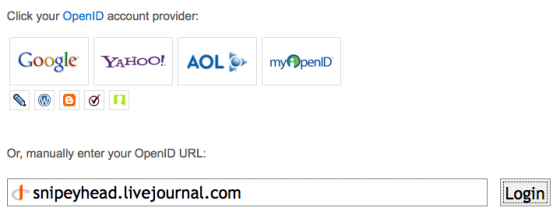
(Alternatively, if the OpenID provider’s icon is listed, as LiveJournal’s is above, I could login without knowing my OpenID url. Most OpenID logins will give you the option of selecting which service you’d like to use, or manually entering your OpenID url.)

If this is the first time I’m using this OpenID account to login to this particular website, I’ll be taken to my OpenID provider’s website (in this example, Livejournal.Com) and I’ll be asked if I want to allow the website to use my OpenID account to authenticate. I will then confirm this, and be taken back to the original website I’m trying to login to.

Pretty simple, right? Unfortunately, this is often not as straightforward as it seems, not because of OpenID itself, but because of the way many websites implement their OpenID system.

Where it Gets Wonky

The way many websites implement OpenID can be utterly maddening, if you have more than one OpenID account – which you probably do.

I was recently on the UXExchange website and was nearly apoplectic with rage as I tried OpenID after OpenID account. I know I have an account there. I have had an account there since the day they launched. But I have NO idea which OpenID I created my account with.

After the 5th try, I gave up and realized I’d have to create a new account. This pissed me off for a few reasons, not the least of which being that in this particular community, prior community engagement (the number of questions you’ve posted and answered, etc) establish your rank. By creating a new account, I’m effectively seen by the community as a newbie, and I’m enough of a nerd that stuff like that matters to me.

Ironically, UXEchange is a usability and information architecture community. I know that I can email them to consolidate my accounts, and I probably will, but this experience really helped underline how easy it is to screw up the user interface for OpenID.

In short, the problem becomes remembering which out of the collection of OpenIDs you have is the one you’ve used to initially create an account with a particular website.

Making it a Little Easier

To use OpenID without losing your mind, you have a few options. The easier would be to decide that you will only ever use one specific OpenID to login to third-party websites, and leave it at that. The problem I have with that is that mainstream adoption of OpenID has happened over a very long period of time, so I may have started off with only LiveJournal as an OpenID account, but then gradually Google, Blogger, Myspace, etc added OpenID support, so I decided that I’d rather use one of the newer ones instead of my LiveJournal account. This is how things got fragmented and confusing for me, and I would assume other people as well.

Fortunately, there is a little known feature of OpenID called delegation that can help save your sanity. If you have your own website with it’s own domain name, you can delegate your own domain name to act as your OpenID.

I decided to start from scratch. I don’t know if I’ll always have my LiveJournal account, I don’t know how much I trust Google anymore, I hate MySpace, I don’t use Blogger, and so on. I created an account at myopenid.com, a very simple OpenID provider that is easy to remember and offers persona managament.

A 20-second registration later, I was set up with snipe.myopenid.com as my new OpenID identifier.

To enable my domain, snipe.net, to act as a delegate for MyOpenID.Com, I added the following to the header of Snipe.Net:

[sourcecode='html'] 2. 3. 4. [/sourcecode]

Now, instead of trying to remember which OpenID provider I used, I use ‘snipe.net’ as my OpenID manual url, and it automatically knows to use my account at MyOpenID to authenticate. Since I’m the only one that has control over Snipe.Net, I’m the only one that can delegate Snipe.Net as snipe.myopenid.com.
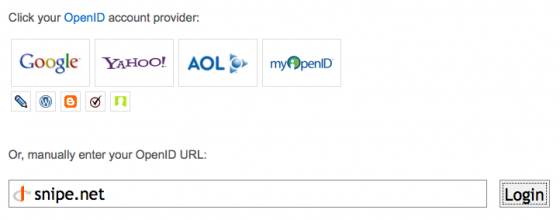
So that’s all there is to it. I have heard that delegating using Google and Yahoo is tricky, if not impossible, but I haven’t looked into it. I personally prefer to avoid letting either of those companies have too much of a reach over what I’m commenting on and where.

Also check out:

If you think this article kicked ass, subscribe to the RSS feed or follow me on Twitter! Share with your friends, or leave a comment below (or better still, do both!) My entire concept of self-worth is in your hands, so that makes you kind of a big deal. Srsly.

This entry was posted on Sunday, February 21st, 2010 at 10:04 pm and is filed under Featured, Tips & Tricks. You can follow any responses to this entry through the RSS 2.0 feed. You can leave a response, or trackback from your own site.
  • http://abrah.am Abraham Williams

    I tried using Google as my OpenID provider for a while. Frustratingly I had all kinds of issues. Been some time though so it might be better now. It has always annoyed me how some sites only accept one or two OpenIDs.

  • http://www.snipe.net snipe

    Yeah, seems like Google and Yahoo suck for that, according to all the of research I've done. Google can kind of suck it anyway.

    I think most OpenID-ready sites do support all OpenID providers, they just don't always give you the option of manually entering a url, which makes it impossible to use them. There are so many UX problems with the way sites implement OpenID, it's not even funny. Probably a big reason it's taken so long to gain any traction.

  • Matt

    …and if the whole OpenID thing causes knowledgable technicians problems, what does the average person in the street think? It's a right pain in the ass in terms of usability. The people who architect these solutions need to architect them for a lower common denominator instead of thinking like a developer.
    User centred design? What a radical idea ;)

  • http://www.snipe.net snipe

    Yeah – it's almost always executed poorly, not always for lack of trying. I know this was a concern for some of the OpenID guys, and they know it contributed to lower adoption rates for the service. If anyone has seen a really great implementation of it, I'd love to see it and showcase it as an example. RPX from JanRain doesn't do a bad job, but I don't think non-premium customers can customize the experience much. (I could be wrong there – it's been a while since I've tinkered.) At least they try to store a cookie so it prompts you to login with the same service you logged in with last time.

  • Lafayme

    I opened up my gmail in one tab, then on a second tab I opened up google to search for info on how one of my OpenID accounts showed up my Facebook acct. and others. I clicked a link that led me here and see that this shows my Disqus info profile and shows all my comments I made on another website. I certainly do not want my email address to be connected with my political views that I have shared in commenting sections all over the net especially because I deal with far left business associates and I lean right. I had established an online connection with someone that was looking favorably at someone I rep and once this business entity saw and read my comments that showed up they blocked me from ever contacting them again and cost the person I rep their dream job. How can I keep my personal persona separate from my business persona?

  • http://www.snipe.net snipe

    Hi Lafayme – Managing personal and professional personas is not easy, that's for sure. The easiest thing to do is to keep professional and personal completely separate. For example, I do not use my real name here in plain text anywhere on the site. It's not hard to make the connection between who I am (my non-profit org, my professional career, and this site), but I take careful steps to keep a line there. For the same reason, I don't use my real name on my Twitter account in text. I have two Facebook accounts (which is technically against their TOS, but oh well.) I only send professional emails from my business accounts, and keep different logins for Disqus or any other service that might aggregate data on my activity.

  • Lafayme

    Thank you so much for being here. I never signed into Disqus …I just clicked on a link in Google and it showed up. I have also noted that when I was on one NYT comment section that it showed my gmail account with my actual name. I did set up a WordPress url that I wanted to use for my political views. But the thing that bothers me the most is that my main MSN account is my oldest email and yet I thought because the address does not show my name that I would be safe in using that email address because I show no profile on MSN per se yet it is the one linked both professionally and personally thru this new linking process. Is there anyway to undo what I have done? This is going to ruin me and actually going to affect people that rely upon me.

  • http://www.snipe.net snipe

    Ironically, after reading some of your previous comments on other blogs, I am disinclined to help you as well.

    Having said that, Disqus will typically keep you logged in until you specifically log out, so you should pay more attention to whether or not you are logged into Disqus before commenting. If you don't want it traced back to you, make sure you're logged out and comment as a guest.

  • Matt
  • georgerevutsky

    Great and useful article – thanks so much.

  • http://www.benway.net benwaynet

    I was about to comment and thank you for this post about OpenID. Reading through the string of comments I can to this reponce about you not wanting to help because of someone's views. Wow, that's really small minded.
    I guess I'll just say thank you for the post and hope some day you open your mind and love everyone.

    Have a great day.

  • http://www.snipe.net snipe

    Are you kidding me? She wasn't showing love to “everyone” when she posted her right-wing paranoid hatemongering. Listen, if you don't like it, go to someone else's blog – but I'm not going to help someone cover up what they say online. If you're going to have an opinion, at least have the balls to stand behind it. I simply told her I wouldn't help her. Her question was completely off-topic for the post (it has nothing to do with setting up an OpenID on your own site). That's not small-minded, that's caring enough about what's important to you to demand that people be accountable for the hateful things they post online. If you don't like it, don't come back to this blog.

  • http://www.benway.net benwaynet

    Just because someone doesn't show love, doesn't mean you shouldn't
    Your reply sounds very angry, and I'm sorry for that.
    I'll pray for you and respect your wishes and not return.
    Thank you for the information about openID.

  • http://melbymonkey.com/ Melby

    Thanks for this, got it all set up now! =D

  • http://www.thegraphicmac.com JimD

    I've had the same problem with OpenID… pissed me off so much that I more or less gave up on it. Perhaps I'll take a look at it again at some point. The Facebook or Google logins just seem easier to deal with anymore. I hate to give them too much trust, but I'm too old and tired to fight it.

  • http://jbhannah.net/ Jesse B. Hannah

    This worked perfectly for me. You don't even have to go through their domain setup process; just putting those for lines between the head tags of a web page does the trick.

  • http://www.thebigpropertylist.co.uk/ JamesUK

    This openID lark is really doing my head in. I’ve used the same process to use my own domain as my open ID by delegating to myopenID.com. When I make a comment on a website using OpenID it displays my name and links to a Disqus profile that shows my custom URL. How can I get the link to go directly to my domain and not the disqus profile?

    • http://www.snipe.net snipe

      I think that might just be a function of Disqus. I see your website url, but your Disqus url is http://disqus.com/openid-70925/, so it looks like the Open ID business worked as expected. Disqus might just have a policy of creating a unique profile for every login it processes.