My final post for 2009 should probably have been more climactic. If I had planned it right, the Death in the Digital Age post should have been my last for this year. Oh well.
I mentioned in a previous post that I was switching the comments system on Snipe.Net to Disqus, and although I’ve been overall quite happy with the changeover, one issue that frustrating to me is that the comment count on the site’s homepage, category pages, and individual blog post pages (single.php) was kinda fux0red.
On the homepage, it displayed “x comments and y reactions” which made the text too long for the carefully crafted masking tape strip meant to contain them. On the blog post article pages, it shows “Comments”, omitting the comment count altogether.
I found a way to fix it, and the site that contained part one of the fix is now unavailable, I figured I’d post it here in case anyone needs it:
Around line 275 of the DISQUS plugin in disqus.php (accessible via dashboard – plugins – editor), you’ll see the following:
[source lang=’php’]} else if ( (is_single() || is_page() || $withcomments || is_feed()) ) {[/source]change this line to:
[source lang=’php’]} else if ( (is_page() || $withcomments || is_feed()) ) {[/source]When I did this, I was then seeing duplicate “X Comments”, one from WordPress and one from Disqus – in other words, the page was displaying both the WordPress version and the Disqus version, but taking out the WP Comments counter in the single.php removed the code Disqus was replacing, so I ended up with no comments.
The solution for me was to add style=”display: none” to the WordPress comments part of the single.php file, so it looks like this:
[source lang=’php’][/source]If your comment counter is still showing “and x reactions”, there is a way to fix this too, although it kind of sucks. In your Disqus control panel, in SETTINGS in the CUSTOMIZE tab, you have to remove the template text that is in place for the Reactions section:
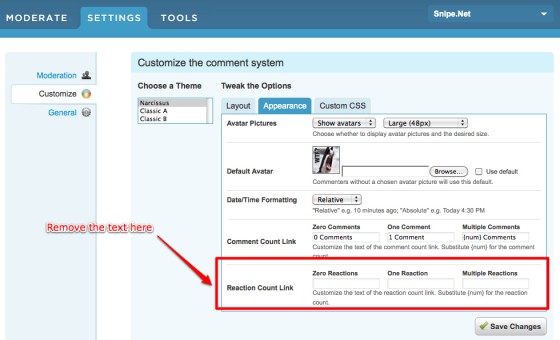
The reason this sucks is because by removing the template text here, it also removes the number count text from the Reactions section below the comments block on the article pages, as you can see in my comments block below. It still shows a “Reactions” header, but instead of showing “34 Reactions”, it leaves off the running tally of reactions to the post. I don’t know of a workaround for this yet, but it’s what I had to do to get the comment counter to fit on the tiny masking tape design again.
This leaves the text in the source, so the Disqus Javascript can successfully replace it with it’s own comment counter, but hides it from displaying to the user.
Hope that helps – happy new year 🙂


