I’ve decided to move the comment system on Snipe.Net over to Disqus. I like it so far, but I’ve run into a few glitches and challenges that I thought I’d share with you. (Also, it explains why things may look funny here for a few days while I work out the display kinks.)
What’s Disqus?
Disqus is a commenting system that you can apply to any website. If you’ve got a static site that you want to enable comments on without mucking around with databases and scripting languages, Disqus might be something you want to look into. Disqus can also be used (as in this case) as a replacement for a standard commenting system like WordPress’ native comments. Oh, and did I mention it’s free?
I’d like to be very clear here with regard to what Disqus is NOT. Disqus is not a content management/blogging platform. It would not replace your WordPress or Movable Type installation, and the way by which you post new content. It handles only the comments, and is basically agnostic to your actual site content.
I’ve known about Disqus for years, but normal WordPress commenting was enough to do the job for me, so I never bothered investigating it much, but with the emergence of third-party login connections like Facebook Connect, Twitter’s OAuth, OpenID, and so on, I realized I wanted to offer these ways of authenticating to my site users. Hacking WordPress (or using several clunky and sometimes conflicting plugins) for each one of these authentication methods wasn’t something I had the energy to do, plus Disqus offers a few additional features I really liked, such as tracking “reactions” and the ability for users to upload a video response.
Disqus isn’t the only one doing this. IntenseDebate.Com offers very similar services and an almost comparable feature set. I set up an IntenseDebate account and even set up the WordPress plugin, but ended up a little underwhelmed, for reasons that are outside the scope of this article. If you’re interested in comparing the two, check out this wiki page by deuts.org.
Why Disqus?
What really convinced me that Disqus was stable and strong enough to give it a shot is the fact that Mashable.Com uses Disqus exclusively to handle their site comments, and that’s kind of a big deal. As a frequent visitor to Mashable, I always love being able to one-click login to reply, and seeing the “reactions” is always interesting to me.
I’ve already mentioned a few of the things I really like about Disqus – and for a full feature set, visit their website and click on the “This is why you should too” link on their homepage – but these were the key factors for me:
Ability for a commenter to use Facebook, Twitter, OpenID, Yahoo and other networks to authenticate and post. This was probably the most important factor. I had previously hacked together some Facebook Connection functionality, but it was a massive pain in the ass, and would cause the page to reload itself once on every page load in Firefox. Really annoying. Plus, I wanted to widen the net to OpenID and Twitter, without a lot of extra work. Logging in is still optional, but more features are available if the user logs in using one of the methods offered.
Facebook Newsfeeds. This was part of the reason I had originally hooked up Facebook Connect to the site in the first place – the ability to allow the user to post a notification to Facebook that they have just commented on my site. I am intimately, painfully aware of the effectiveness of the Facebook news feed in spreading content because of my extensive work developing Facebook applications, so this was a feature I definitely wanted.
Incidentally, when you sign up for Disqus, they give you an API key based off of Facebook’s new fourth-party functionality that lets services like Disqus create an application on the fly. IntenseDebate, on the other hand, asks you to manually create an application in Facebook and then enter your API key.
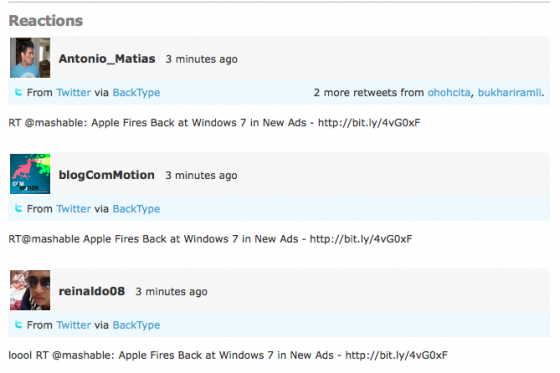
Ability to track Reactions. As I’ve mentioned, this is a feature I really like about Disqus. Reactions are similar to trackbacks, although my WordPress has never been great about capturing all of the places one of my posts might have been mentioned, especially social networks. Reactions let you mine social comments and mentions from places such as Twitter, FriendFeed, Digg, and YouTube, then display them with your comments:
“Record a video” option. While I absolutely do not expect anyone who visits this blog regularly to ever record a video response (and frankly it would probably be a little creepy if they did), this was interesting to me for another project I’m working on where that type of thing would totally make sense, so I figured I’d include it and see how it worked.
Response rating. The “like” functionality is something I think is useful to get an idea of who the people are who are contributing the most valuable comment content to the site.
Email notifications of follow-up comments. This is something I have had for a while on Snipe.Net by way of a WordPress Plugin called Subscribe to Comments – and it is such essential functionality, it actually surprises me that WordPress hasn’t made this part of the core yet. The Subscribe to Comments plugin worked fine, although it was a little on the clunky side to customize the look+feel.
So that’s what I was looking for. All of the functions above work as advertised, from what I can see so far, so I’m happy about that.
The Challenges
Everything was not exactly smooth sailing to start off with though, and I’m still trying to deal with some frustrations that come with Disqus. Depending on how customized your look and feel is, these may not even be issues for you, but since my site design is heavily stylized, it’s actually giving me some headaches. I’ll get into more detail in this section.
Import didn’t work. Disqus lets you import your existing blog comments from a variety of blogging platforms, including self-hosted WordPress installs, Blogger, Drupal, Joomla, Movable Type, Tumblr, Sandvox, chi.mp, Squarespace and more. I apparently was one of a handful of people affected by a temporary bug in their importer, and while it was frustrating at the time, they got it sorted the same day. I had emailed support, left a few blog comments on their blog and didn’t hear back, but they did eventually tag me back on Twitter. (Annoying that they didn’t respond with an acknowledgment of the issue before it had been fixed though. A “we’re looking into it” would have been nice, rather than leaving me wondering if anyone was there.)
Pain in the ass to style. The documentation on the styles used in Disqus is not exactly extensive. They basically tell you which CSS ids are used for a small handful of the elements in the Disqus thread block, but everything else you have to figure out on your own using Firebug.
Not a lot of flexibility in layout. This may not affect you at all if you’re using a pretty standard blog template. Mine was written from scratch, and although I still use a lot of the typical WordPress conventions (the HTML/CSS ids for the sidebar, for example), since you cannot actually modify the HTML that is output from the javascript calls, it can be limiting.
I had to take down my “Latest Comments” widget from the sidebar, since that was based on WordPress comments and it wouldn’t see any Disqus comments – but the Disqus javascript they provide to display most recent comments looked like braised ass in Marsala sauce when I tossed it into the sidebar. I may be able to work with it a little more, forcing my will through CSS alone, but this is time-consuming and even more annoying since there is no documentation on the styles being used there. I’ll keep plugging away at it, but if they let me define my own HTML containers for, say, the avatar and the text separately, it would be a lot easier.
Also, the “x comments” text that I usually have on the label over the blog image in both the blog post itself and on the category, homepage and tag pages is now basically sorta busted. Disqus uses javascript to fill in these areas, but you cannot customize the text from what I can see. Since my blog was designed with room for only “x comments”, not “x comments and y reactions”, this is making things look a little weird. I may have to actually redesign some of the sections to accommodate this issue, which makes me cranky.
In the Disqus admin, you only have three basic templates to pick from for your comments area display, none of which really rocked my socks. I picked the one that was the least weird-looking with my heavily stylized blog design, but as you can see, it still looks weird and amorphous. I’ll have to spend some time combing through the styles manually with Firebug to see how much I can improve that.
Also, protip: If your comment counts are not displaying properly on your index/category pages, be sure to check the box in the WordPress Disqus Advanced Options in your WordPress admin:

They don’t make it abundantly clear what checking that box does, but my comment count wasn’t being displayed on my homepage until I checked that box.
Some features a little buggy. For example, default avatar upload isn’t working. I expect this is a temporary issue, but it’s frustrating having a brandy new comment system and seeing the shitty gray default Disqus icon all over the place. It’s great that you can upload your own default icon for your site, but it’s only great if it actually works.
Also, in the custom CSS section of the Disqus.Com admin area, they suggest you use @import to import an externally hosted style sheet. Only that didn’t work at all.
And finally, for some reason, the comment count at the top of the blog posts pages isn’t working at all, which is why you just see “comments” in the masking tape area above the blog image, instead of “x comments.” Not sure what’s up with that, but I’ll be pestering them about it later.
Standard paranoia. Since the blog comments no longer live on my server, if something were to happen to Disqus, temporarily or forever (DDoS, network outage, bankruptcy, etc), I’d be shit outta luck, same as happens any time you rely on a third-party system to host your content. Again, my concerns are slightly assuaged by the fact that Mashable trusts them.
The API
If you’re feeling ambitious, Disqus has a rudimentary API set up, however their documentation on this is arguably worse than any I’ve seen, and I’ve wrangled some gnarly APIs in my day. I should rephrase that – the API function documentation is adequate, but they leave out some really important details. Every request you make using their API requires either a forum API key or a user API key – only they don’t tell you WHERE you’re supposed to find your API keys in the first place.
So you’ve got a shiny new car, and an operators manual – but no freaking keys. NO WHERE in your dashboard does it tell you what your user API key is, and without that, you cannot find out your forum API key, forum id numbers, or anything else at all.
If you’re a standard site/blog owner who just wants to add comments to your site, you will probably never need to even look at the API, but in the off chance you actually end up tinkering with the API, here’s how you find out ALL of your API key and forum id information. Hopefully it will spare you the frustration and headache I went through to figure it out.
If you were writing a script to access the API, you might use something like cURL in PHP. To test these functions out, you can just use a command line terminal or ssh terminal using cURL as long as the machine you’re logged into via shell has cURL installed. The API responses are in JSON format.
You need to perform these in order, since each step relies on the information you obtained in the previous step.
1. To get your Disqus User API key (which you need to obtain your Forum API key and everything else):
Login to Disqus.Com, and go to this url – http://disqus.com/api/get_my_key/
2. To get your Disqus Forum ID:
Via command line, type:
[sourcecode lang=shell]curl -0 -L “http://disqus.com/api/get_forum_list?user_api_key=_USER_API_KEY_”[/sourcecode]
You’ll get a JSON response that looks like this:
[sourcecode language=’html’]{“message”: [{“created_at”: “2009-10-22 10:05:15.657635”,
“shortname”: “snipenet”, “id”: “123456”, “name”: “Snipe.Net”}], “code”: “ok”,
“succeeded”: true}[/sourcecode]
3. To get your Disqus Forum API Key for the Forum ID:
Via command line, type:
[sourcecode language=’html’]curl -0 -L “http://disqus.com/api/get_forum_api_key?user_api_key=_USER_API_KEY_&forum_id=123456″[/sourcecode]
where the Disqus Forum IS you obtained from step 2 is ‘123456’. The message field in the JSON response should contain your API key, so you’ll see something like this:
Now that you’ve got all THAT, you can actually move forward with interacting with the API, as per the documentation.
Conclusion
It’s a little early in the game to know whether or not making the switch to Disqus was the right one. Fortunately, reverting it back to WordPress comments will take a lot less work than switching it to Disqus did, if it comes down to that.
I think Disqus will work out very well, and I’m excited about the new features it brings to my site, even if some of the styling and layout limitations are frustrating.
But hey, if you actually made it through this long, drawn-out post, leave me a comment so I can test how well Disqus is working 🙂


