Snipe.Net - Geeky Stuff
Twitter
Currently: @egyp7 dude, you'd better not fuck with those disc golfers. in reply to egyp7 4 hrs ago

Extending Facebook Static FBML Tabs with Dynamic Content

closeThis post was published 2 years 7 months ago. There is a chance that some APIs or software versions discussed have changed since this article was written.

This tutorial walks you through how to use DynamicFBML to do simple content replacement that will allow you to fit more content into your tabs. You can create image or video galleries, or even an entire micro-site inside your Static FBML tab without a lot of complicated scripting.

If you’re not sure what Static FBML is, check out my previous tutorial that shows you how powerful the Static FBML application can be, and how you can create very compelling, highly branded Facebook Fan page tabs without the hassle of building a custom Facebook application.

At its most basic, the functionality we’re discussing is simply one or more text or image links that, when clicked, cause content in a set space to change. Some potential uses:

  • Dynamic image gallery where the user clicks on a thumbnail to see a larger version of the image
  • Video gallery that allows you to include thumbnails on the video that loads the selected video into a single player space. This can be particularly helpful in tightly designed Static FBML pages where you have limited space to display a lot of content.
  • Or even using your Static FBML tab as a mini-site, replacing the entire tab’s content with new content to simulate multiple pages

We’re going to explore a few examples in this article, but it’s basically the same code regardless of how you apply it. First, let’s look at creating a micro-site within a Facebook Static FBML tab – see a live demo of the tab we’re going to create here.

Notice the navigation within the tab itself (Home, Specials, Locations, About). Clicking on them displays new content in the entire tab without actually reloading the page. This is an example of Facebook’s DynamicFBML, and you won’t believe how easy it is to implement. Seriously, you won’t.
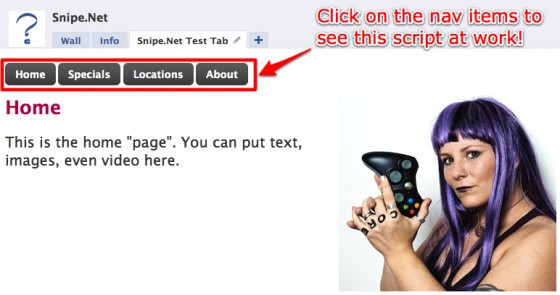
snipe_tab

So, okay… maybe that tab isn’t the fanciest thing you’ve ever seen, but it gives you a clear idea of how this works. How plain or sophisticated the design is depends entirely on you and how comfy you are in a graphics program.

If you dig the cool-looking button CSS in the test page, you can learn how to get that effect by visiting ZurbBlog’s post on Super Awesome Buttons with CSS3 and RGBA.

But here’s the great part: the code needed to create that tab is basically this:

<!-- navigation elements -->
<a href="#" clicktoshow="nav1" clicktohide="nav2,nav3,nav4">Home</a>
<a href="#" clicktoshow="nav2" clicktohide="nav1,nav3,nav4">Specials</a>
<a href="#" clicktoshow="nav3" clicktohide="nav1,nav2,nav4">Locations</a>
<a href="#" clicktoshow="nav4" clicktohide="nav1,nav2,nav3">About</a>

<!-- Content to display when user clicks on the Home tab -->
<div id="nav1">
	Homepage text
</div>

<!-- Content to display when user clicks on the Specials tab -->
<div id="nav2" style="display: none;">
	Specials text
</div>

<!-- Content to display when user clicks on the Locations tab -->
<div id="nav3" style="display: none;">
	Locations text
</div>

<!-- Content to display when user clicks on the About tab -->
<div id="nav4" style="display: none;">
	About text
</div>

Seriously. That’s it. That’s ALL there is to it. Naturally, I stripped out the extraneous text, images and styles from my demo for simplicity’s sake, but that’s honestly it.

This is arguably the one thing that is exactly as easy as it appears to be with regard to developing anything for Facebook.

This code is fairly straightforward, but let’s take a look at what’s happening here.

In the first part, we’re setting our links. For the micro-site, these are our navigation links. Everything here looks like pretty standard HTML except for the extra “clicktoshow” and “clicktohide” elements. (Note: The links do not have to be set before the content divs – you’ll set them wherever they make sense in your design. You’ll see an example of this further down the article in the image gallery sample.)

<!-- navigation elements -->
<a href="#" clicktoshow="nav1" clicktohide="nav2,nav3,nav4">Home</a>
<a href="#" clicktoshow="nav2" clicktohide="nav1,nav3,nav4">Specials</a>
<a href="#" clicktoshow="nav3" clicktohide="nav1,nav2,nav4">Locations</a>
<a href="#" clicktoshow="nav4" clicktohide="nav1,nav2,nav3">About</a>

The clicktoshow element allows you to specify the id’s of the elements you wish to show when the link is clicked. Conversely, the clicktohide element allows you to specify the ids of the elements you wish to hide when the link is clicked.

In our navigation elements, since the div that contains the homepage text is set as nav1 in our HTML, we want the clicktoshow for the Home link to be nav1 (since we want that div to show when we click on it.) Likewise, since we’re completely replacing whatever div is currently visible with the nav1 div contents, we want to specify everything that isn’t nav1 in the clicktohide.

Combining divs in hide/show

What’s particularly fun about the clicktoshow and clicktohide (other than their sheer ease of use) is the fact that unlike a more complicated true JavaScript version, showing and hiding two or more divs at the same time on the same click is simply a matter of specifying them in the clicktohide or clicktoshow parameters.

<!-- set up our text links -->
<a href="#" clicktoshow="nav1" clicktohide="nav2,nav3">Oh</a>
<a href="#" clicktoshow="nav2" clicktohide="nav1,nav3">Hai</a>
<a href="#" clicktoshow="nav1,nav2" clicktohide="nav3">Oh Hai</a>
<a href="#" clicktoshow="nav1,nav2,nav3">Oh Hai SRSLY!</a>

<!-- Content to display when user clicks on the Home tab -->
<div id="nav1">
	Oh
</div>

<!-- Content to display when user clicks on the Specials tab -->
<div id="nav2" style="display: none;">
	Hai
</div>

<!-- Content to display when user clicks on the Locations tab -->
<div id="nav3" style="display: none;">
	SRSYLY!
</div>

In the snippet above, we’re using only three divs with four nav elements. By specifying multiple ids in the clicktoshow parameter, we can show multiple divs at once, so when you click on “Oh Hai SRSLY!”, you’re looking at nav1, nav2 and nav3 all being shown at once. Piece of pie.
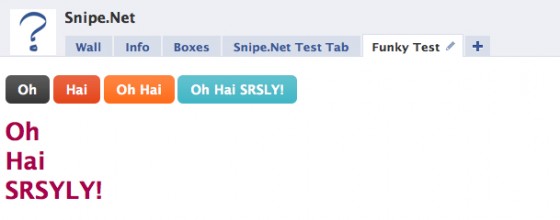
snipe_tab_funky

Example Image Gallery

One more example that will hopefully get your creative juices going – let’s look at how to do an image gallery using only clicktoshow and clicktohide.

In this gallery, we have a set of thumbnails with one large space set aside in our design where the fullsize image will display. You can see a simple demo of this gallery here.

gallery

Now take a look at the sourcecode below. Notice that we’re using the exact same code as we used in the other examples - we’ve just changed the names of the divs so they make more sense semantically in a gallery.

<!-- set the divs for the fullsize images -->
<div id="image1">
	<img src="http://www.snipe.net/wp-content/uploads/2009/10/full-1.jpg" />
</div>

<div id="image2" style="display: none;">
	<img src="http://www.snipe.net/wp-content/uploads/2009/10/full-2.jpg" />
</div>

<div id="image3" style="display: none;">
	<img src="http://www.snipe.net/wp-content/uploads/2009/10/full-3.jpg" />
</div>

<div id="image4" style="display: none;">
	<img src="http://www.snipe.net/wp-content/uploads/2009/10/full-4.jpg" /><br />
</div>

<!-- set up our thumbnails -->
<a href="#" clicktoshow="image1" clicktohide="image2,image3,image4">
	<img src="http://www.snipe.net/wp-content/uploads/2009/10/thumb-1.jpg" />
</a>

<a href="#" clicktoshow="image2" clicktohide="image1,image3,image4">
	<img src="http://www.snipe.net/wp-content/uploads/2009/10/thumb-2.jpg" />
</a>

<a href="#" clicktoshow="image3" clicktohide="image1,image2,image4">
	<img src="http://www.snipe.net/wp-content/uploads/2009/10/thumb-3.jpg" />
</a>

<a href="#" clicktoshow="image4" clicktohide="image1,image2,image3">
	<img src="http://www.snipe.net/wp-content/uploads/2009/10/thumb-4.jpg" />
</a>

By the way – if you dig the images used in that sample gallery, be sure to check out the Great Pumpkin Roundup post that shows examples of some of the most amazing pumpkin carving you’ve ever seen in your whole life.

In a project for vitamin water, I needed to create what appeared to be a dynamic video player, using only the default Facebook media player, which doesn’t support options like having a playlist where people can click on a gallery of thumbnails and load the video into a single player. See below:

new_moon_tab

The code used to pull this off is almost identical to the image gallery example above. No foolin’.

But wait – there’s more!

An additional DynamicFBML function that you may find useful is Clicktotoggle, which is very similar to Clicktoshow and Clicktohide, except instead of turning visibility on and off by clicking on on different links, you toggle visibility on and off by clicking the same link.

Your takeaway

While I certainly hope that the code presented here will be useful to you, the concept of what you can do using clicktoshow and clicktohide is more important. You’re not limited to creating a micro-site or an image gallery. Get creative and have some fun with this. Not many people are being adventurous in their Static FBML tabs yet, so you have an opportunity to really wow your users with your newfound skills.

Additional Resources

Also check out:

If you think this article kicked ass, subscribe to the RSS feed or follow me on Twitter! Share with your friends, or leave a comment below (or better still, do both!) My entire concept of self-worth is in your hands, so that makes you kind of a big deal. Srsly.

This entry was posted on Saturday, October 17th, 2009 at 1:16 am and is filed under Featured, Web Development. You can follow any responses to this entry through the RSS 2.0 feed. You can leave a response, or trackback from your own site.
  • http://twitter.com/umefarooq umefarooq

    Hi i have read this and you previous post regarding FBML, simple FBML is working fine but when i want to create something like this tutorial its not working at all i have copied complete micro site code from this tutorial and put it Static FBML and save nothing happen. Please help me regarding this. what i have to do.

  • Matt

    Okay so there is something that I misunderstood about FB. After wrestling with this for some time, I went home and a couple of hours later I looked at the page I had created and it worked. So obviously some process on FB's servers needed to be run or whatever.

    So this is good on one hand, but on the other: how much time did I waste trying to get something to work when all I needed was to wait a while. Anyhoo, thanks for the code and tutorial

  • http://www.snipe.net snipe

    Hi Matt – Updates to Static FBML are reflected immediately, there isn't really anything the server needs to do to sync up. That said, Facebook is a buggy, buggy beast, so they may have been having some trouble when you tried. I make updates and additions to Static FBML boxes all the time and the changes are always reflected immediately – however I've had tabs disappear on me, or weirder still, tabs that weren't meant to be on the boxes tab/fanpage tab randomly show up.

  • http://www.snipe.net snipe

    If the code is correct, it will work as expected. Not sure what else to tell you.

  • http://www.hostingmigliore.com/ seekman

    Hello,

    I wrote a question here… I hope you can help… the button is not working and I don't know why…

    http://www.security-exchange.net/forums/showthr

    Please help me

  • http://www.snipe.net snipe

    You have your closing fb:visible-to-connection before the opening fb:visible-to-connection.

  • http://www.hostingmigliore.com/ seekman

    Thanks for the reply…
    yes that was on the beginning, but as you can see from the reply, it has been corrected, but the button is still not clickable :(

    Do I need to host an app for this code?

  • http://www.snipe.net snipe

    Please post your code as it appears on pastebin.com and reply with the url that is generated.

  • http://www.hostingmigliore.com/ seekman
  • http://www.snipe.net snipe

    For someone who is asking for help, you don't follow directions well. Pastebin is easier to read code on, and includes line-numbering and submission of corrections, which is why I asked you to post it there.

    That said, the code works fine in Firefox and Safari. I put it on my fan page in a Static FBML box and it behaves as expected.
    http://www.facebook.com/pages/SnipeNet/11663394

    When I was not a fan, I saw an image telling me to become a fan. When I clicked on “become a fan”, I saw a similar message, but with a NEXT button. I clicked NEXT, and the area changed to allow me to invite friends. I clicked NEXT again and got a final message.

  • http://www.hostingmigliore.com/ seekman

    I am sorry for misunderstanding what you asked. I thought that ” post your code as it appears on pastebin.com ” it means to post the code that it appears on pastebin.com, doesn't mean where I paste it.
    Since I saw this code first on pasterbin I thought that posting it in that forum is the same as “it appears on pasterbin”…
    I would probably have done it right if I'd seen “post your code on pasterbin…”. Sorry for misunderstanding.

    Yes the code you used works fine… but why here, where I applied it doesn't work? http://www.facebook.com/pages/Per-i-Sardi-di-Am

  • Pingback: Adventures in FBML | Mando Group Labs

  • http://www.snipe.net snipe

    Ahh, I see how that would have been confusing. I didn't realize you orginally found it on pastebin.

    The code you have on your fan page is exactly what you posted? Then gosh, I'm not sure why it wouldn't work. The only suggestion I have would be to remove the Static FBML boxes you have, and try reinstalling he app. Facebook can be a little dodgey sometimes, and occasionally this resolves weirdness.

  • http://www.hostingmigliore.com/ seekman

    Snipe, that code is (in part) working!! You are right, FBML static had to be re-installed.

    Now there is another problem – the friend invitation doesn't work… you can test it, after sending the invitation it gives an error message.

    Do you think it would be better to change the code with “suggest to friends” … do you know where the code should be changed and how?

  • Carlos Gordillo

    Hi Snipe!! A great post. I'm looking now for the vitamin water fan page, and in the ncaa hoops tab there's a great popup for the video player. http://www.facebook.com/vitaminwater?v=app_3602….

    Can you tell mes please how can i get this code, to replicate this tab for my facebook page?

  • http://www.snipe.net snipe
  • Carlos Gordillo

    Thanks a lot for your quick answer.

  • http://www.hostingmigliore.com/ seekman

    snipe, please help :(

  • http://www.snipe.net snipe

    Carlos – I am at work right now and do not have the time to look at this in detail right now. I will help when I can.

  • http://twitter.com/nayanlodha Nayan

    fantabulas

  • http://www.facebook.com/stephanekoch Stéphane Koch

    This is a really great and helpful resource :)
    How can I add a mouse over to the menu buttons, I could find anything about in the FBML ?
    http://www.facebook.com/pages/FourSquare-Day-Ro
    Thanks for your help !

  • http://www.snipe.net snipe

    Replied via Twitter, but for the sake of other readers – in short, you can't, using FBJS. Facebook restricts mouseover events so that the user has to click on something else before they work. See the demos here:
    http://www.facebook.com/pages/SnipeNet/11663394

    However, if all you're looking to do is some button higlights, CSS will work for those, so you're in luck. :) Just do the mouseover effects in CSS and you're golden.

  • http://twitter.com/nayanlodha Nayan

    But I had tried the same code its not working.

  • Lorenzo

    Thanks a million! Been looking for this for ages. You explain it so well too, thanks!!!!

  • http://www.gnomestew.com/ John Arcadian

    You have totally made my day. Thanks for the awesome post. In building an FBML page I was able to figure out everything but this.

  • Holly Beach

    Great post! Very helpful but I still feel as though I'm doing something wrong with the mini-navigation tabs on the FBML tab. For some reason, I can only navigate to Nav 1 or the “home” page and whenever I click on other navs, they do not appear. Also, the content I put in other navs only appears in nav 1. I have re-checked this code over and over again but cannot figure out what I am doing wrong. I am pretty new with this (and a struggling intern) so any help would be greatly appreciated. Thanks so much!

  • caparepandrew

    That is an awesome demo page but where is the source code for that stuff? I'm especially interested in the FBJS. Thanks for the great info!

  • http://twitter.com/20QBE 20 QBE Solutions

    Hi,
    We just loved the post! But we're not able to add tabs with CSS buttons with FBML. Please let us know how to do that.

    Thanks!

  • Batolo

    This post is awsome u rock big time. Thank You very much!!!

  • nicholashill

    I loved this info, and it's gone very far in helping! But one thing I'm struggling with is the CSS3 buttons you have there. I don't really know code, so what I've been able to do is use snippets, and edit those to eventually get what I need. However, I still don't know how to implement the CSS3 code on the site you specified into the FMBL you used. Any chance you would be willing to share the entire code you used in the first example with the CSS buttons!? PLEASE!? If I could get that, I could just upload new images and replace the img string in the CSS to match mine. Your help already has been great on this site!

  • Theresia

    Hi,

    Thanks for your sharing, appreciated much ^^V
    I have try for your basic step about extending tabs, but i find difficult in the step “how to make my link tabs fancy as yours”

    Would you like to share some sample, i mean the codes to make like yours, so i will understand how the css works.

    Sorry for not properly English…

    cheers,
    Tere

  • http://www.facebook.com/amwayarenafanpage Jacque

    Great tutorial! Thank you for the code!

    Can you please help me get rid of the box around the “micro-site”? It automatically comes with Static FBML but I really don't want it. My images are larger than the default box.

  • Theresia

    Hi, continue from my previous question…
    I have been tried, how to make my extending tab looks fancy. So here's my trial, you can paste into FBML tab and see the result. But still i can find yet how to invisible the line when we point the cursor ( did you guys get it what i mean, sorry for not good English )

    <div style=”background: #2daebf url(/images/alert-overlay.png) repeat-x; display: inline-block; font-size: 16px; ; padding: 5px 10px 6px; color: #fff; width: 100px; height:25px; text-decoration: none; font-weight: bold; line-height: 1; -moz-border-radius: 5px; -webkit-border-radius: 5px; -moz-box-shadow: 0 1px 3px #999; -webkit-box-shadow: 0 1px 3px #999; text-shadow: 0 -1px 1px #222; border-bottom: 1px solid #222; position: relative; cursor: pointer”>Outles
    </div>
    <div style=”background: #2daebf url(/images/alert-overlay.png) repeat-x; display: inline-block; font-size: 16px; padding: 5px 10px 6px; color: #fff; width: 100px; height:25px; text-decoration: none; font-weight: bold; line-height: 1; -moz-border-radius: 5px; -webkit-border-radius: 5px; -moz-box-shadow: 0 1px 3px #999; -webkit-box-shadow: 0 1px 3px #999; text-shadow: 0 -1px 1px #222; border-bottom: 1px solid #222; position: relative; cursor: pointer”>Welcome
    </div>

    Dear snipe ,

    Can i use that code into FBML ? is it OK, i mean not against the Facebook rules ?

  • yangiz

    Hi Snipe! nice post, it helped me a lot :)

    Just one question, do you know how can I add Blog RSS feed on a FBML static page?
    or a twitter feed?

    In advance, thanks for your answer :)

  • kirtikumarpanchal

    This is a very nice examples.
    It is very helpfull to me.
    Thank you…

  • Pingback: Weekly links (weekly) | Frontiering Talk

  • http://www.electricfirefly.com.au josh909

    Really informative and great post – a lot of useful info.

    I implemented a combination of a nav bar and image gallery to a client's page to showcase their product ranges. Needless to say they were impressed with the customised approach. Thanks again!

  • http://www.talentkidz.com Dev

    Thank you, this is really good info.

  • Pingback: Beginning of a unique GoalFace fan page on facebook : .Net and Some (may be MORE) Random Thoughts

  • http://www.facebook.com/people/Alberto-Eduardo/702201891 Alberto Eduardo

    Hello friend, excellent post, do you have any idea how to display a like button inside a dialog pop up using the open graph and static fbml?

    Thanks

  • http://twitter.com/rgkoi Rg Enzon

    This is post the bomb! Thank you for sharing this, this is what I've been looking for. :) Really thank you!

  • http://smartsolutionscenter.com A.Hariri

    Great post…Just Great!

  • Charlie

    Thank you so much. Seriously, I've searched high and low for a way to do a tabbed box in Facebook without having to use JavaScript, but to no avail. I almost feel stupid for not having discovered DynamicFBML earlier, given how much time I've spent pouring over pages upon pages of Facebook documentation. These clicktohide and clicktoshow attributes are definitely going to make my job a lot easier.

  • http://www.snipe.net snipe

    Glad it could help!

  • http://www.snipe.net snipe

    It's totally not your fault. These functions are incredibly useful yet remarkably well hidden within the FB docs. One would think they would highlight them, since they are SO easy to use and add so much additional functionality. But you know and I know how craptastic the FB docs are…

  • http://www.facebook.com/pages/Amity/98936939217?ref=ts Juannikin

    thank you sooo much!!! this is awesome. i'll definitely use it on my page :)

  • Gerish

    All code stated above doesn't work to mine, I am wondering why.,

  • Josh

    The code works once or 2 times, then it didnt work in my case. im using:


    Home
    Specials
    Locations
    About

    Homepage text

    Specials text

    Locations text

    About text

    WHICH IS THE FIRST CODE, POSTED ON THIS SITE.

    THE PROBLEM: content is not changing as i click, any link it always says “home page content”

    Any help would be great, thanks

  • http://www.snipe.net snipe

    Don't know – it's worked for lots of people, and I reuse this code all the time. Perhaps you could be a little more specific with respect to what “doesn't work” means?

  • Pingback: anej mehadzic » Razlike med osebnimi profili, skupinami in stranmi na Facebooku