Snipe.Net - Geeky Stuff
Twitter
Currently: @jkprime ugh.. Yeah. It's just embarassing. For men and women. in reply to jkprime 15 mins ago

Extending Facebook Static FBML Tabs with Dynamic Content

closeThis post was published 2 years 3 months 22 days ago. There is a chance that some APIs or software versions discussed have changed since this article was written.

This tutorial walks you through how to use DynamicFBML to do simple content replacement that will allow you to fit more content into your tabs. You can create image or video galleries, or even an entire micro-site inside your Static FBML tab without a lot of complicated scripting.

If you’re not sure what Static FBML is, check out my previous tutorial that shows you how powerful the Static FBML application can be, and how you can create very compelling, highly branded Facebook Fan page tabs without the hassle of building a custom Facebook application.

At its most basic, the functionality we’re discussing is simply one or more text or image links that, when clicked, cause content in a set space to change. Some potential uses:

  • Dynamic image gallery where the user clicks on a thumbnail to see a larger version of the image
  • Video gallery that allows you to include thumbnails on the video that loads the selected video into a single player space. This can be particularly helpful in tightly designed Static FBML pages where you have limited space to display a lot of content.
  • Or even using your Static FBML tab as a mini-site, replacing the entire tab’s content with new content to simulate multiple pages

We’re going to explore a few examples in this article, but it’s basically the same code regardless of how you apply it. First, let’s look at creating a micro-site within a Facebook Static FBML tab – see a live demo of the tab we’re going to create here.

Notice the navigation within the tab itself (Home, Specials, Locations, About). Clicking on them displays new content in the entire tab without actually reloading the page. This is an example of Facebook’s DynamicFBML, and you won’t believe how easy it is to implement. Seriously, you won’t.
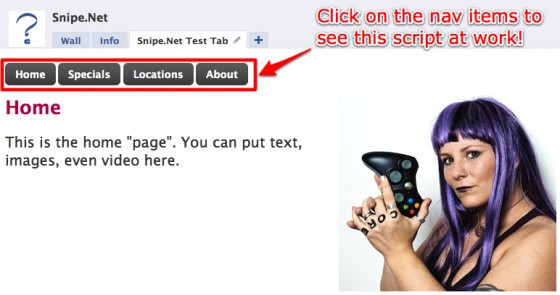
snipe_tab

So, okay… maybe that tab isn’t the fanciest thing you’ve ever seen, but it gives you a clear idea of how this works. How plain or sophisticated the design is depends entirely on you and how comfy you are in a graphics program.

If you dig the cool-looking button CSS in the test page, you can learn how to get that effect by visiting ZurbBlog’s post on Super Awesome Buttons with CSS3 and RGBA.

But here’s the great part: the code needed to create that tab is basically this:

[sourcecode lang='html']
Home
Specials
Locations
About

[/sourcecode]

Seriously. That’s it. That’s ALL there is to it. Naturally, I stripped out the extraneous text, images and styles from my demo for simplicity’s sake, but that’s honestly it.

This is arguably the one thing that is exactly as easy as it appears to be with regard to developing anything for Facebook.

This code is fairly straightforward, but let’s take a look at what’s happening here.

In the first part, we’re setting our links. For the micro-site, these are our navigation links. Everything here looks like pretty standard HTML except for the extra “clicktoshow” and “clicktohide” elements. (Note: The links do not have to be set before the content divs – you’ll set them wherever they make sense in your design. You’ll see an example of this further down the article in the image gallery sample.)

[sourcecode lang='html']
Home
Specials
Locations
About[/sourcecode]

The clicktoshow element allows you to specify the id’s of the elements you wish to show when the link is clicked. Conversely, the clicktohide element allows you to specify the ids of the elements you wish to hide when the link is clicked.

In our navigation elements, since the div that contains the homepage text is set as nav1 in our HTML, we want the clicktoshow for the Home link to be nav1 (since we want that div to show when we click on it.) Likewise, since we’re completely replacing whatever div is currently visible with the nav1 div contents, we want to specify everything that isn’t nav1 in the clicktohide.

Combining divs in hide/show

What’s particularly fun about the clicktoshow and clicktohide (other than their sheer ease of use) is the fact that unlike a more complicated true JavaScript version, showing and hiding two or more divs at the same time on the same click is simply a matter of specifying them in the clicktohide or clicktoshow parameters.

[sourcecode lang='html']
Oh
Hai
Oh Hai
Oh Hai SRSLY!

[/sourcecode]

In the snippet above, we’re using only three divs with four nav elements. By specifying multiple ids in the clicktoshow parameter, we can show multiple divs at once, so when you click on “Oh Hai SRSLY!”, you’re looking at nav1, nav2 and nav3 all being shown at once. Piece of pie.
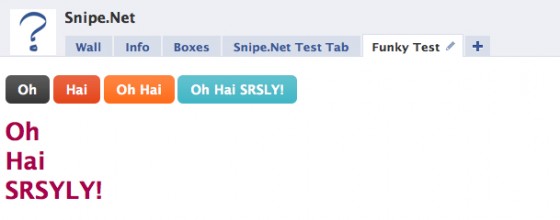
snipe_tab_funky

Example Image Gallery

One more example that will hopefully get your creative juices going – let’s look at how to do an image gallery using only clicktoshow and clicktohide.

In this gallery, we have a set of thumbnails with one large space set aside in our design where the fullsize image will display. You can see a simple demo of this gallery here.

gallery

Now take a look at the sourcecode below. Notice that we’re using the exact same code as we used in the other examples - we’ve just changed the names of the divs so they make more sense semantically in a gallery.

[sourcecode lang='html']


[/sourcecode]

By the way – if you dig the images used in that sample gallery, be sure to check out the Great Pumpkin Roundup post that shows examples of some of the most amazing pumpkin carving you’ve ever seen in your whole life.

In a project for vitamin water, I needed to create what appeared to be a dynamic video player, using only the default Facebook media player, which doesn’t support options like having a playlist where people can click on a gallery of thumbnails and load the video into a single player. See below:

new_moon_tab

The code used to pull this off is almost identical to the image gallery example above. No foolin’.

But wait – there’s more!

An additional DynamicFBML function that you may find useful is Clicktotoggle, which is very similar to Clicktoshow and Clicktohide, except instead of turning visibility on and off by clicking on on different links, you toggle visibility on and off by clicking the same link.

Your takeaway

While I certainly hope that the code presented here will be useful to you, the concept of what you can do using clicktoshow and clicktohide is more important. You’re not limited to creating a micro-site or an image gallery. Get creative and have some fun with this. Not many people are being adventurous in their Static FBML tabs yet, so you have an opportunity to really wow your users with your newfound skills.

Additional Resources

Also check out:

If you think this article kicked ass, subscribe to the RSS feed or follow me on Twitter! Share with your friends, or leave a comment below (or better still, do both!) My entire concept of self-worth is in your hands, so that makes you kind of a big deal. Srsly.

This entry was posted on Saturday, October 17th, 2009 at 1:16 am and is filed under Featured, Web Development. You can follow any responses to this entry through the RSS 2.0 feed. You can leave a response, or trackback from your own site.
  • http://www.snipe.net snipe

    You would code image buttons the same way you would code the links with the text links, except youd use an img src HTML tag where the clickable text would normally go. That part is HTM, not FBML, so a quick google search on using images in HTML should get you the answers you need. Incidentally, the example page on Facebook that I used does not use image buttons, it uses text links.

  • newb

    Hi, thanks for the info, just wondering how you add more than 4 images to the gallery. Ive tried just continuing the code to have a total of 8 or more images, but they wont show. Any idea why? Ive also tried reducing the size of the thumbs to make room…im a total newb, any help is appreciated!

  • newb

    also ive set up some tabs withing a static fbml tab which use a div id tag to define each tab (if that makes sense) and im wanting to paste your image gallery code into that tab. Which doesnt work and i think it might be because there is one div id=tag within another. Is that right? any idea how i can get around it? could you have a look at the code for me?

  • http://reazulk.wordpress.com/ Rubel

    Hi,
    I want to create a page where only Fan user can visit that page.
    can you please help us.

  • http://www.snipe.net snipe

    It cannot be done. Facebook does not allow it.

  • newb

    hi, thanks for the reply. Which part exactly do you mean cannot be done?

  • newb

    oh whoops sorry that wasnt a reply to me :P seee newwwb!

  • JNess

    hi, i'm trying to add a fb:swf tag for a youtube video to my fanpage, but stick it inside some html code that i created in photoshop (sliced and coded), i went into the html code and replaced the blank graphic i left with the swf coding, made sure it was the same pixel size, but when i load it into fbml, it adds padding above and below and messes up the graphic. here's the page:
    http://www.facebook.com/theliverblog?v=app_4949…

    any ideas on how to lose that extra space? thanks.

  • Mike

    This is awesome bro….now I can really do justice to our page..Thank you so much

  • http://www.snipe.net snipe

    Glad it helps! (I'm a chick, btw :) )

  • john

    hello, i actually posted something here before but then posted again saying i found my answer. Im stuck now. when i put the background color in the div tags for the pages, what ever page has the back color shows one the first tab. only once though. once i click another tab and go back to the home tab, it only shows what should be there. another way of saying it is if “home” & “specials” both have back ground color they both show on home. once i click specials and go back to home it displays correctly. this is what i have: <!– Content to display when user clicks on the Home tab –>
    <div id=”nav1″style=”background-color: #eeef89;”> then content. can u please advise? any one

  • Maru

    Hi there! I'm wondering if it's possible to add a form to a static fbml and show the answer in the user's feed. I saw that in http://www.facebook.com/atlantis?v=app_96240565488 (“where are you going?” part).
    I think it's a terrific idea, but couldn't find out how to do that.
    Thanks!

  • http://www.snipe.net snipe

    Afraid not – that's an application, not a static FBML box:
    http://www.facebook.com/apps/application.php?id…

    Static FBML cannot send form data, and cannot post to newsfeeds.

  • newb

    hi snipe, just wondering if its possible to add more than 4 images to the gallery as im really stuck on my page, thanks

  • http://www.snipe.net snipe

    There is no limitation on the number of images, If it's not working, your code is most likely biffed somewhere. It its not a Facebook limitation.

  • newb

    not sure where i could have screwed it cos i didnt make any changes besides add extra code for extra images, but will keep looking, thanks heaps for the response

  • newb

    it was biffed code! ahaha thanks for reminding me im not perfect

  • dom

    i copied and pasted your code below in my static fbml box. links don't work.
    i just get
    Home Specials Locations About
    Homepage text

    Any thoughts?

    <!– navigation elements –>
    Home
    Specials
    Locations
    About

    <!– Content to display when user clicks on the Home tab –>
    <div id=”nav1″>
    Homepage text
    </div>

    <!– Content to display when user clicks on the Specials tab –>
    <div id=”nav2″ style=”display: none;”>
    Specials text
    </div>

    <!– Content to display when user clicks on the Locations tab –>
    <div id=”nav3″ style=”display: none;”>
    Locations text
    </div>

    <!– Content to display when user clicks on the About tab –>
    <div id=”nav4″ style=”display: none;”>
    About text
    </div>

  • http://www.snipe.net snipe

    Hehe – I figured it was. It usually is :) Glad you got it sorted.

  • http://www.snipe.net snipe

    I'm not sure what you mean – that should be all you see until you click on Specials/Locations/etc. The homepage text (dev1) is visible until you click on something else, at which point that div is reveald and the others are hidden.

    Where did you paste this?

  • dom

    Within Edit FBML, I pasted it in the FBML text box right under the Box Title.

    Oddly enough it does work it looks and works fine in the Facebook Developer FBML Test Console.

  • http://www.facebook.com/pages/Spectrum-Imaging-Center/130250999882?ref=mf#!/pages/Spectrum-Imaging-Center/130250999882?v=app_4949752878&ref=mf ZAF

    Hi, I just started a fan page for a client and was browsing around for FBML tips. Your code is a perfect starting point to further customize. However, when I pasted the code into my tab, the click to show isn't working. What's funny is that when I paste the same code into the FB test page it works in the preview. Any ideas?

  • ZAF

    Solved myself without touching the code, but by fiddling around. I'm not sure what worked but here's my fiddling sequence: tried the same code another page I admin and lo and behold it worked just like that. With this small victory I figured it had to be something with the settings on the FBML page so I went back to the edit page and clicked on application settings and saw that the tab was both box and tab on top. Since I didn't want the side box I removed it, and when I went back to the page voila, it was working. I never touched the code. Don't know why that would work.

    Just sharing what worked for me. Nice site, I'll keep browsing through for tips on styling now.

  • Pingback: Just Share @ Little » Blog Archive » Bagaimana membuat Facebook Tab dengan FBML

  • Imran_khan88

    Helo ma'am… I ve been following ur site for so long…. still I cant figure it out –> How to make super awsome button… THIS IS MY PROGRAM…. PLS TELL ME WHICH CODE I SHUD CHANGE …. If its possible kindly reply to my Facebook account http://www.facebook.com/profile.php?ref=profile…

    <style type=”text/css”>
    .menu {
    background:#FFFFFF none repeat scroll 0 0;
    border:0px dashed #BDC7D8; padding:5px;
    font-family:”lucida grande”,tahoma,verdana,arial,sans-serif; font-size:11px;
    width: 750px; margin-left:0%; margin-right:0%;
    }
    .menu h3 {
    margin-bottom:10px; padding:5px 0 0 5px; font-size:13px;
    }
    .menu ul {
    color:#3B5998; padding:0 10px 5px;
    }
    .menu li {
    font-weight:bold;
    list-style-image:none; list-style-position:inside; list-style-type:square;wa
    padding:0 0 5px;
    }
    .menu .descrip {
    color:#444444; font-weight:normal;
    padding:3px 0 0 15px;
    border:thick;
    }
    h3 {color:#3b5998;}
    <!–
    a:link {color: #a9014b; text-decoration: none; }
    a:active {color: #a9014b; text-decoration: none; }
    a:visited {color: #a9014b; text-decoration: none; }
    a:hover {color: #3b5998; text-decoration: none; }
    –>
    </style>

    <div style=”display:none”><fb:tabs> <fb:tab_item href=”#” title=”My Photos” /></fb:tabs></div>

  • http://www.snipe.net snipe

    I'm not sure I understand – you just want to make the same kinds of buttons as I use in my sample page? You can just use the code here: http://www.zurb.com/article/266/super-awesome-b… (this was references further up in this article). I'm replying here so as to help other people if they have the same question.

  • Pingback: Facebook apps and pages…

  • JNess

    i'm still looking for some help. i posted earlier, but never got any response and i still haven't figured it out. I'm trying to slice a graphic i made in photoshop, then replacing one of the slices with a youtube video. when i do this, i have a spacing problem above and below the video and adjacent slices. I made sure that it's the correct sizing, so I'm lost. here's a link if you would like to check it out.
    http://www.facebook.com/theliverblog?v=app_4949…

  • http://www.snipe.net snipe

    Try tweaking the CSS padding and margins. I've had to use nagative padding to get things to line up corectly in the past. If the code is correct, that's all I can suggest.

  • Nathan

    Hi,
    Firstly, thanks for a heap of inspiration. In the previous comments, there are two notes about people with the video gallery not being able to stop a video before the next one starts and having two videos going at once (one hidden, one visible).

    You noted that you don't have a solution unfortunately, and neither do I – but this page looks like it has similar functionality (albeit with their own bugs) but have managed to get videos to play without clicking an overlay image and turning off when flicking between.

    Any ideas? http://www.facebook.com/twighlight (a small bit of irony in it being the twilight page).

  • http://www.snipe.net snipe

    Looks like they're using custom FBJS for that, not the stock clicktoshow, clicktohide.

  • http://goincase.com/ flapple

    Hallo Snipe,

    Thanks for the heads-up on the clicktoshow element!

    I just set it up on my work's Facebook page: http://facebook.com/goincase

    It's based on your example with an extra text div.

    Here's the code so other people can use it as well…


    <!-- set the divs for the fullsize images -->
    <div id="img1"><img src="image1.jpg"/></div>
    <div id="img2" style="display:none;"><img src="image2.jpg"/></div>
    <div id="img3" style="display:none;"><img src="image3.jpg"/></div>
    <div id="img4" style="display:none;"><img src="image4.jpg"/></div>

    <!-- set up the thumbnails (aaa href typo done on purpose for pasting purposes in this comment) -->
    <aaa href="#" clicktoshow="img1,txt1" clicktohide="img2,txt2,img3,txt3,img4,txt4"><img src="thumb1.jpg"/>
    <aaa href="#" clicktoshow="img2,txt2" clicktohide="img1,txt1,img3,txt3,img4,txt4"><img src="thumb2.jpg"/>
    <aaa href="#" clicktoshow="img3,txt3" clicktohide="img1,txt1,img2,txt2,img4,txt4"><img src="thumb3.jpg"/>
    <aaa href="#" clicktoshow="img4,txt4" clicktohide="img1,txt1,img2,txt2,img3,txt3"><img src="thumb4.jpg"/>

    <!-- set the divs for the text -->
    <div id="txt1">insert text for image 1</div>
    <div id="txt2" style="display:none;">insert text for image 2</div>
    <div id="txt3" style="display:none;">insert text for image 3</div>
    <div id="txt4" style="display:none;">insert text for image 4</div>

  • http://www.facebook.com/dirtybulldogs Foliot

    thanks a lot!! worked great!

  • Pingback: CapeLinks Blog

  • Pingback: How to Pimp Your Facebook Fan Page » CapeLinks Blog

  • http://www.facebook.com/ruthcuadrado Ruth Cuadrado

    After reading this awesome post over and over again, I was finally able to put together a page using clicktoshow – clicktohide.

    I'm really looking forward to hear all your feedback. The page is still a test, but you can find it here: http://www.facebook.com/HiltonCaribbean?v=app_1…

    I've also used something that wasn't mentioned on this post, which is using fb:profile-pic and fb:name to build a page that contains all the other pages associated to ours. Hope you can use this feature too! It's much easier than what I thought.

    Feel free to ask me for help!

    Ruth

    • http://www.facebook.com/mollymwhite Molly White

      Ruth, I’d be curious to know the code for the fb:profile-pic fb:name, I am using the free involver app as a tab on my business page now, but would love to control it and be able to name the tab. Here’s the tab as it is now: http://www.facebook.com/MollyWhiteMarketing?v=app_257169290416&ref=ts. My email on the page and I would love to hear about how to use the code. Thanks!

  • http://www.facebook.com/JSRSDR Sommer Roy

    Thank you Thank you Thank you Thank you!!! Imma newbie in the wold of fbml, html..etc..your site was soo easy to follow and now instead of having a list a mile long on my fb static page, I can divide it into pages which doesn't cause fb errors for having too much content and all around better look and feel!! thanks soooo much! Wish everyone was able to put it as nice and easy to understand as you have!

  • http://www.facebook.com/profile.php?id=607015871 Fredrik Andersson

    Hi Snipe.

    I really, really, really love your guide :) . This was exactly what I wanted to do but never understood how to. I'm going to make a tab with videos. Maybe like five different videos but all display in the same window, kinda like your twilight tingy.

    Thanks alot for the tips :) .

    I only got one question. If I want the same background image for all the thumbnails + the videoplayer. How do I do that? I have tried making a <div id=”background”> and put an image in that one, then all the other code in that div. But that doesn't work. You got any idea?

    Thanks in advance / Fredrik

  • Michael

    Hey thanks for the great post. Can you maybe tell me how i can load a website into a FBML Tab? Would be great. Thanks

  • http://www.snipe.net snipe

    You'll want to use inline styling when normal CSS styling gives you problems. Sometimes it's an issue with conflicting CSS element names (and Facebook's will always override whatever you've done), so inline styling is the only way to force it. So something like <div style=”background-image:url('http://yoursite.com/images/fb.jpg&#39 ;) ”> should work.

  • http://www.snipe.net snipe

    Load website into an FBML tab? As in using an IFRAME or something? You cannot do this – Facebook doesn't allow it. You'll need to build a version of your website within the Facebook FBML box.

  • zing

    hi, how do i do the coding for the tabs in the mini site, i am abit puzzled, hope you will be able to help me :D thanks!! :D hope you can show me an example :D thanks!

  • http://www.snipe.net snipe

    I'm not sure what you're asking for – the example code is in the tutorial above.

  • Rene

    I got the gallery up on my facebook wall, but it shows ALL 17 full-size images before the first click. How can I make it default to just showing the first one (image1) when they first go to the tab?

  • Rene

    I got the gallery up on my facebook wall, but it shows ALL 17 full-size images before the first click. How can I make it default to just showing the first one (image1) when they first go to the tab?

  • http://www.snipe.net snipe

    Hi Rene – there is an error somewhere in your code then. You've either got your divs messed up, or your clicktohide/clicktoshow isn't hiding and showing the right div names.

  • http://www.facebook.com/profile.php?id=607015871 Fredrik Andersson

    Hi, this really got nothing to do with this. But I ask anyway and maybe someone here knows the answer =) (the facebook forum is kinda hard to get answers on tbh)

    I have just made an application, it's just a simple commentbox. But anyway.

    Today when I post something in it, it shows this on my news feed:

    “Source: http://apps.facebook.com/example/tab.php
    about a minute ago via Kommentarbox”.

    Is there any chance to change the source URL and the URL that is linked to the name “Kommentarbox”?

    Because I am using this on another site, we can call it Bananas. Can I have it like this:

    “Source: http://www.facebook.com/Bananas
    about a minute ago via Bananas”.

    Thx in advance / Fredrik

    (Just remove this if you don't think it fits here)

  • http://www.facebook.com/profile.php?id=607015871 Fredrik Andersson

    It worked wonders =). Ty very much

  • nmckean

    Hi,

    I've been playing with Click to Toggle to hide or show answers on an FAQ, but visibility defaults to “On” and clicking forces it to “Off”. Any ideas on how to reverse that? Default to off and go on with a click?

  • Matt

    I took your code _exactly_ from above and put it in a box and it worked fine. When I switched it to a tab page, it stopped working. I had tried to make a little image gallery and had ran into the same behavior: in boxes clicktoshow/hide worked just fine, but nothing would happen when moving it to a page.