Snipe.Net - Geeky Stuff
Twitter
Currently: @egyp7 dude, you'd better not fuck with those disc golfers. in reply to egyp7 4 hrs ago

Extending Facebook Static FBML Tabs with Dynamic Content

closeThis post was published 2 years 7 months ago. There is a chance that some APIs or software versions discussed have changed since this article was written.

This tutorial walks you through how to use DynamicFBML to do simple content replacement that will allow you to fit more content into your tabs. You can create image or video galleries, or even an entire micro-site inside your Static FBML tab without a lot of complicated scripting.

If you’re not sure what Static FBML is, check out my previous tutorial that shows you how powerful the Static FBML application can be, and how you can create very compelling, highly branded Facebook Fan page tabs without the hassle of building a custom Facebook application.

At its most basic, the functionality we’re discussing is simply one or more text or image links that, when clicked, cause content in a set space to change. Some potential uses:

  • Dynamic image gallery where the user clicks on a thumbnail to see a larger version of the image
  • Video gallery that allows you to include thumbnails on the video that loads the selected video into a single player space. This can be particularly helpful in tightly designed Static FBML pages where you have limited space to display a lot of content.
  • Or even using your Static FBML tab as a mini-site, replacing the entire tab’s content with new content to simulate multiple pages

We’re going to explore a few examples in this article, but it’s basically the same code regardless of how you apply it. First, let’s look at creating a micro-site within a Facebook Static FBML tab – see a live demo of the tab we’re going to create here.

Notice the navigation within the tab itself (Home, Specials, Locations, About). Clicking on them displays new content in the entire tab without actually reloading the page. This is an example of Facebook’s DynamicFBML, and you won’t believe how easy it is to implement. Seriously, you won’t.
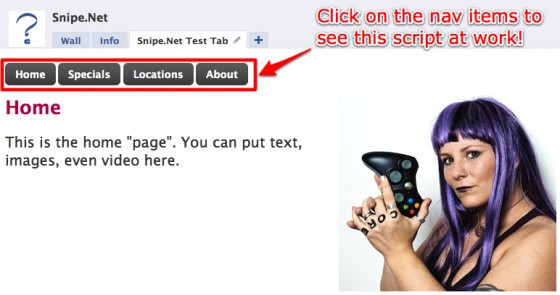
snipe_tab

So, okay… maybe that tab isn’t the fanciest thing you’ve ever seen, but it gives you a clear idea of how this works. How plain or sophisticated the design is depends entirely on you and how comfy you are in a graphics program.

If you dig the cool-looking button CSS in the test page, you can learn how to get that effect by visiting ZurbBlog’s post on Super Awesome Buttons with CSS3 and RGBA.

But here’s the great part: the code needed to create that tab is basically this:

<!-- navigation elements -->
<a href="#" clicktoshow="nav1" clicktohide="nav2,nav3,nav4">Home</a>
<a href="#" clicktoshow="nav2" clicktohide="nav1,nav3,nav4">Specials</a>
<a href="#" clicktoshow="nav3" clicktohide="nav1,nav2,nav4">Locations</a>
<a href="#" clicktoshow="nav4" clicktohide="nav1,nav2,nav3">About</a>

<!-- Content to display when user clicks on the Home tab -->
<div id="nav1">
	Homepage text
</div>

<!-- Content to display when user clicks on the Specials tab -->
<div id="nav2" style="display: none;">
	Specials text
</div>

<!-- Content to display when user clicks on the Locations tab -->
<div id="nav3" style="display: none;">
	Locations text
</div>

<!-- Content to display when user clicks on the About tab -->
<div id="nav4" style="display: none;">
	About text
</div>

Seriously. That’s it. That’s ALL there is to it. Naturally, I stripped out the extraneous text, images and styles from my demo for simplicity’s sake, but that’s honestly it.

This is arguably the one thing that is exactly as easy as it appears to be with regard to developing anything for Facebook.

This code is fairly straightforward, but let’s take a look at what’s happening here.

In the first part, we’re setting our links. For the micro-site, these are our navigation links. Everything here looks like pretty standard HTML except for the extra “clicktoshow” and “clicktohide” elements. (Note: The links do not have to be set before the content divs – you’ll set them wherever they make sense in your design. You’ll see an example of this further down the article in the image gallery sample.)

<!-- navigation elements -->
<a href="#" clicktoshow="nav1" clicktohide="nav2,nav3,nav4">Home</a>
<a href="#" clicktoshow="nav2" clicktohide="nav1,nav3,nav4">Specials</a>
<a href="#" clicktoshow="nav3" clicktohide="nav1,nav2,nav4">Locations</a>
<a href="#" clicktoshow="nav4" clicktohide="nav1,nav2,nav3">About</a>

The clicktoshow element allows you to specify the id’s of the elements you wish to show when the link is clicked. Conversely, the clicktohide element allows you to specify the ids of the elements you wish to hide when the link is clicked.

In our navigation elements, since the div that contains the homepage text is set as nav1 in our HTML, we want the clicktoshow for the Home link to be nav1 (since we want that div to show when we click on it.) Likewise, since we’re completely replacing whatever div is currently visible with the nav1 div contents, we want to specify everything that isn’t nav1 in the clicktohide.

Combining divs in hide/show

What’s particularly fun about the clicktoshow and clicktohide (other than their sheer ease of use) is the fact that unlike a more complicated true JavaScript version, showing and hiding two or more divs at the same time on the same click is simply a matter of specifying them in the clicktohide or clicktoshow parameters.

<!-- set up our text links -->
<a href="#" clicktoshow="nav1" clicktohide="nav2,nav3">Oh</a>
<a href="#" clicktoshow="nav2" clicktohide="nav1,nav3">Hai</a>
<a href="#" clicktoshow="nav1,nav2" clicktohide="nav3">Oh Hai</a>
<a href="#" clicktoshow="nav1,nav2,nav3">Oh Hai SRSLY!</a>

<!-- Content to display when user clicks on the Home tab -->
<div id="nav1">
	Oh
</div>

<!-- Content to display when user clicks on the Specials tab -->
<div id="nav2" style="display: none;">
	Hai
</div>

<!-- Content to display when user clicks on the Locations tab -->
<div id="nav3" style="display: none;">
	SRSYLY!
</div>

In the snippet above, we’re using only three divs with four nav elements. By specifying multiple ids in the clicktoshow parameter, we can show multiple divs at once, so when you click on “Oh Hai SRSLY!”, you’re looking at nav1, nav2 and nav3 all being shown at once. Piece of pie.
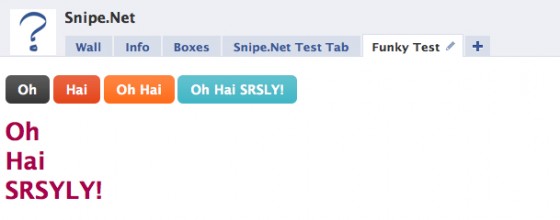
snipe_tab_funky

Example Image Gallery

One more example that will hopefully get your creative juices going – let’s look at how to do an image gallery using only clicktoshow and clicktohide.

In this gallery, we have a set of thumbnails with one large space set aside in our design where the fullsize image will display. You can see a simple demo of this gallery here.

gallery

Now take a look at the sourcecode below. Notice that we’re using the exact same code as we used in the other examples - we’ve just changed the names of the divs so they make more sense semantically in a gallery.

<!-- set the divs for the fullsize images -->
<div id="image1">
	<img src="http://www.snipe.net/wp-content/uploads/2009/10/full-1.jpg" />
</div>

<div id="image2" style="display: none;">
	<img src="http://www.snipe.net/wp-content/uploads/2009/10/full-2.jpg" />
</div>

<div id="image3" style="display: none;">
	<img src="http://www.snipe.net/wp-content/uploads/2009/10/full-3.jpg" />
</div>

<div id="image4" style="display: none;">
	<img src="http://www.snipe.net/wp-content/uploads/2009/10/full-4.jpg" /><br />
</div>

<!-- set up our thumbnails -->
<a href="#" clicktoshow="image1" clicktohide="image2,image3,image4">
	<img src="http://www.snipe.net/wp-content/uploads/2009/10/thumb-1.jpg" />
</a>

<a href="#" clicktoshow="image2" clicktohide="image1,image3,image4">
	<img src="http://www.snipe.net/wp-content/uploads/2009/10/thumb-2.jpg" />
</a>

<a href="#" clicktoshow="image3" clicktohide="image1,image2,image4">
	<img src="http://www.snipe.net/wp-content/uploads/2009/10/thumb-3.jpg" />
</a>

<a href="#" clicktoshow="image4" clicktohide="image1,image2,image3">
	<img src="http://www.snipe.net/wp-content/uploads/2009/10/thumb-4.jpg" />
</a>

By the way – if you dig the images used in that sample gallery, be sure to check out the Great Pumpkin Roundup post that shows examples of some of the most amazing pumpkin carving you’ve ever seen in your whole life.

In a project for vitamin water, I needed to create what appeared to be a dynamic video player, using only the default Facebook media player, which doesn’t support options like having a playlist where people can click on a gallery of thumbnails and load the video into a single player. See below:

new_moon_tab

The code used to pull this off is almost identical to the image gallery example above. No foolin’.

But wait – there’s more!

An additional DynamicFBML function that you may find useful is Clicktotoggle, which is very similar to Clicktoshow and Clicktohide, except instead of turning visibility on and off by clicking on on different links, you toggle visibility on and off by clicking the same link.

Your takeaway

While I certainly hope that the code presented here will be useful to you, the concept of what you can do using clicktoshow and clicktohide is more important. You’re not limited to creating a micro-site or an image gallery. Get creative and have some fun with this. Not many people are being adventurous in their Static FBML tabs yet, so you have an opportunity to really wow your users with your newfound skills.

Additional Resources

Also check out:

If you think this article kicked ass, subscribe to the RSS feed or follow me on Twitter! Share with your friends, or leave a comment below (or better still, do both!) My entire concept of self-worth is in your hands, so that makes you kind of a big deal. Srsly.

This entry was posted on Saturday, October 17th, 2009 at 1:16 am and is filed under Featured, Web Development. You can follow any responses to this entry through the RSS 2.0 feed. You can leave a response, or trackback from your own site.
  • http://www.snipe.net snipe

    Hi Stephanie – well goddamn… you're right. I had so many browsers open playing the trailers, I bet I didn't even notice that part when I was working on it. Honestly, I'm not sure how to resolve that in looking at it quickly. :-/ If you come across a solution (likely via FBJS), please let me know.

    • Alex

      Any solution to this? I’m having the same problem with embedded swfs continuing to play when you switch between divs.

  • Christopher Ng

    Hi ,
    First I want to wish you a Happy New Year.
    Thanks, this is what I had been looking for. But first How do I get my picture upload into the web? Is there any free uploading of jpg file.

  • http://www.snipe.net snipe

    You can use a free service like flickr.com

  • Christopher Ng

    Hi Snip,
    Thanks for your prompt reply. I tried to paste the picture but it turn out to be ? and square.

  • chrstphr

    Sorry i cannot see your reply.

  • chrstphr

    Thanks i got the picture in my facebook! :)

    Can you teach me how to get my website post it in the tab?

  • http://www.snipe.net snipe

    I'm not sure what you're asking :(

  • chrstphr

    sorry. I have a website and i need to use fbml to post it in. Hope you understand. Sorry i do not know the computer term.

  • http://www.snipe.net snipe

    I'm still not sure what you mean. You're trying to use FBML on your website, or trying to put parts of your website into your Facebook fan page?

  • chrstphr

    i what to paste parts of my website into facebook fan page.

    I also tried the video i upload into flickr and using the same method to paste into fbml nothing show up. Why?

  • http://www.snipe.net snipe

    And what problems are you having pasting parts of your website into the FB fan page?

    In order to display video on a Static FBML tab, you have to use the appropriate FBML provided by Facebook:
    http://wiki.developers.facebook.com/index.php/F
    http://wiki.developers.facebook.com/index.php/F

  • chrstphr

    Thanks i got the picture in my facebook! :)

    Can you teach me how to get my website post it in the tab?

  • http://www.snipe.net snipe

    I'm not sure what you're asking :(

  • chrstphr

    sorry. I have a website and i need to use fbml to post it in. Hope you understand. Sorry i do not know the computer term.

  • http://www.snipe.net snipe

    I'm still not sure what you mean. You're trying to use FBML on your website, or trying to put parts of your website into your Facebook fan page?

  • chrstphr

    i what to paste parts of my website into facebook fan page.

    I also tried the video i upload into flickr and using the same method to paste into fbml nothing show up. Why?

  • http://www.snipe.net snipe

    And what problems are you having pasting parts of your website into the FB fan page?

    In order to display video on a Static FBML tab, you have to use the appropriate FBML provided by Facebook:
    http://wiki.developers.facebook.com/index.php/F
    http://wiki.developers.facebook.com/index.php/F

  • quixoticmedia

    Hey great article, I was wondering how you got your twitter update in the top right of the website to work in both FF and IE. I have created it for an established seo client at http://seowizz.net in the bottom left of the website, It works beautifully in FF but gives a javascript error in IE of some sort. Any advice is appreciated. Thanks in advance.

  • http://www.snipe.net snipe

    I'm not using javascript for it – I modified the code on one of the standard Twitter wordpress plugins to display the way I want it to display, but it's all PHP/CSS, no Javascript, so it bypasses any browser-specific issues.

  • quixoticmedia

    aah, i see. Care to share which plugin you have used so I can give it a try? Pretty please. :) Thanks for the intel.

  • http://www.snipe.net snipe

    I believe it was Twitter Tools by Alex King: http://wordpress.org/extend/plugins/twitter-tools/

  • chrstphr

    Dear Snipe,
    yes only part of my wedsite into FB.

    I had read through the instruction regarding to the video clip. They FVL method seem to need a source web video. Is there a website where I can upload.

  • http://www.snipe.net snipe

    You can use YouTube and the fb:swf tag:
    http://wiki.developers.facebook.com/index.php/F

    The example on that documentation page shows a YouTube video being implemented.

  • chrstphr

    Is it this statement? What do I need to change?

    <fb:swf
    swfbgcolor=”000000″
    imgstyle=”border-width:3px; border-color:white;”
    swfsrc='http://www.youtube.com/v/xxxxxxxxxx&#39;
    imgsrc='http://img.youtube.com/vi/xxxxxxxxxx/2.jpg&#39;
    width='340' height='270' />

    • lsa

      When i use this code i dont see flash, i need click to white area and just after this i see my flash. What i need to do to see flash file after i go to my fan page? (i mean i want enter url of fan page in browser and after this i want see working flash.. with loader.. and flash animation..)

      Thank you.

      • http://www.snipe.net snipe

        Facebook does not allow Flash to autoload. No way around it.

  • http://www.snipe.net snipe

    You have to change the YouTube url to the url of whatever video you wan to show on YouTube.

  • http://www.facebook.com/diloreto Tony DiLoreto

    good article – but how can I get the user id of the person viewing my fan page (even if I have to have an app), without making the user do some type of event?

  • http://www.snipe.net snipe

    No, you cannot. :(

  • jean

    these posts are awesome and very helpful. you rule. srsly.

  • http://www.portlandormarketing.com/ Michelle Blum

    ya ya! so easy yet so perfect. Thanks for this. I'm gonna try it out today.

  • Nikolas

    How can i change the background color in a tag??

  • http://www.snipe.net snipe

    Just use the CSS for background-color, same as you would in regular HTML

  • http://www.facebook.com/profile.php?id=1145898932 facebook-1145898932

    Your micro-site screwed in IE8, no font or format is displayed.

  • http://www.snipe.net snipe

    That's most likely a result of the button CSS I'm using. I don't have IE8 handy, so I can't take a look, but if the barebones code works, that's all that matters for the purpose of this tutorial. Thanks for the heads up.

  • http://www.snipe.net snipe

    Hmm… I just pulled it up in IE8 and it looks fine. The CSS buttons aren't rounded, but they're definitely there, and so it the other formatting and text. *shrug*

  • kiyone

    Great article! Very informative

  • webwhispers

    Have tried to display different content for Fans and non-Fans @
    http://www.facebook.com/webwhispers?v=box_3
    However this does not work on IE.

    Have checked out this page and it works well on all browsers.
    http://www.facebook.com/sears#/sears?v=app_1046

    How does one do it?

    • Ronshi

      hey web whispers could u plz tell me the whole coding of yer page i guess i can help u!!

  • Alex

    hi, i was curious about the vitamin water facebook page. i noticed their profile picture on the wall, is very very big. I tried to upload a big picture on my page to see if it works and as I expected…it doesnt (gpt an error message sayn that the picture is too wide or too long, and I should try to upload one thats closer to a square). I dont even know what are the maximum size allowed and certainly vitamin water exceeded that somehow. Any idea how they did it ? thanks.

  • Yannis

    Hi, your examples were very helpfull to begin with fbml. I am trying to put flash buttons (swf) to fbml but i can't manage it. Is there any way to do it?

  • http://www.snipe.net snipe

    Hi Yannis – you just need to use the fb:swf tag:
    http://wiki.developers.facebook.com/index.php/F

  • jperk

    I've complimented you before on this, but I must do it again since I used the info for my organization's FB fan page. Other than a few tweaks that were necessary and the fact that IE doesn't work with the code nearly as well as other browsers, I managed to create a pretty cool video clip tab. Thanks for providing the instruction!

  • Pingback: 4 Ways to Fire Up Your Facebook Fan Page « Above The Static

  • http://www.worstdamnblog.com Josh

    This is a great tutorial. However, for some reason my links aren't working. Whenever I click one of the other links – the content doesn't change. Any idea what the problem could be?

  • http://www.facebook.com/Benedex.Web.Designer Benedex Forastiere

    nice…thank u

  • http://www.facebook.com/Benedex.Web.Designer Benedex Forastiere

    why I cannot add you to my facebook's friend?

  • http://www.snipe.net snipe

    I do not accept friend invitation from people I don't know on Facebook.

  • Mihir

    Have you seen, Friday's fan page with the store locator tab. How does that work?

  • http://www.snipe.net snipe

    They have created a store locator application and set the application as a fan page tab.

  • Fatima

    Hi Sniper, I wonder if you could help me.

    I'm having trouble using buttons, like in the top picture, instead of text as ways of linking the tabs with their content (FBML is still rather new to me). Could you please give me an example of how the code for this should look so I know what I'm doing wrong?

    Thanks in advance

  • john

    first thanks for post. Now the question. when i put background color in one of the “pages” of the mini site, the other 3 fail to show any content. this is what im using <div style='background-color: #eeef89'> can you please help?

  • john

    never mind, i figured it out. I just don't know what i'm doing so i play around untill something works. I was struck by common sense and realized the style='background-color: #eeef89' had to go in the <div> tags you provided. Thanks