Snipe.Net - Geeky Stuff
Twitter
Currently: @alphabitch we still love you baby in reply to alphabitch 5 hrs ago

Extending Facebook Static FBML Tabs with Dynamic Content

This tutorial walks you through how to use DynamicFBML to do simple content replacement that will allow you to fit more content into your tabs. You can create image or video galleries, or even an entire micro-site inside your Static FBML tab without a lot of complicated scripting.

If you’re not sure what Static FBML is, check out my previous tutorial that shows you how powerful the Static FBML application can be, and how you can create very compelling, highly branded Facebook Fan page tabs without the hassle of building a custom Facebook application.

At its most basic, the functionality we’re discussing is simply one or more text or image links that, when clicked, cause content in a set space to change. Some potential uses:

  • Dynamic image gallery where the user clicks on a thumbnail to see a larger version of the image
  • Video gallery that allows you to include thumbnails on the video that loads the selected video into a single player space. This can be particularly helpful in tightly designed Static FBML pages where you have limited space to display a lot of content.
  • Or even using your Static FBML tab as a mini-site, replacing the entire tab’s content with new content to simulate multiple pages

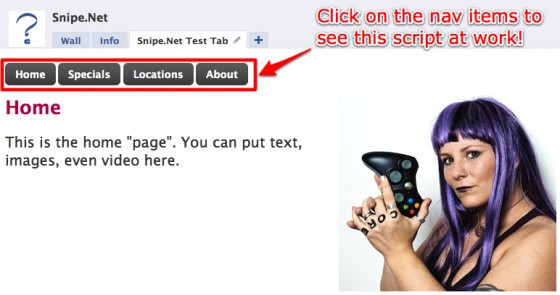
We’re going to explore a few examples in this article, but it’s basically the same code regardless of how you apply it. First, let’s look at creating a micro-site within a Facebook Static FBML tab – see a live demo of the tab we’re going to create here.

Notice the navigation within the tab itself (Home, Specials, Locations, About). Clicking on them displays new content in the entire tab without actually reloading the page. This is an example of Facebook’s DynamicFBML, and you won’t believe how easy it is to implement. Seriously, you won’t.
snipe_tab

So, okay… maybe that tab isn’t the fanciest thing you’ve ever seen, but it gives you a clear idea of how this works. How plain or sophisticated the design is depends entirely on you and how comfy you are in a graphics program.

If you dig the cool-looking button CSS in the test page, you can learn how to get that effect by visiting ZurbBlog’s post on Super Awesome Buttons with CSS3 and RGBA.

But here’s the great part: the code needed to create that tab is basically this:

<!-- navigation elements -->
<a href="#" clicktoshow="nav1" clicktohide="nav2,nav3,nav4">Home</a>
<a href="#" clicktoshow="nav2" clicktohide="nav1,nav3,nav4">Specials</a>
<a href="#" clicktoshow="nav3" clicktohide="nav1,nav2,nav4">Locations</a>
<a href="#" clicktoshow="nav4" clicktohide="nav1,nav2,nav3">About</a>

<!-- Content to display when user clicks on the Home tab -->
<div id="nav1">
	Homepage text
</div>

<!-- Content to display when user clicks on the Specials tab -->
<div id="nav2" style="display: none;">
	Specials text
</div>

<!-- Content to display when user clicks on the Locations tab -->
<div id="nav3" style="display: none;">
	Locations text
</div>

<!-- Content to display when user clicks on the About tab -->
<div id="nav4" style="display: none;">
	About text
</div>

Seriously. That’s it. That’s ALL there is to it. Naturally, I stripped out the extraneous text, images and styles from my demo for simplicity’s sake, but that’s honestly it.

This is arguably the one thing that is exactly as easy as it appears to be with regard to developing anything for Facebook.

This code is fairly straightforward, but let’s take a look at what’s happening here.

In the first part, we’re setting our links. For the micro-site, these are our navigation links. Everything here looks like pretty standard HTML except for the extra “clicktoshow” and “clicktohide” elements. (Note: The links do not have to be set before the content divs – you’ll set them wherever they make sense in your design. You’ll see an example of this further down the article in the image gallery sample.)

<!-- navigation elements -->
<a href="#" clicktoshow="nav1" clicktohide="nav2,nav3,nav4">Home</a>
<a href="#" clicktoshow="nav2" clicktohide="nav1,nav3,nav4">Specials</a>
<a href="#" clicktoshow="nav3" clicktohide="nav1,nav2,nav4">Locations</a>
<a href="#" clicktoshow="nav4" clicktohide="nav1,nav2,nav3">About</a>

The clicktoshow element allows you to specify the id’s of the elements you wish to show when the link is clicked. Conversely, the clicktohide element allows you to specify the ids of the elements you wish to hide when the link is clicked.

In our navigation elements, since the div that contains the homepage text is set as nav1 in our HTML, we want the clicktoshow for the Home link to be nav1 (since we want that div to show when we click on it.) Likewise, since we’re completely replacing whatever div is currently visible with the nav1 div contents, we want to specify everything that isn’t nav1 in the clicktohide.

Combining divs in hide/show

What’s particularly fun about the clicktoshow and clicktohide (other than their sheer ease of use) is the fact that unlike a more complicated true JavaScript version, showing and hiding two or more divs at the same time on the same click is simply a matter of specifying them in the clicktohide or clicktoshow parameters.

<!-- set up our text links -->
<a href="#" clicktoshow="nav1" clicktohide="nav2,nav3">Oh</a>
<a href="#" clicktoshow="nav2" clicktohide="nav1,nav3">Hai</a>
<a href="#" clicktoshow="nav1,nav2" clicktohide="nav3">Oh Hai</a>
<a href="#" clicktoshow="nav1,nav2,nav3">Oh Hai SRSLY!</a>

<!-- Content to display when user clicks on the Home tab -->
<div id="nav1">
	Oh
</div>

<!-- Content to display when user clicks on the Specials tab -->
<div id="nav2" style="display: none;">
	Hai
</div>

<!-- Content to display when user clicks on the Locations tab -->
<div id="nav3" style="display: none;">
	SRSYLY!
</div>

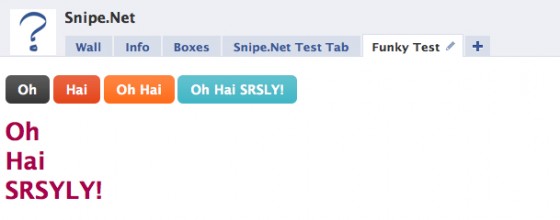
In the snippet above, we’re using only three divs with four nav elements. By specifying multiple ids in the clicktoshow parameter, we can show multiple divs at once, so when you click on “Oh Hai SRSLY!”, you’re looking at nav1, nav2 and nav3 all being shown at once. Piece of pie.
snipe_tab_funky

Example Image Gallery

One more example that will hopefully get your creative juices going – let’s look at how to do an image gallery using only clicktoshow and clicktohide.

In this gallery, we have a set of thumbnails with one large space set aside in our design where the fullsize image will display. You can see a simple demo of this gallery here.

gallery

Now take a look at the sourcecode below. Notice that we’re using the exact same code as we used in the other examples - we’ve just changed the names of the divs so they make more sense semantically in a gallery.

<!-- set the divs for the fullsize images -->
<div id="image1">
	<img src="http://www.snipe.net/wp-content/uploads/2009/10/full-1.jpg"/>
</div>

<div id="image2" style="display: none;">
	<img src="http://www.snipe.net/wp-content/uploads/2009/10/full-2.jpg"/>
</div>

<div id="image3" style="display: none;">
	<img src="http://www.snipe.net/wp-content/uploads/2009/10/full-3.jpg"/>
</div>

<div id="image4" style="display: none;">
	<img src="http://www.snipe.net/wp-content/uploads/2009/10/full-4.jpg"/><br />
</div>

<!-- set up our thumbnails -->
<a href="#" clicktoshow="image1" clicktohide="image2,image3,image4">
	<img src="http://www.snipe.net/wp-content/uploads/2009/10/thumb-1.jpg"/>
</a>

<a href="#" clicktoshow="image2" clicktohide="image1,image3,image4">
	<img src="http://www.snipe.net/wp-content/uploads/2009/10/thumb-2.jpg"/>
</a>

<a href="#" clicktoshow="image3" clicktohide="image1,image2,image4">
	<img src="http://www.snipe.net/wp-content/uploads/2009/10/thumb-3.jpg"/>
</a>

<a href="#" clicktoshow="image4" clicktohide="image1,image2,image3">
	<img src="http://www.snipe.net/wp-content/uploads/2009/10/thumb-4.jpg/>
</a>

By the way – if you dig the images used in that sample gallery, be sure to check out the Great Pumpkin Roundup post that shows examples of some of the most amazing pumpkin carving you’ve ever seen in your whole life.

In a project for vitamin water, I needed to create what appeared to be a dynamic video player, using only the default Facebook media player, which doesn’t support options like having a playlist where people can click on a gallery of thumbnails and load the video into a single player. See below:

new_moon_tab

The code used to pull this off is almost identical to the image gallery example above. No foolin’.

But wait – there’s more!

An additional DynamicFBML function that you may find useful is Clicktotoggle, which is very similar to Clicktoshow and Clicktohide, except instead of turning visibility on and off by clicking on on different links, you toggle visibility on and off by clicking the same link.

Your takeaway

While I certainly hope that the code presented here will be useful to you, the concept of what you can do using clicktoshow and clicktohide is more important. You’re not limited to creating a micro-site or an image gallery. Get creative and have some fun with this. Not many people are being adventurous in their Static FBML tabs yet, so you have an opportunity to really wow your users with your newfound skills.

Additional Resources

Also check out:

If you think this article kicked ass, subscribe to the RSS feed or follow me on Twitter! Share with your friends, or leave a comment below (or better still, do both!) My entire concept of self-worth is in your hands, so that makes you kind of a big deal. Srsly.

This entry was posted on Saturday, October 17th, 2009 at 1:16 am and is filed under Featured, Web Development. You can follow any responses to this entry through the RSS 2.0 feed. You can leave a response, or trackback from your own site.
  • http://www.adelaidedj.com/ DJ Adelaide

    cool post, i’m going to try it out on my fanpage!

  • http://www.adelaidedj.com DJ Adelaide

    cool post, i’m going to try it out on my fanpage!

  • http://twitter.com/Brian_Lord Brian_Lord

    This opens the door up for many possibilities on my fan page. Thanks! Excited to try it out.

  • http://thefstopfiles.com/ Gabe

    Great tutorial. I like how simple it is. Is there any way to add an “active” class or the like to the tabs that are clicked on (and then also remove it as others are clicked)? It would be much better to be able to give the user some ideas of which tab's content they are currently seeing.

  • http://twitter.com/bunkerdesigns Bunker Designs

    Hi nice article, does anyone know if there's about issues on the facebook application behavior changes when are added to a fan page tab? I have a simple application that work fine on stand alone mode and when I add it to my fan page tab seems like there are java script like problems there: Some clicktoshow/hide links don't work properly , some comment boxes neither.
    These facebook application articles are very useful, thanks again :^)
    Let me know if you want to take a look of it.

  • http://www.snipe.net snipe

    Hi Bunker – this article doesn't really address Facebook applications, only Static FBML boxes, but I have used clicktohide and clicktoshow in applications in fan page tabs without any difficulty at all. You can see an example here:
    http://www.facebook.com/pages/D23/321772865696?...

    The slideshow and the poll both use clicktohide and clicktoshow. Are you certain there isn't an error in your code that would cause them to break? Otherwise, I'd need a specific example in order to be more useful to you.

  • http://twitter.com/bunkerdesigns Bunker Designs

    Thanks, I'll see what the problem is. I wrote it because at the end it is rendered as a FBML but u are right there would be several things behind that.

  • http://www.cherilnclarke.com/ CNC

    Great post. I keep having one difficulty, however, the “clicktohide” function doesn't seem to be working. Any suggestions on what I might be doing wrong?

    http://www.facebook.com/pages/Cheril-N-Clarke/5...

  • http://www.snipe.net snipe

    Hi Cheri – can you go to http://www.pastebin.com and paste the FBML code you're using? I can't just view the source and see, since Facebook converts everything into real javascript once it runs through their server.

  • http://www.cherilnclarke.com/ CNC

    Okay, I'll check that link out. Thanks!

    The other issue I'm having is that the tab I'm creating keeps moving to my boxes. I don't want it to be in the boxes tab, but to be a tab of it it's own.

  • http://www.snipe.net snipe

    When you set it as a tab, it moves back to boxes on its own accord? That sounds like a bug in Facebook. Once it's set as a tab, it shouldn't move itself back to boxes. On your page, when you go to EDIT PAGE, you set the tab/box setting here:

    http://www.flickr.com/photos/snipeyhead/4040528...

    And then you should see this:

    http://www.flickr.com/photos/snipeyhead/4040527...

    Is that not happening for you?

  • http://www.snipe.net snipe

    Really glad it helped, Brian! :) It's really fun to know this right now, since most people are just starting out with Fan Pages and don't really understand how flexible they can be. You can definitely put yourself ahead of the curve by being a little creative :)

  • http://www.cherilnclarke.com/ CNC

    It does but at some point the info in my tab ends up being in my Boxes. lol. I went to bed last night w/an extra tab and woke up to find all of that design and info in my Boxes tab. It's driving me nuts.

  • http://www.snipe.net snipe

    Hi Gabe – Hmm… I'm not actually sure that Facebook supports that natively – BUT you could do it with a little convoluted trickery. One thing I have discovered is that in this particular type of FBML, you can actually use clicktohide and clicktoshow on elements outside the div you're working in.

    So you could basically create a separate list of nav links and put them *inside* the divs you're showing and hiding. I don't know if I'm being clear here, but you'd basically have something like this:

    div 1 – default:
    - nav bar
    - default content

    div 2
    - nav bar with div2's “active state” treatment
    - div 2 content

    div 3
    - nav bar with div3's “active state” treatment
    - div 3 content

    and so on. So basically, you'd include a navbar inside each div, styled to show that div as the active one.

    Make sense?

  • http://www.snipe.net snipe

    If you get stuck, throw your code into http://www.pastebin.com and I'll take a look. :)

  • http://www.snipe.net snipe

    Hmmm…. well if your settings match up to the screenshots I posted, it may be a Facebook bug. They just rolled out some major changes to their newsfeed yesterday, and things are a little buggy right now, as happens every time they roll out platform changes. (I swear, if I rolled out new software and broke as much stuff as they do when they roll out changes, I'd have been fired ages ago. Meh.)

    Those settings are the ONLY things that should control whether your content lives in boxes or tabs, so if you're good to go there, I'd say give it a few days and try not to fret too much. It could well be Facebook having problems because of the new code rollout.

  • http://www.snipe.net snipe

    Also, sorry for calling you Cheri, not Cheril. I skimmed your page too fast :)

  • http://www.cherilnclarke.com/ CNC

    Thanks again! I'll give it a few days. I hope that's the problem. :-)

  • http://twitter.com/bunkerdesigns Bunker Designs

    Yes I'm stuck. I Checked for duplicated comments xids and something wrong but I didn't find anything. The clickstoshow/hide work fine on the stand alone application, there's just a problem with the first comment there. On the fan page tab the clickstoshow/hide aren't working fine.

    Thanks again, please do not spend too much time on it just give it a quick look to see if you see something wrong. I'll really appreciate that.

    Rendered code: http://pastebin.com/m3970d1b2
    Stand alone application: http://apps.facebook.com/bunkerdesigns/
    Facebook page tab:http://www.facebook.com/pages/Bunker-Designs/56364963685?v=app_97252655208&ref=mf

  • http://www.snipe.net snipe

    Hi Bunker – On your app tab page, the image clicktoshow/hide are working fine – it looks like just the nav buttons are not, correct?

    Have you tried validating your output in an HTML validator? You may not have noticed this (since the changes are below the page fold) but when you click on the nav items in the tab, they *are* actually changing. Look at the size of the browser scrollbar on the right when you click between the nav links. Its as if there is a closing div tag that's out of place. The clicktohide/show is actually working, it just looks like it's not because the top part of the page content isn't changing. Below the fold is though.

  • http://twitter.com/bunkerdesigns Bunker Designs

    Hi thanks for the answer. I tried some HTML validators as you suggested me but I didn't find anything out of place. The weird thing is it works fine on the stand alone application http://apps.facebook.com/bunkerdesigns/ I've been trying to figure out the problem in different ways so I removed the fb tags and the clicktoshow/hide works fine now. I'm going to review the fb tags to find the problems. I'll update this post with the results.

  • http://twitter.com/bunkerdesigns Bunker Designs

    Ok these are my results:
    – The problem were the fb:comments tags – seems like there are some limitations with them on fan page tabs. When I remove them all works fine (click show/hide).
    – I had to do a work around adding a double div on the show/hide divs to make them work with the fb:comments

  • http://www.snipe.net snipe

    Hi Bunker – what has your experience been with comments and static FBML? I have ever done it, but it comes up a lot

  • everyounce

    Your Facebook link at the top right of page doesn't work by the looks. I might be wrong, but it just sends me to my personal newsfeed…

  • http://www.snipe.net snipe

    It does – my privacy controls are such that if I'm not already a friend, you can't see me.

  • everyounce

    Ah ok, thought I might be wrong.

    Do you have plenty of work on at the moment?

    Tim

  • http://www.snipe.net snipe

    I'm fairly booked up, but it always depends on the project. Smaller projects with quick turnaround times are easy for me to crank out.

  • alljects

    hello snipe can you help me to add a background in to my page http://www.facebook.com/pages/Filipino-Power/17... teach me also on how to align picture like the newmoon that you creat, is there any toturial for fbml aside from wiki and more xample like your blog..

  • http://www.actycrea.com/ Alex Null

    Hi, nice tutorial. Is it posible to add a tab to a group, with the content of this tab dinamically output by an external system? a cms? or a crm?

  • jcperk

    The video gallery is excellent–just one question. I notice that if I click one thumbnail to play a video and then click another thumbnail-without pausing the first video while it's playing–the audio from the first video keeps playing, so I wind up with two audios playing at the same time. Any idea what type of code is needed to not just hide, but also stop, the first video upon clicking another thumbnail? Thanks so much for any tips–this is a fabulous idea!

  • dNz

    maybe a newb-question, but how can i create a button like the ones in the article, but have them hyperlink elsewhere outside of the FBML?

    Thnx

  • http://twitter.com/Brian_Lord Brian F. Lord

    Hey I am wondering how I can use CSS to add styling to my FBML page. Is there a Wiki you know of or a starting point you can give me. Thanks in advance

  • Mariano Tello

    Wow, you did a very nice job here. Seeing this i was wondering if you know a way to replicate what VH1 does with its landing page: http://www.facebook.com/vh1

    When you land in their page, if you are not a fan, you are displayed a text, asking you to become fan. But if you land in the page and you are fan, you are displayed something entirely different.

  • http://www.snipe.net snipe

    The FBML you're looking for is visible-to-connection:
    http://wiki.developers.facebook.com/index.php/F...

  • lelefay

    Umm, you basically rock the big one! Thank you for taking the time and sharing your resources!!! You are my new found favorite! -sly (newbie with all things cool)

  • Mariano Tello

    Woa!! Thanks for sharing your knowledge, it really helped me out. Thanks again :D

  • http://www.snipe.net snipe

    Unfortunately, if you're pulling external data, you need an application, can't do a static FBML thing. You can create an application and use these techniques, but not sure how apps work wit groups, since I don't use groups much.

  • http://www.snipe.net snipe

    Ah interesting. Not actually sure how we'd fix that. :(

  • http://www.snipe.net snipe

    Just change the href=”" bit to point to the link you want to link to. If you google for HTML tutorials, you'll see plenty of info on links

  • http://www.snipe.net snipe

    Glad to help! :)

  • http://www.snipe.net snipe

    Glad to hear it helped you out! :)

  • theo

    Wow, thanks for that amazing nugget. I've been looking for a simple way to do just that for weeks. Seriously, thanks!

  • http://www.facebook.com/people/Stephanie-Fuda/1153438311 Stephanie Fuda

    Great post! works awesome, but i have a question.

    I've use the code form your example which is awesome, and it's working great with sfws in each panel, but i notice on IE that when one video is playing, and while it is playing i can switch to another video and still hear the audio from the first video. i'm having this in the version i set up but also see it happening in the vitamin water example. any ideas on how to swap more cleanly?
    thanks!

  • http://home.liveplay.asia/ efoc

    It only works well in other browsers except IE. I am using IE 8, it shows this message: 'FBML' is undefined

    Any other have this problem when browse using IE?

  • Siempre bueno

    Hi
    if i want the template of this new moon tab (here is the link)

    http://www.facebook.com/vitaminwater?v=app_1703...

    in order to modify the layout and the design…
    I've been looking for an fbml template but couldn't found
    so how can you help please?
    thanks

  • alkemia

    thank from france for your tuto…

  • http://www.facebook.com/webwhispers Glenn

    Check out some interesting stuff you can do on your Facebook Fan page. Steps & code provided. Click on “Fan Page Utilities” tab

  • http://www.snipe.net snipe

    You're very welcome, Alkemia :)

  • http://www.snipe.net snipe

    Uhm, I'm afraid I can't do that. Vitamin Water paid my company a lot of money to create that design and it is their property. You're welcome to use it as inspiration, but you cannot copy it exactly.

  • http://www.snipe.net snipe

    Are you still having this problem? Can you give me a link to your fan page so I can take a look?

  • http://www.snipe.net snipe

    Hi Stephanie – well goddamn… you're right. I had so many browsers open playing the trailers, I bet I didn't even notice that part when I was working on it. Honestly, I'm not sure how to resolve that in looking at it quickly. :-/ If you come across a solution (likely via FBJS), please let me know.

  • Christopher Ng

    Hi ,
    First I want to wish you a Happy New Year.
    Thanks, this is what I had been looking for. But first How do I get my picture upload into the web? Is there any free uploading of jpg file.

  • http://www.snipe.net snipe

    You can use a free service like flickr.com

  • Christopher Ng

    Hi Snip,
    Thanks for your prompt reply. I tried to paste the picture but it turn out to be ? and square.

  • chrstphr

    Sorry i cannot see your reply.

  • chrstphr

    Thanks i got the picture in my facebook! :)

    Can you teach me how to get my website post it in the tab?

  • http://www.snipe.net snipe

    I'm not sure what you're asking :(

  • chrstphr

    sorry. I have a website and i need to use fbml to post it in. Hope you understand. Sorry i do not know the computer term.

  • http://www.snipe.net snipe

    I'm still not sure what you mean. You're trying to use FBML on your website, or trying to put parts of your website into your Facebook fan page?

  • chrstphr

    i what to paste parts of my website into facebook fan page.

    I also tried the video i upload into flickr and using the same method to paste into fbml nothing show up. Why?

  • http://www.snipe.net snipe

    And what problems are you having pasting parts of your website into the FB fan page?

    In order to display video on a Static FBML tab, you have to use the appropriate FBML provided by Facebook:
    http://wiki.developers.facebook.com/index.php/F...
    http://wiki.developers.facebook.com/index.php/F...

  • chrstphr

    Thanks i got the picture in my facebook! :)

    Can you teach me how to get my website post it in the tab?

  • http://www.snipe.net snipe

    I'm not sure what you're asking :(

  • chrstphr

    sorry. I have a website and i need to use fbml to post it in. Hope you understand. Sorry i do not know the computer term.

  • http://www.snipe.net snipe

    I'm still not sure what you mean. You're trying to use FBML on your website, or trying to put parts of your website into your Facebook fan page?

  • chrstphr

    i what to paste parts of my website into facebook fan page.

    I also tried the video i upload into flickr and using the same method to paste into fbml nothing show up. Why?

  • http://www.snipe.net snipe

    And what problems are you having pasting parts of your website into the FB fan page?

    In order to display video on a Static FBML tab, you have to use the appropriate FBML provided by Facebook:
    http://wiki.developers.facebook.com/index.php/F...
    http://wiki.developers.facebook.com/index.php/F...

  • quixoticmedia

    Hey great article, I was wondering how you got your twitter update in the top right of the website to work in both FF and IE. I have created it for an established seo client at http://seowizz.net in the bottom left of the website, It works beautifully in FF but gives a javascript error in IE of some sort. Any advice is appreciated. Thanks in advance.

  • http://www.snipe.net snipe

    I'm not using javascript for it – I modified the code on one of the standard Twitter wordpress plugins to display the way I want it to display, but it's all PHP/CSS, no Javascript, so it bypasses any browser-specific issues.

  • quixoticmedia

    aah, i see. Care to share which plugin you have used so I can give it a try? Pretty please. :) Thanks for the intel.

  • http://www.snipe.net snipe

    I believe it was Twitter Tools by Alex King: http://wordpress.org/extend/plugins/twitter-tools/

  • chrstphr

    Dear Snipe,
    yes only part of my wedsite into FB.

    I had read through the instruction regarding to the video clip. They FVL method seem to need a source web video. Is there a website where I can upload.

  • http://www.snipe.net snipe

    You can use YouTube and the fb:swf tag:
    http://wiki.developers.facebook.com/index.php/F...

    The example on that documentation page shows a YouTube video being implemented.

  • chrstphr

    Is it this statement? What do I need to change?

    <fb:swf
    swfbgcolor=”000000″
    imgstyle=”border-width:3px; border-color:white;”
    swfsrc='http://www.youtube.com/v/xxxxxxxxxx'
    imgsrc='http://img.youtube.com/vi/xxxxxxxxxx/2.jpg'
    width='340' height='270' />

  • http://www.snipe.net snipe

    You have to change the YouTube url to the url of whatever video you wan to show on YouTube.

  • http://www.facebook.com/diloreto Tony DiLoreto

    good article – but how can I get the user id of the person viewing my fan page (even if I have to have an app), without making the user do some type of event?

  • http://www.snipe.net snipe

    No, you cannot. :(

  • jean

    these posts are awesome and very helpful. you rule. srsly.

  • http://www.portlandormarketing.com/ Michelle Blum

    ya ya! so easy yet so perfect. Thanks for this. I'm gonna try it out today.

  • Nikolas

    How can i change the background color in a tag??

  • http://www.snipe.net snipe

    Just use the CSS for background-color, same as you would in regular HTML

  • http://www.facebook.com/profile.php?id=1145898932 facebook-1145898932

    Your micro-site screwed in IE8, no font or format is displayed.

  • http://www.snipe.net snipe

    That's most likely a result of the button CSS I'm using. I don't have IE8 handy, so I can't take a look, but if the barebones code works, that's all that matters for the purpose of this tutorial. Thanks for the heads up.

  • http://www.snipe.net snipe

    Hmm… I just pulled it up in IE8 and it looks fine. The CSS buttons aren't rounded, but they're definitely there, and so it the other formatting and text. *shrug*

  • kiyone

    Great article! Very informative

  • webwhispers

    Have tried to display different content for Fans and non-Fans @
    http://www.facebook.com/webwhispers?v=box_3
    However this does not work on IE.

    Have checked out this page and it works well on all browsers.
    http://www.facebook.com/sears#/sears?v=app_1046...

    How does one do it?

  • Alex

    hi, i was curious about the vitamin water facebook page. i noticed their profile picture on the wall, is very very big. I tried to upload a big picture on my page to see if it works and as I expected…it doesnt (gpt an error message sayn that the picture is too wide or too long, and I should try to upload one thats closer to a square). I dont even know what are the maximum size allowed and certainly vitamin water exceeded that somehow. Any idea how they did it ? thanks.

  • Yannis

    Hi, your examples were very helpfull to begin with fbml. I am trying to put flash buttons (swf) to fbml but i can't manage it. Is there any way to do it?

  • http://www.snipe.net snipe

    Hi Yannis – you just need to use the fb:swf tag:
    http://wiki.developers.facebook.com/index.php/F...

  • jperk

    I've complimented you before on this, but I must do it again since I used the info for my organization's FB fan page. Other than a few tweaks that were necessary and the fact that IE doesn't work with the code nearly as well as other browsers, I managed to create a pretty cool video clip tab. Thanks for providing the instruction!

  • http://abovethestatic.wordpress.com/2010/01/28/4-ways-to-fire-up-your-facebook-fan-page/ 4 Ways to Fire Up Your Facebook Fan Page « Above The Static

    [...] create your own customized tabs with the Static FBML option (something helpfully explored in this how to by Snipe.net) and the possibilities for an eye-catching, informative first impression are greatly [...]

  • http://www.worstdamnblog.com Josh

    This is a great tutorial. However, for some reason my links aren't working. Whenever I click one of the other links – the content doesn't change. Any idea what the problem could be?

  • http://www.facebook.com/Benedex.Web.Designer Benedex Forastiere

    nice…thank u

  • http://www.facebook.com/Benedex.Web.Designer Benedex Forastiere

    why I cannot add you to my facebook's friend?

  • http://www.snipe.net snipe

    I do not accept friend invitation from people I don't know on Facebook.

  • Mihir

    Have you seen, Friday's fan page with the store locator tab. How does that work?

  • http://www.snipe.net snipe

    They have created a store locator application and set the application as a fan page tab.

  • Fatima

    Hi Sniper, I wonder if you could help me.

    I'm having trouble using buttons, like in the top picture, instead of text as ways of linking the tabs with their content (FBML is still rather new to me). Could you please give me an example of how the code for this should look so I know what I'm doing wrong?

    Thanks in advance

  • john

    first thanks for post. Now the question. when i put background color in one of the “pages” of the mini site, the other 3 fail to show any content. this is what im using <div style='background-color: #eeef89'> can you please help?

  • john

    never mind, i figured it out. I just don't know what i'm doing so i play around untill something works. I was struck by common sense and realized the style='background-color: #eeef89' had to go in the <div> tags you provided. Thanks

  • http://www.snipe.net snipe

    You would code image buttons the same way you would code the links with the text links, except youd use an img src HTML tag where the clickable text would normally go. That part is HTM, not FBML, so a quick google search on using images in HTML should get you the answers you need. Incidentally, the example page on Facebook that I used does not use image buttons, it uses text links.

  • newb

    Hi, thanks for the info, just wondering how you add more than 4 images to the gallery. Ive tried just continuing the code to have a total of 8 or more images, but they wont show. Any idea why? Ive also tried reducing the size of the thumbs to make room…im a total newb, any help is appreciated!

  • newb

    also ive set up some tabs withing a static fbml tab which use a div id tag to define each tab (if that makes sense) and im wanting to paste your image gallery code into that tab. Which doesnt work and i think it might be because there is one div id=tag within another. Is that right? any idea how i can get around it? could you have a look at the code for me?

  • http://reazulk.wordpress.com/ Rubel

    Hi,
    I want to create a page where only Fan user can visit that page.
    can you please help us.

  • http://www.snipe.net snipe

    It cannot be done. Facebook does not allow it.

  • newb

    hi, thanks for the reply. Which part exactly do you mean cannot be done?

  • newb

    oh whoops sorry that wasnt a reply to me :P seee newwwb!

  • JNess

    hi, i'm trying to add a fb:swf tag for a youtube video to my fanpage, but stick it inside some html code that i created in photoshop (sliced and coded), i went into the html code and replaced the blank graphic i left with the swf coding, made sure it was the same pixel size, but when i load it into fbml, it adds padding above and below and messes up the graphic. here's the page:
    http://www.facebook.com/theliverblog?v=app_4949...

    any ideas on how to lose that extra space? thanks.

  • Mike

    This is awesome bro….now I can really do justice to our page..Thank you so much

  • http://www.snipe.net snipe

    Glad it helps! (I'm a chick, btw :) )

  • john

    hello, i actually posted something here before but then posted again saying i found my answer. Im stuck now. when i put the background color in the div tags for the pages, what ever page has the back color shows one the first tab. only once though. once i click another tab and go back to the home tab, it only shows what should be there. another way of saying it is if “home” & “specials” both have back ground color they both show on home. once i click specials and go back to home it displays correctly. this is what i have: <!– Content to display when user clicks on the Home tab –>
    <div id=”nav1″style=”background-color: #eeef89;”> then content. can u please advise? any one

  • Maru

    Hi there! I'm wondering if it's possible to add a form to a static fbml and show the answer in the user's feed. I saw that in http://www.facebook.com/atlantis?v=app_96240565488 (“where are you going?” part).
    I think it's a terrific idea, but couldn't find out how to do that.
    Thanks!

  • http://www.snipe.net snipe

    Afraid not – that's an application, not a static FBML box:
    http://www.facebook.com/apps/application.php?id...

    Static FBML cannot send form data, and cannot post to newsfeeds.

  • newb

    hi snipe, just wondering if its possible to add more than 4 images to the gallery as im really stuck on my page, thanks

  • http://www.snipe.net snipe

    There is no limitation on the number of images, If it's not working, your code is most likely biffed somewhere. It its not a Facebook limitation.

  • newb

    not sure where i could have screwed it cos i didnt make any changes besides add extra code for extra images, but will keep looking, thanks heaps for the response

  • newb

    it was biffed code! ahaha thanks for reminding me im not perfect

  • dom

    i copied and pasted your code below in my static fbml box. links don't work.
    i just get
    Home Specials Locations About
    Homepage text

    Any thoughts?

    <!– navigation elements –>
    Home
    Specials
    Locations
    About

    <!– Content to display when user clicks on the Home tab –>
    <div id=”nav1″>
    Homepage text
    </div>

    <!– Content to display when user clicks on the Specials tab –>
    <div id=”nav2″ style=”display: none;”>
    Specials text
    </div>

    <!– Content to display when user clicks on the Locations tab –>
    <div id=”nav3″ style=”display: none;”>
    Locations text
    </div>

    <!– Content to display when user clicks on the About tab –>
    <div id=”nav4″ style=”display: none;”>
    About text
    </div>

  • http://www.snipe.net snipe

    Hehe – I figured it was. It usually is :) Glad you got it sorted.

  • http://www.snipe.net snipe

    I'm not sure what you mean – that should be all you see until you click on Specials/Locations/etc. The homepage text (dev1) is visible until you click on something else, at which point that div is reveald and the others are hidden.

    Where did you paste this?

  • dom

    Within Edit FBML, I pasted it in the FBML text box right under the Box Title.

    Oddly enough it does work it looks and works fine in the Facebook Developer FBML Test Console.

  • http://www.facebook.com/pages/Spectrum-Imaging-Center/130250999882?ref=mf#!/pages/Spectrum-Imaging-Center/130250999882?v=app_4949752878&ref=mf ZAF

    Hi, I just started a fan page for a client and was browsing around for FBML tips. Your code is a perfect starting point to further customize. However, when I pasted the code into my tab, the click to show isn't working. What's funny is that when I paste the same code into the FB test page it works in the preview. Any ideas?

  • ZAF

    Solved myself without touching the code, but by fiddling around. I'm not sure what worked but here's my fiddling sequence: tried the same code another page I admin and lo and behold it worked just like that. With this small victory I figured it had to be something with the settings on the FBML page so I went back to the edit page and clicked on application settings and saw that the tab was both box and tab on top. Since I didn't want the side box I removed it, and when I went back to the page voila, it was working. I never touched the code. Don't know why that would work.

    Just sharing what worked for me. Nice site, I'll keep browsing through for tips on styling now.

  • http://jepri-sinaga.freeiz.com/?p=7 Just Share @ Little » Blog Archive » Bagaimana membuat Facebook Tab dengan FBML

    [...] Contoh FBML Fan Page [...]

  • Imran_khan88

    Helo ma'am… I ve been following ur site for so long…. still I cant figure it out –> How to make super awsome button… THIS IS MY PROGRAM…. PLS TELL ME WHICH CODE I SHUD CHANGE …. If its possible kindly reply to my Facebook account http://www.facebook.com/profile.php?ref=profile...

    <style type=”text/css”>
    .menu {
    background:#FFFFFF none repeat scroll 0 0;
    border:0px dashed #BDC7D8; padding:5px;
    font-family:”lucida grande”,tahoma,verdana,arial,sans-serif; font-size:11px;
    width: 750px; margin-left:0%; margin-right:0%;
    }
    .menu h3 {
    margin-bottom:10px; padding:5px 0 0 5px; font-size:13px;
    }
    .menu ul {
    color:#3B5998; padding:0 10px 5px;
    }
    .menu li {
    font-weight:bold;
    list-style-image:none; list-style-position:inside; list-style-type:square;wa
    padding:0 0 5px;
    }
    .menu .descrip {
    color:#444444; font-weight:normal;
    padding:3px 0 0 15px;
    border:thick;
    }
    h3 {color:#3b5998;}
    <!–
    a:link {color: #a9014b; text-decoration: none; }
    a:active {color: #a9014b; text-decoration: none; }
    a:visited {color: #a9014b; text-decoration: none; }
    a:hover {color: #3b5998; text-decoration: none; }
    –>
    </style>

    <div style=”display:none”><fb:tabs> <fb:tab_item href=”#” title=”My Photos” /></fb:tabs></div>

  • http://www.snipe.net snipe

    I'm not sure I understand – you just want to make the same kinds of buttons as I use in my sample page? You can just use the code here: http://www.zurb.com/article/266/super-awesome-b... (this was references further up in this article). I'm replying here so as to help other people if they have the same question.

  • http://benfoord.com/blog/2010/02/24/facebook-apps-and-pages/ Facebook apps and pages…
  • JNess

    i'm still looking for some help. i posted earlier, but never got any response and i still haven't figured it out. I'm trying to slice a graphic i made in photoshop, then replacing one of the slices with a youtube video. when i do this, i have a spacing problem above and below the video and adjacent slices. I made sure that it's the correct sizing, so I'm lost. here's a link if you would like to check it out.
    http://www.facebook.com/theliverblog?v=app_4949...

  • http://www.snipe.net snipe

    Try tweaking the CSS padding and margins. I've had to use nagative padding to get things to line up corectly in the past. If the code is correct, that's all I can suggest.

  • Nathan

    Hi,
    Firstly, thanks for a heap of inspiration. In the previous comments, there are two notes about people with the video gallery not being able to stop a video before the next one starts and having two videos going at once (one hidden, one visible).

    You noted that you don't have a solution unfortunately, and neither do I – but this page looks like it has similar functionality (albeit with their own bugs) but have managed to get videos to play without clicking an overlay image and turning off when flicking between.

    Any ideas? http://www.facebook.com/twighlight (a small bit of irony in it being the twilight page).

  • http://www.snipe.net snipe

    Looks like they're using custom FBJS for that, not the stock clicktoshow, clicktohide.

  • http://goincase.com/ flapple

    Hallo Snipe,

    Thanks for the heads-up on the clicktoshow element!

    I just set it up on my work's Facebook page: http://facebook.com/goincase

    It's based on your example with an extra text div.

    Here's the code so other people can use it as well…


    <!-- set the divs for the fullsize images -->
    <div id="img1"><img src="image1.jpg"/></div>
    <div id="img2" style="display:none;"><img src="image2.jpg"/></div>
    <div id="img3" style="display:none;"><img src="image3.jpg"/></div>
    <div id="img4" style="display:none;"><img src="image4.jpg"/></div>

    <!-- set up the thumbnails (aaa href typo done on purpose for pasting purposes in this comment) -->
    <aaa href="#" clicktoshow="img1,txt1" clicktohide="img2,txt2,img3,txt3,img4,txt4"><img src="thumb1.jpg"/>
    <aaa href="#" clicktoshow="img2,txt2" clicktohide="img1,txt1,img3,txt3,img4,txt4"><img src="thumb2.jpg"/>
    <aaa href="#" clicktoshow="img3,txt3" clicktohide="img1,txt1,img2,txt2,img4,txt4"><img src="thumb3.jpg"/>
    <aaa href="#" clicktoshow="img4,txt4" clicktohide="img1,txt1,img2,txt2,img3,txt3"><img src="thumb4.jpg"/>

    <!-- set the divs for the text -->
    <div id="txt1">insert text for image 1</div>
    <div id="txt2" style="display:none;">insert text for image 2</div>
    <div id="txt3" style="display:none;">insert text for image 3</div>
    <div id="txt4" style="display:none;">insert text for image 4</div>

  • http://www.facebook.com/dirtybulldogs Foliot

    thanks a lot!! worked great!

  • http://www.capelinks.net/blog/how-to-pimp-your-facebook-fan-page/ CapeLinks Blog

    How to Pimp Your Facebook Fan Page…

    Facebook's Audience Here are some Facebook stats straight from the horse's mouth: More than 400 million active users 50% of our active users log on to Facebook in any given day More than 35 million users update their status each day More than 6…

  • http://www.capelinks.com/xpress/how-to-pimp-your-facebook-fan-page/ How to Pimp Your Facebook Fan Page » CapeLinks Blog

    [...] Creating a custom facebook fan page Extending Facebook Static FBML Tabs with Dynamic Content [...]

  • http://www.facebook.com/ruthcuadrado Ruth Cuadrado

    After reading this awesome post over and over again, I was finally able to put together a page using clicktoshow – clicktohide.

    I'm really looking forward to hear all your feedback. The page is still a test, but you can find it here: http://www.facebook.com/HiltonCaribbean?v=app_1...

    I've also used something that wasn't mentioned on this post, which is using fb:profile-pic and fb:name to build a page that contains all the other pages associated to ours. Hope you can use this feature too! It's much easier than what I thought.

    Feel free to ask me for help!

    Ruth

  • http://www.facebook.com/JSRSDR Sommer Roy

    Thank you Thank you Thank you Thank you!!! Imma newbie in the wold of fbml, html..etc..your site was soo easy to follow and now instead of having a list a mile long on my fb static page, I can divide it into pages which doesn't cause fb errors for having too much content and all around better look and feel!! thanks soooo much! Wish everyone was able to put it as nice and easy to understand as you have!

  • http://www.facebook.com/profile.php?id=607015871 Fredrik Andersson

    Hi Snipe.

    I really, really, really love your guide :) . This was exactly what I wanted to do but never understood how to. I'm going to make a tab with videos. Maybe like five different videos but all display in the same window, kinda like your twilight tingy.

    Thanks alot for the tips :) .

    I only got one question. If I want the same background image for all the thumbnails + the videoplayer. How do I do that? I have tried making a <div id=”background”> and put an image in that one, then all the other code in that div. But that doesn't work. You got any idea?

    Thanks in advance / Fredrik

  • Michael

    Hey thanks for the great post. Can you maybe tell me how i can load a website into a FBML Tab? Would be great. Thanks

  • http://www.snipe.net snipe

    You'll want to use inline styling when normal CSS styling gives you problems. Sometimes it's an issue with conflicting CSS element names (and Facebook's will always override whatever you've done), so inline styling is the only way to force it. So something like <div style=”background-image:url('http://yoursite.com/images/fb.jpg')”> should work.

  • http://www.snipe.net snipe

    Load website into an FBML tab? As in using an IFRAME or something? You cannot do this – Facebook doesn't allow it. You'll need to build a version of your website within the Facebook FBML box.

  • zing

    hi, how do i do the coding for the tabs in the mini site, i am abit puzzled, hope you will be able to help me :D thanks!! :D hope you can show me an example :D thanks!

  • http://www.snipe.net snipe

    I'm not sure what you're asking for – the example code is in the tutorial above.

  • Rene

    I got the gallery up on my facebook wall, but it shows ALL 17 full-size images before the first click. How can I make it default to just showing the first one (image1) when they first go to the tab?

  • Rene

    I got the gallery up on my facebook wall, but it shows ALL 17 full-size images before the first click. How can I make it default to just showing the first one (image1) when they first go to the tab?

  • http://www.snipe.net snipe

    Hi Rene – there is an error somewhere in your code then. You've either got your divs messed up, or your clicktohide/clicktoshow isn't hiding and showing the right div names.

  • http://www.facebook.com/profile.php?id=607015871 Fredrik Andersson

    Hi, this really got nothing to do with this. But I ask anyway and maybe someone here knows the answer =) (the facebook forum is kinda hard to get answers on tbh)

    I have just made an application, it's just a simple commentbox. But anyway.

    Today when I post something in it, it shows this on my news feed:

    “Source: http://apps.facebook.com/example/tab.php
    about a minute ago via Kommentarbox”.

    Is there any chance to change the source URL and the URL that is linked to the name “Kommentarbox”?

    Because I am using this on another site, we can call it Bananas. Can I have it like this:

    “Source: http://www.facebook.com/Bananas
    about a minute ago via Bananas”.

    Thx in advance / Fredrik

    (Just remove this if you don't think it fits here)

  • http://www.facebook.com/profile.php?id=607015871 Fredrik Andersson

    It worked wonders =). Ty very much

  • nmckean

    Hi,

    I've been playing with Click to Toggle to hide or show answers on an FAQ, but visibility defaults to “On” and clicking forces it to “Off”. Any ideas on how to reverse that? Default to off and go on with a click?

  • Matt

    I took your code _exactly_ from above and put it in a box and it worked fine. When I switched it to a tab page, it stopped working. I had tried to make a little image gallery and had ran into the same behavior: in boxes clicktoshow/hide worked just fine, but nothing would happen when moving it to a page.

  • http://twitter.com/umefarooq umefarooq

    Hi i have read this and you previous post regarding FBML, simple FBML is working fine but when i want to create something like this tutorial its not working at all i have copied complete micro site code from this tutorial and put it Static FBML and save nothing happen. Please help me regarding this. what i have to do.

  • Matt

    Okay so there is something that I misunderstood about FB. After wrestling with this for some time, I went home and a couple of hours later I looked at the page I had created and it worked. So obviously some process on FB's servers needed to be run or whatever.

    So this is good on one hand, but on the other: how much time did I waste trying to get something to work when all I needed was to wait a while. Anyhoo, thanks for the code and tutorial

  • http://www.snipe.net snipe

    Hi Matt – Updates to Static FBML are reflected immediately, there isn't really anything the server needs to do to sync up. That said, Facebook is a buggy, buggy beast, so they may have been having some trouble when you tried. I make updates and additions to Static FBML boxes all the time and the changes are always reflected immediately – however I've had tabs disappear on me, or weirder still, tabs that weren't meant to be on the boxes tab/fanpage tab randomly show up.

  • http://www.snipe.net snipe

    If the code is correct, it will work as expected. Not sure what else to tell you.

  • http://www.hostingmigliore.com/ seekman

    Hello,

    I wrote a question here… I hope you can help… the button is not working and I don't know why…

    http://www.security-exchange.net/forums/showthr...

    Please help me

  • http://www.snipe.net snipe

    You have your closing fb:visible-to-connection before the opening fb:visible-to-connection.

  • http://www.hostingmigliore.com/ seekman

    Thanks for the reply…
    yes that was on the beginning, but as you can see from the reply, it has been corrected, but the button is still not clickable :(

    Do I need to host an app for this code?

  • http://www.snipe.net snipe

    Please post your code as it appears on pastebin.com and reply with the url that is generated.

  • http://www.hostingmigliore.com/ seekman
  • http://www.snipe.net snipe

    For someone who is asking for help, you don't follow directions well. Pastebin is easier to read code on, and includes line-numbering and submission of corrections, which is why I asked you to post it there.

    That said, the code works fine in Firefox and Safari. I put it on my fan page in a Static FBML box and it behaves as expected.
    http://www.facebook.com/pages/SnipeNet/11663394...

    When I was not a fan, I saw an image telling me to become a fan. When I clicked on “become a fan”, I saw a similar message, but with a NEXT button. I clicked NEXT, and the area changed to allow me to invite friends. I clicked NEXT again and got a final message.

  • http://www.hostingmigliore.com/ seekman

    I am sorry for misunderstanding what you asked. I thought that ” post your code as it appears on pastebin.com ” it means to post the code that it appears on pastebin.com, doesn't mean where I paste it.
    Since I saw this code first on pasterbin I thought that posting it in that forum is the same as “it appears on pasterbin”…
    I would probably have done it right if I'd seen “post your code on pasterbin…”. Sorry for misunderstanding.

    Yes the code you used works fine… but why here, where I applied it doesn't work? http://www.facebook.com/pages/Per-i-Sardi-di-Am...

  • http://labs.mandogroup.com/programming/adventures-in-fbml/ Adventures in FBML | Mando Group Labs

    [...] app, there are one or two dynamic things you can achieve with some built in functionality. Over at snipe.net there’s a great tutorial on how to use dynamicFBML to create a simple tabbed navigation [...]

  • http://www.snipe.net snipe

    Ahh, I see how that would have been confusing. I didn't realize you orginally found it on pastebin.

    The code you have on your fan page is exactly what you posted? Then gosh, I'm not sure why it wouldn't work. The only suggestion I have would be to remove the Static FBML boxes you have, and try reinstalling he app. Facebook can be a little dodgey sometimes, and occasionally this resolves weirdness.

  • http://www.hostingmigliore.com/ seekman

    Snipe, that code is (in part) working!! You are right, FBML static had to be re-installed.

    Now there is another problem – the friend invitation doesn't work… you can test it, after sending the invitation it gives an error message.

    Do you think it would be better to change the code with “suggest to friends” … do you know where the code should be changed and how?

  • Carlos Gordillo

    Hi Snipe!! A great post. I'm looking now for the vitamin water fan page, and in the ncaa hoops tab there's a great popup for the video player. http://www.facebook.com/vitaminwater?v=app_3602....

    Can you tell mes please how can i get this code, to replicate this tab for my facebook page?

  • http://www.snipe.net snipe
  • Carlos Gordillo

    Thanks a lot for your quick answer.

  • http://www.hostingmigliore.com/ seekman

    snipe, please help :(

  • http://www.snipe.net snipe

    Carlos – I am at work right now and do not have the time to look at this in detail right now. I will help when I can.

  • http://twitter.com/nayanlodha Nayan

    fantabulas

  • http://www.facebook.com/stephanekoch Stéphane Koch

    This is a really great and helpful resource :)
    How can I add a mouse over to the menu buttons, I could find anything about in the FBML ?
    http://www.facebook.com/pages/FourSquare-Day-Ro...
    Thanks for your help !

  • http://www.snipe.net snipe

    Replied via Twitter, but for the sake of other readers – in short, you can't, using FBJS. Facebook restricts mouseover events so that the user has to click on something else before they work. See the demos here:
    http://www.facebook.com/pages/SnipeNet/11663394...

    However, if all you're looking to do is some button higlights, CSS will work for those, so you're in luck. :) Just do the mouseover effects in CSS and you're golden.

  • http://twitter.com/nayanlodha Nayan

    But I had tried the same code its not working.

  • Lorenzo

    Thanks a million! Been looking for this for ages. You explain it so well too, thanks!!!!

  • http://www.gnomestew.com/ John Arcadian

    You have totally made my day. Thanks for the awesome post. In building an FBML page I was able to figure out everything but this.

  • Holly Beach

    Great post! Very helpful but I still feel as though I'm doing something wrong with the mini-navigation tabs on the FBML tab. For some reason, I can only navigate to Nav 1 or the “home” page and whenever I click on other navs, they do not appear. Also, the content I put in other navs only appears in nav 1. I have re-checked this code over and over again but cannot figure out what I am doing wrong. I am pretty new with this (and a struggling intern) so any help would be greatly appreciated. Thanks so much!

  • caparepandrew

    That is an awesome demo page but where is the source code for that stuff? I'm especially interested in the FBJS. Thanks for the great info!

  • http://twitter.com/20QBE 20 QBE Solutions

    Hi,
    We just loved the post! But we're not able to add tabs with CSS buttons with FBML. Please let us know how to do that.

    Thanks!

  • Batolo

    This post is awsome u rock big time. Thank You very much!!!

  • nicholashill

    I loved this info, and it's gone very far in helping! But one thing I'm struggling with is the CSS3 buttons you have there. I don't really know code, so what I've been able to do is use snippets, and edit those to eventually get what I need. However, I still don't know how to implement the CSS3 code on the site you specified into the FMBL you used. Any chance you would be willing to share the entire code you used in the first example with the CSS buttons!? PLEASE!? If I could get that, I could just upload new images and replace the img string in the CSS to match mine. Your help already has been great on this site!

  • Theresia

    Hi,

    Thanks for your sharing, appreciated much ^^V
    I have try for your basic step about extending tabs, but i find difficult in the step “how to make my link tabs fancy as yours”

    Would you like to share some sample, i mean the codes to make like yours, so i will understand how the css works.

    Sorry for not properly English…

    cheers,
    Tere

  • http://www.facebook.com/amwayarenafanpage Jacque

    Great tutorial! Thank you for the code!

    Can you please help me get rid of the box around the “micro-site”? It automatically comes with Static FBML but I really don't want it. My images are larger than the default box.

  • Theresia

    Hi, continue from my previous question…
    I have been tried, how to make my extending tab looks fancy. So here's my trial, you can paste into FBML tab and see the result. But still i can find yet how to invisible the line when we point the cursor ( did you guys get it what i mean, sorry for not good English )

    <div style=”background: #2daebf url(/images/alert-overlay.png) repeat-x; display: inline-block; font-size: 16px; ; padding: 5px 10px 6px; color: #fff; width: 100px; height:25px; text-decoration: none; font-weight: bold; line-height: 1; -moz-border-radius: 5px; -webkit-border-radius: 5px; -moz-box-shadow: 0 1px 3px #999; -webkit-box-shadow: 0 1px 3px #999; text-shadow: 0 -1px 1px #222; border-bottom: 1px solid #222; position: relative; cursor: pointer”>Outles
    </div>
    <div style=”background: #2daebf url(/images/alert-overlay.png) repeat-x; display: inline-block; font-size: 16px; padding: 5px 10px 6px; color: #fff; width: 100px; height:25px; text-decoration: none; font-weight: bold; line-height: 1; -moz-border-radius: 5px; -webkit-border-radius: 5px; -moz-box-shadow: 0 1px 3px #999; -webkit-box-shadow: 0 1px 3px #999; text-shadow: 0 -1px 1px #222; border-bottom: 1px solid #222; position: relative; cursor: pointer”>Welcome
    </div>

    Dear snipe ,

    Can i use that code into FBML ? is it OK, i mean not against the Facebook rules ?

  • yangiz

    Hi Snipe! nice post, it helped me a lot :)

    Just one question, do you know how can I add Blog RSS feed on a FBML static page?
    or a twitter feed?

    In advance, thanks for your answer :)

  • kirtikumarpanchal

    This is a very nice examples.
    It is very helpfull to me.
    Thank you…

  • http://www.frontiering.com.au/blog/bookmarks/weekly-links-weekly-22/ Weekly links (weekly) | Frontiering Talk

    [...] Extending Facebook Static FBML Tabs with Dynamic Content | Snipe.Net [...]

  • http://www.electricfirefly.com.au josh909

    Really informative and great post – a lot of useful info.

    I implemented a combination of a nav bar and image gallery to a client's page to showcase their product ranges. Needless to say they were impressed with the customised approach. Thanks again!

  • http://www.talentkidz.com Dev

    Thank you, this is really good info.

  • http://www.facebook.com/yahyaayob Yahya Ayob

    Hi Snipe.

    I’ve been reading this comment reply to Gabe’s question and I’m trying to understand it and picture your explanation in the html and css.

    It will be great if you can show an example in html and css.

    While I’m still figuring out on how to highlight a navigation tab when the content is currently being viewed, I will await for your prompt reply.

    Btw, great tutorial! =)

  • http://blog.budigelli.com/goalface/beginning-of-a-unique-goalface-fan-page-on-facebook/ Beginning of a unique GoalFace fan page on facebook : .Net and Some (may be MORE) Random Thoughts

    [...] shot). Then, I felt little ambitious and started exploring ways to make it dynamic. I came across this post while looking for ways to bring the dynamic [...]

  • http://www.facebook.com/people/Alberto-Eduardo/702201891 Alberto Eduardo

    Hello friend, excellent post, do you have any idea how to display a like button inside a dialog pop up using the open graph and static fbml?

    Thanks

  • http://twitter.com/rgkoi Rg Enzon

    This is post the bomb! Thank you for sharing this, this is what I've been looking for. :) Really thank you!

  • http://smartsolutionscenter.com A.Hariri

    Great post…Just Great!

  • Charlie

    Thank you so much. Seriously, I've searched high and low for a way to do a tabbed box in Facebook without having to use JavaScript, but to no avail. I almost feel stupid for not having discovered DynamicFBML earlier, given how much time I've spent pouring over pages upon pages of Facebook documentation. These clicktohide and clicktoshow attributes are definitely going to make my job a lot easier.

  • http://www.snipe.net snipe

    Glad it could help!

  • http://www.snipe.net snipe

    It's totally not your fault. These functions are incredibly useful yet remarkably well hidden within the FB docs. One would think they would highlight them, since they are SO easy to use and add so much additional functionality. But you know and I know how craptastic the FB docs are…

  • http://www.facebook.com/pages/Amity/98936939217?ref=ts Juannikin

    thank you sooo much!!! this is awesome. i'll definitely use it on my page :)

  • Gerish

    All code stated above doesn't work to mine, I am wondering why.,

  • Josh

    The code works once or 2 times, then it didnt work in my case. im using:


    Home
    Specials
    Locations
    About

    Homepage text

    Specials text

    Locations text

    About text

    WHICH IS THE FIRST CODE, POSTED ON THIS SITE.

    THE PROBLEM: content is not changing as i click, any link it always says “home page content”

    Any help would be great, thanks

  • http://www.snipe.net snipe

    Don't know – it's worked for lots of people, and I reuse this code all the time. Perhaps you could be a little more specific with respect to what “doesn't work” means?

  • http://anej.si/razlike-med-osebnimi-profili-skupinami-in-stranmi-na-facebooku/ anej mehadzic » Razlike med osebnimi profili, skupinami in stranmi na Facebooku

    [...] FBML je na kratko Facebookova različica HTMLja. Administratorjem strani je na voljo kot aplikacija, ki jo namestijo na stran. Tam lahko urejajo ime zavihka, vsebino pa oblikujejo s HTML in dodatnimi FBML tagi. Uporabni so lahko kot pristajalni zavihki (landing tabs), ki uporabnike motivirajo k članstvu na strani. O tem sem pisal že v objavi Landing tab na Facebooku. Sicer pa je primerov uporabe malo morje. Z nekaj iznajdljivosti je lahko posamezni FBML zavihek že mala statična spletna stran. Nekaj idej lahko najdete na npr. na tej povezavi. [...]

  • Davis

    Thank you for posting such useful info and in a way a COMPLETE beginner with no training understands.

    First, I've created a pretty decent layout with your hide/show codes. Is there a way to create “SUB-hide/show” content? That is, if I click on “Button ABC” can the content revealed under Button ABC have it's own set of hide/no-hide buttons with content? In essence, it looks as though there's another “page” of button choices and the customer has never left the single tab.

    Second, is there coding that I can add to the simple “button” that either highlights it OR changes the curser into a hand?

    See? I told you I was a super dooper noob.

    Thanks in advance!

  • http://www.snipe.net snipe

    Hi Davis – sure, you can nest hide/show divs inside of an existing hide/show div – just pick different div names and assign them accordingly to the clicktohide/clicktoshow.

    Highlighting the button on mouseover, or to show the current tab?

  • Davis

    WOW. Fast response, thanks! Highlighting the button on mouse over or having it change color, which ever is easiest AND showing current tab… if it's not too much to ask.
    Thanks again!!!!!

  • http://www.snipe.net snipe

    Showing current tab probably wouldn't be possible without some FBJS – or without doing some kooky div work – which is possible, just hard to explain. You can see an example here:
    http://www.facebook.com/GVIfans?v=app_328187193031

    What I basically did was make each entire page – including the clickable tab nav – inside the divs that get hidden and shown. So the default loading div has [nav] and [content]. When you click on a nav item, it hides the ENTIRE default div, including the [nav] and [content] and shows the new div, which has its own [nav] and [content] with the [nav] showing the current div highlighted.

    See, it's confusing :)

  • Davis

    I'm BEGINNING to see. :)
    Is there a simple way for simple folks like me to change th color of the basic button?

  • http://www.snipe.net snipe

    I'm not 100% sure what you're calling a “basic button”?

  • Davis

    Sorry, again, noob talk here. I was just looking for the simple code to change color on the following type of button:
    <button type=”button”>Gulf Coast Ford</button>

    I've tried several different code variations and I am OBVIOUSLY missing something ultra simple; I've been in front of the computer too long and it's all just fuzzy at this point.

    Sorry to take so much of your time for such a super simple concept, for most.

  • http://www.snipe.net snipe

    You would use CSS. <button type=”button” style=”color: red; background-color: white;”>Gulf Coast Ford</button> – that type of thing. Lots of great CSS tutorials here: http://www.w3schools.com/css/

  • http://www.snipe.net snipe

    Not sure if my comment system ate the code… Would be:
    {button type=”button” style=”color: red; background-color: white;”}Your text here{/button}, but replace the curly braces with normal > < tags from HTML. I probably wouldn't use a button element and would just use text, just because the button HTML element can be a little wonky in some browsers, but it's up to you.

  • Davis

    AWESOME, thanks so much again and I'll post the link once I get my little page setup.
    Take care!

  • http://www.snipe.net snipe

    No problem, glad to help :)

  • http://www.carsmosis.com Taddeo

    Awesome, as usual. You continue to save me money by allowing me to do the work myself.. Thanks again. Now if only I could get some information on what it would take to have “tell your friends”… similar to the twilight page (new moon) – if anyone has any ideas….

  • http://www.snipe.net snipe

    Glad to help :)

    As for “telling your friends”, I don't actually remember what we did for the twilight page, but it's pretty easy to implement a FB Share link. Share links show up in the stream, so all friends of the user see it (versus an invite functionality that lets you pick specific friends). It's been what we default to more than invite, since invites get drowned among the 900 other requests people have on that page. http://wiki.developers.facebook.com/index.php/F...

  • http://www.carsmosis.com Taddeo

    Awesome. Thanks so much for pointing us in the right direction. Love the site!

  • http://webdesign.opace.co.uk Birmingham Web Design

    I was looking for the best way to implement custom tabsin FB, then cam across your article. Combined with the CSS button trick, this is excellent! About to try it out on a client's Fan Page. Thanks!

  • http://facebook.com/kerryregoconsulting Kerry Rego

    Thanks for providing source code. I have been using many different approaches to customizing my brand page and now need to step it up. I'm a quick learner but I definitely need examples to learn from. Thank you so much for posting this valuable information and I am much obliged!

  • David Henrich

    I was having the same problem. What caused it was I had the FMBL box: “available”, once I removed that the code worked. For those having the same problem: Click the Main page, Edit -> Click “Application Settings” under FBML, -> click the “(remove)” link that is to the right of “Box:”

  • http://www.strategicguru.com Strategic Guru

    Wow, I had no idea Facebook navigation within a tab was so easy to do!

  • Shailendra Deogam

    Hi,
    Thanks for the great article. I have been looking for FBML article since Friday. I got the best article here only. The only thing I am missing here is the dynamic FBML. I would like to know how to make a clickable part on an image. Say, I have an image of face of a girl and when I click on her left eye – it will take me to XY link and on right eye – it should take me to YZ link.
    Thanks in advance.

  • Gemmie

    All of your information is really helpful. Reading through all of the comments I haven't found a possible solution to a problem I have come across, though.

    I am trying to place an optin form in an FBML tab with a background image. I have it all in place and showing well in Chrome, Firefox and Safari, but the image doesn't show in IE. I'm using inline css. When I try to set up style tags and use them in div's, the image disappears from showing in all of the browsers.

    Can you help me out with a solution? Thanks.

  • AdeleMB

    Hi,
    This has been soooo helpful! Thanks!
    I was hoping you might know if there is a simple way to add a caption to each image when full size?
    Thanks :-)

  • http://www.facebook.com/mollymwhite Molly White

    Ruth, I’d be curious to know the code for the fb:profile-pic fb:name, I am using the free involver app as a tab on my business page now, but would love to control it and be able to name the tab. Here’s the tab as it is now: http://www.facebook.com/MollyWhiteMarketing?v=app_257169290416&ref=ts. My email on the page and I would love to hear about how to use the code. Thanks!

  • http://www.snipe.net snipe

    Hi Adele – not sure what you mean exactly? If you just wnt to add some text with the image, just include it inside the divs that you're making clickable.

  • http://www.snipe.net snipe

    Hi Gemmie – I'd have to see a sample of your code to be helpful. Can you paste your code into pastebin.com and then reply with the link that's generated so I can see it?

  • http://www.snipe.net snipe

    Hi Shailendra – what you're describing isn't dynamic FBML, it's simple CSS. Facebook doesn't allow imagemaps, so a CSS method is required. There is a decent tutorial here: http://www.marketingtechblog.com/programming/cs...

  • Cat

    Thank you so much for this page! It allowed me to get at least some customization to my company's FB. Now I can go thru and jazz it up later. :) You rock!

    The only thing I am having an issue with is that in IE, it seems to work fine, but in Firefox it acts all hinky and instead of just flipping between the tabs it keeps going home when I click on a tab. Your page works fine so it must be something I've done wrong somewhere. :/ Oh well, at least there is something up on our page now.

    Thanks again!

  • Gemmie

    The link to an example of my code is http://pastebin.com/1rjPMvd8. I know my code is wierd and you shouldn't put it like this in a table, but it was the only way I could find that sort of worked. As I said, the subscription box shows in Chrome, Firefox and Safari, but not in IE. I have continued to play with it, but can't find anything that fixes this problem.

    So thanks for any and all the advise you can give. Much appreciated.

  • http://www.edgarsanchez.net/ Edgar Sanchez

    Nice post, thanks,

    Anyway, don´t you think that too many content could distract users? I keep on thinking that it´s better keeping your FB page simple and redirect users to your website ( where you have absolute control) if they want further information.

  • http://www.snipe.net snipe

    Depends entirely on your audience and the content you provide. If your audience is very facebook-centric, why not exists where they exist?

  • http://zbinteractive.com/leadfeed/?p=2731 Expert Facebook Fan Page Designer (Full Project) (anywhere) « {zb}Interactive's Lead Feed

    [...] or http://www.snipe.net/2009/10/mini-site-facebook-static-fbml/#axzz0qJqUwsoW (scroll down to the twilight new moon [...]

  • Marshmello

    Wow! This is a great help for fan pages! Great work! Please show me the full coding of you page? I want to see how you combined the link tabs with the images so that it appear as a button. Thank you

  • http://www.snipe.net snipe

    Just use the styling detailed in the link I provided: http://www.zurb.com/article/266/super-awesome-b...

  • Switchbladehunter

    Yes, I viewed the page, but I don't where in the coding I must put the code provided on that website? Here is my coding (like provided above):

    News

    Releases

    Events

    Band of the Week

    <div id=”nav1″>
    text
    </div>

    <div id=”nav2″ style=”display: none;”>
    text
    </div>

    <div id=”nav3″ style=”display: none;”>
    text
    </div>

    <div id=”nav4″ style=”display: none;”>
    text
    </div>

    Can you please tell me where to insert the coding provided on that website. I'm a little useless with coding.

    Here is the link of the page I'm trying to put buttons on: http://www.facebook.com/pages/I-Love-Metal/4671...

    Thanks in advance!

  • http://www.afhill.com Andrea Hill (afhill)

    great article – I was just looking for FBML documentation but I came across one of your posts and now I'm reading through many others you've written. Thanks for making this all seem so easy!

  • Liz

    Heya,

    I copy/pasted your code into my box and it doesn't work. Has the way it work changed since you did the article?

  • Hlnfan39

    Bit of a question. When creating your FBML tab, your tab name in the picture =, “Snipe.net Test Tab” is longer that the typical tab name, but is still showing in the image. When creating my tab, it truncates the name with… Is there a way to show the entire tab name?

  • http://www.snipe.net snipe

    No, it hasn't changed, but FB has been very buggy today. That's probably why.

  • http://www.snipe.net snipe

    The tab name will always appear in full when the tab is selected. It's when the tab is not the active tab that it gets truncated.

  • stonedPanda

    I fucking love you! You've just saved me $99 from buying this kind of layout from some crappy web design company!

  • http://www.smashingmagazine.com/2010/07/07/designing-a-facebook-fan-page-showcases-tutorials-resources/ Designing A Facebook Fan Page: Showcases, Tutorials, Resources – Smashing Magazine

    [...] is and why it’s sometimes quite enough to create an attractive and efficient Facebook fan page.Extending Facebook Static FBML Tabs with Dynamic Content Continuing from the previous guide, this tutorial explains how to add some spice to your Facebook [...]

  • http://www.webdesigncool.com/designing-a-facebook-fan-page-showcases-tutorials-resources Designing A Facebook Fan Page: Showcases, Tutorials, Resources | Web Design Cool

    [...] Extending Facebook Static FBML Tabs with Dynamic Content Continuing from the previous guide, this tutorial explains how to add some spice to your Facebook fan page using the DynamicFBML function. You can build an image or video gallery or even a micro-site inside a Static FBML tab quite easily. [...]

  • http://www.iknowidea.com/generate-idea/designing-a-facebook-fan-page-showcases-tutorials-resources/ Designing A Facebook Fan Page: Showcases, Tutorials, Resources | i know idea

    [...] Extending Facebook Static FBML Tabs with Dynamic Content Continuing from the previous guide, this tutorial explains how to add some spice to your Facebook fan page using the DynamicFBML function. You can build an image or video gallery or even a micro-site inside a Static FBML tab quite easily. [...]

  • cardeo

    Nice post, very useful

  • http://xtremelysocial.com/2010/smashing-magazine-tim%e2%80%99s-shared-items-in-google-reader-designing-a-facebook-fan-page-showcases-tutorials-resources/ Smashing Magazine: Tim’s shared items in Google Reader: Designing A Facebook Fan Page: Showcases, Tutorials, Resources | XtremelySocial.com

    [...] Extending Facebook Static FBML Tabs with Dynamic Content Continuing from the previous guide, this tutorial explains how to add some spice to your Facebook fan page using the DynamicFBML function. You can build an image or video gallery or even a micro-site inside a Static FBML tab quite easily. [...]

  • http://localmarketpower.com Brian

    Thanks for this great post.
    I created some test pages when I first read this article last year. But after FB's recent changes concerning the Welcome tab, I only get the nav1 view. Here's the beginning of the code:

    <!– navigation elements –>
    <img border=”0″ src=”http://www.localmarketpower.com/images/welcome.jpg” width=”128″ height=”33″>
    <img border=”0″ src=”http://www.localmarketpower.com/images/ourservices.jpg” width=”128″ height=”33″>
    <img border=”0″ src=”http://www.localmarketpower.com/images/contact.jpg” width=”128″ height=”33″>
    <img border=”0″ src=”http://www.localmarketpower.com/images/recommended.jpg” width=”128″ height=”33″>

    It was working fine and I used to get 4 different views via the 4 clickable images. I never changed the code but now only nav1 shows?

  • http://www.snipe.net snipe
  • http://localmarketpower.com Brian

    code is
    http://localmarketpower.com/images/ourservices.jpg
    http://localmarketpower.com/images/contact.jpg

    and those image paths are working

    I noticed that image paths you tried are missing the / after .com
    Was that a typo or did you get those paths from a link?

  • http://www.snipe.net snipe

    I copied them from the code you posted.

  • http://localmarketpower.com Brian

    Sorry about that, here's the code again:

    <!– navigation elements –>
    <img border=”0″ src=”http://www.localmarketpower.com/images/welcome.jpg” width=”128″ height=”33″>
    <img border=”0″ src=”http://www.localmarketpower.com/images/ourservices.jpg” width=”128″ height=”33″>
    <img border=”0″ src=”http://www.localmarketpower.com/images/contact.jpg” width=”128″ height=”33″>
    <img border=”0″ src=”http://www.localmarketpower.com/images/recommended.jpg” width=”128″ height=”33″>

    <!– Content to display when user clicks on the Welcome tab –>

    I posted all the code here: http://pastebin.com/dtEKqXJW

    Seems like it started after they nixed the Welcome tab but then changed their mind. I also remember something about changes to boxes so don't know if that had anything to do with it?

  • http://localmarketpower.com Brian

    Never mind. I feel like an idiot. I had recently done a 301 for the www and forgot to update the code. Duh! And that explains the mangled path too. Sorry to bother but once again thanks for the great post.

  • http://www.snipe.net snipe

    Hah – okay, that explains it. I was pasting the url directly and it kept reslolving to that broken hostname. Glad you got it sorted out. :)

    If you're interested, I did a follow up post with a more advanced version here:
    http://www.snipe.net/2010/05/static-fbml-micros...

  • http://www.facebook.com/people/Lashelle-Wolter/661408364 Lashelle Wolter

    Absolutely amazing idea. Thanks to this tutorial, I was able to create a new look for my business's landing page. Check it out! http://www.facebook.com/RomanticPassions?v=app_... I used the div hide/show tags to create a mini page flip through within the site itself. To see this, click on the products link on the right side. By the way, I am NOT a professional developer or designer. Simple technique. Great results.

  • Alexandra

    Where do I add the styling for the buttons? I'm confused.

  • http://www.snipe.net snipe

    It's basic HTML/CSS, so you would add the style info at the top of the page, like you normally would with an HTML page.

  • lsa

    When i use this code i dont see flash, i need click to white area and just after this i see my flash. What i need to do to see flash file after i go to my fan page? (i mean i want enter url of fan page in browser and after this i want see working flash.. with loader.. and flash animation..)

    Thank you.

  • http://www.snipe.net snipe

    Facebook does not allow Flash to autoload. No way around it.

  • http://www.myspace.com/catwardproductions CatWard

    First let me say thank you again for this post – so super helpful.

    Now the question – for some reason, the super awesome buttons on my page's mini-site don't show up in IE anymore. They show up in firefox just fine, just in IE they only display as links. They were working up until a few days ago and I didn't touch the code – is anyone else having this issue? Is it just with the newest version of IE?

    Thanks!

  • http://www.snipe.net snipe

    Hi CatWard – I'm on a Mac, so I very rarely use IE at all. Couldn't really tell you. :( Could be a FB issue – god knows they have enough of those. Do the buttons show up normally (correctly I mean) on mine in IE? http://www.facebook.com/snipe.net?v=app_1703717...

  • http://www.myspace.com/catwardproductions CatWard

    No – that was the first thing I checked just to make sure it jsut wasn't my code that was hinky. Must be something IE did somewhow or FB did with how it works in IE or whatnot. Oh well, at least the links are still there, just not the buttons around them. I'll try and figure out buttons that do show in IE. (Unfortunately my company is a Microsoft partner so I am kinda forced to make sure our stuff works in IE first and foremost – blech)

    Thanks though. :)

    ~ Cat

  • StaceyD

    Hi I have checked out you code and have to say its pretty cool.. implemented it onto one of my facebook pages but Im havin a bit of a problem, so I was wondering if you could help me!

    When you first click on the page it shows up all the divs that should be hidden on the first screen, its only when u click on the initial button on the page that the hidden divs disappear! Is there any way that they can be hidden when the user lands on my page??

    Thanks

  • http://www.snipe.net snipe

    Without seeing your code, there's no way for me to tell, but I'd say double-check your code. Hundreds of people have used this code without any problems, and whenever anyone has had a problem, it's always been a div out of place or something else they overlooked. If you want me to look at the code, paste it into pastebin.org and reply with the link, and I'll try to check it out today or tomorrow. My day is already double-booked though, so it may take a little time.

  • http://www.jeffersonfaudan.wordpress.com Dvovirtualtech

    hi there! thanks for this… still really if you have a bit of patience… i really wanted to understand how that is to make a video overlay on background without the need of using dreamweaver… can you help me with the code…? only if you have time…. please in my email… it's dvovirtualtech@gmail.com

  • http://www.snipe.net snipe

    You would use the CSS background attributes. If you google for it, you should find lots of tutorials.

  • Saad Rehman

    I almost fell in love with you website! Great tutorial, infact Awesome! I like the way you write and explain. It's fun reading tutorials here…

    Though I did want to ask you one thing… is this thing, clicktotoggle and clicktohide, FBML specific, or is it part of actual HTML? I mean cal I use it outside of facebook? Without using fb api?

  • http://www.snipe.net snipe

    Hi Saad,

    clicktohide, clicktoshow and clicktotoggle are Facebook-specific FBJS calls that won't work outside of Static FBML o an FBML Facebook application.

  • Saad Rehman

    I totally take back the 'almost' from my post. I am in love with this site! (The quick response thing did it :P )

    Is there a way I can implement similar tricks in HTMl, CSS etc? Outside of fb API that is?

  • http://www.snipe.net snipe

    You would have to use JavaScript/CSS. If you Google for it, you can find lots of examples and tutorials. Please note that the examples and tutorials you find will not work inside of Static FBML or an FBML application.

    http://www.google.com/search?hl=en&q=click+to+h...

  • Adam

    I am also experiencing the issue with Internet Explorer. The problem is that IE isnt reading the inlined CSS and an external style sheet needs to be used. I have tried to do this but to no avail. I am on a Mac and I use Firefox & Safari but there are still too many people out there that still us IE. Any tips on how to do this?

  • http://www.snipe.net snipe

    It looks like a bug currently with IE+Facebook, regarding style sheets – http://www.hyperarts.com/blog/facebook-static-fbml-external-stylesheets/

  • Urban500

    Really nice! I actually tried to use it in a dialog box to creat a picture gallery. But after opening the dialog it shows all the divs. After clicking the hyperlinks it is working again. Anyone any idea to solve the problem?

  • http://www.snipe.net snipe

    I’ve used it in a similar case before. I’d check your code if I were you – most likely a misplaced div or unclosed tag.

  • Urban500

    You are right, there was a mistake hiding. Thank you very much! Great website!

  • http://www.snipe.net snipe

    No prob :) Happens to be the best of us :)

  • Sergeylandar

    Is it possible make dynamic animated photogallery without flash on Facebook Page? Maybe on JS ?
    If yes, can you show example?

    Thank you.

  • http://www.snipe.net snipe

    Please try to keep up with the class. See fbmhell.com for FBJS examples.

  • http://www.facebook.com/ScottFisherCHA Scott Fisher

    My son and I are in the process of putting together a Fan Page for Supporting Scouts at ThePopcornScout.com using your nav tabs with hide/show. One thing that my son would REALLY like to do on his page is have a tab where people can leave comments of support for our Troops (our Troops – not our military. Big Difference). Is there a way to embed a Comment Box on one of your tabs we’ve put on there? The idea would be that any post to this comment box would post to the Page Wall BUT if you looked at the comment box then you would only see the messages of Support for Our Troops. Thanks for all you do!

  • http://www.facebook.com/pashakagan Pasha Kagan

    Hey there!
    I tried your code, it didn’t work in Firefox.
    Any ideas why?…

  • http://www.snipe.net snipe

    The code works fine in Firefox – what specifically is it doing or not doing? I’d double-check your code, check your divs, etc.

  • DonOfTheWorld

    Hye, nice article, I just want to ask you that how can I embed the videos on the right side of the fb page using fbml as the above ‘Twilight – New Moon’ page.

  • http://www.snipe.net snipe

    I’m not sure of what you’re asking. You’d build the layout in HTML/CSS and then place the videos wherever they’re supposed to appear in the page.

  • DonOfTheWorld

    Ok………The second thing is, in case of videos, I added them with their thumbnails but they are not working properly.

    When I clicked the 2nd thumbnail, the video started in a new player, not in the player 1 (same with the 3rd thumbnail) & when I clicked the 4th thumbnail, it doesn’t show any response.

  • http://www.snipe.net snipe

    Check your divs. The most common reason for that is an unclosed (or incorrectly closed) div tag.

  • DonOfTheWorld

    Well, I checked them but still the same problem. It works with the photo gallery correctly but not with the video gallery.

  • http://www.snipe.net snipe

    I would have to just suggest that you check again. There is no technical difference between using images or video there, so if one works and the other doesn’t, something is bonked with your code.

  • Anonymous

    Everything seems to be working great and thank you for making this simple. The only problem i seem to be having is how do I get rid of the sidebar?

  • DonOfTheWorld

    Hye again,,,,,,,,,I solved the problem,,,,,,now both the video & photo gallery are working properly, thanks for assistance.

    I’ve a question that ‘How the tabs (nav. items) can be customized’? How their buttons can be changed! I followed your link to the ZURB website, but failed to understand how to do that. Please let me know…..
    Thanks.

  • Ahmadkhaerulanam

    You’re The King
    Thank For your articles
    yihaaaaaaaaaaaaaaaaaaaaaaaaaaaaaaaaaaaaaaaaa………………………………..!!!!

    you’re The King, No Secret………………!!! Anymore……………….!!!!

    sorry i am newbie ^_^

  • http://www.facebook.com/painuly Manish Painuly

    awesome post..
    keep it ..

blog comments powered by Disqus