If you’re interested in writing a web-based Twitter application but aren’t sure where to start, the Twitter OAuth library from Abraham Wiliams makes authenticating with OAuth and Twitter a breeze.
Please note: Use of the information in this article is conditional on the fact that you swear NOT to to make any of those goddamned Twitter games that spam Twitter timelines or send DMs like Spymaster or Quizzes. If you’re reading this to learn how to create one of those, please fuck right off. Do not pass go, do not collect $200. Those apps are the anal cancer of Twitter and the people who write them should be clubbed like baby seals.
Right then. Moving on.
OAuth is an open protocol to allow secure API authorization in a simple and standard method from desktop and web applications. In layman’s terms, it is a system by which you can allow a user to authenticate with an OAuth-enabled service without providing you with their credentials to that service.
In my Twitter anti-social media douchebag service, DoucheNuker.Com, we use Twitter’s OAuth to validate the user and make Twitter API requests on their behalf, specifically sending a DM to the douchebag they are nuking, another DM to @spam to report them to Twitter as a spammer, and then a block request to block the spammer’s account from being able to follow them in the future.
Why OAuth?
Using OAuth allows you to write applications that access the Twitter API but do not require your users to give you their Twitter username and password. This is important for a variety of reasons:
- If the user changes their Twitter login, they do not have to update that information with you for your application to continue working for them
- Using OAuth puts the user in control – if they ever wish to stop using your application, they can disable it through Twitter instead of trusting your application to stop using their login information. Once they disable it through Twitter, any requests by your application will require them to manually approve the connection again.
- Increased sense of trust, since the user doesn’t have to worry about your application stealing their Twitter credentials and using it for nefarious purposes. I personally wouldn’t trust any web-based application that asks for my Twitter username and password, and given Twitter’s recent history of bad press regarding their security, more and more users are following that lead.
Definitions
Before I show you how to use Abraham’s shmancy library to connect to Twitter’s OAuth, you should understand the basics of how OAuth works and what it’s doing. And before we get too caught up in that, it’s important that we establish some definitions that you’ll see if you do any additional research into OAuth:

User: The users of your application.
Consumer: Your application, which you have registered with Twitter
Service Provider: The third-party service the consumer (your application) is authenticating against – in this case, Twitter.
These terms are used in much of the OAuth documentation, so they’re worth remembering.
So now that you know the lingo, how does OAuth actually work? For a detailed technical view of what gets passed back and forth, check out the core spec documentation on OAuth. Included in that documentation is the detailed chart below.
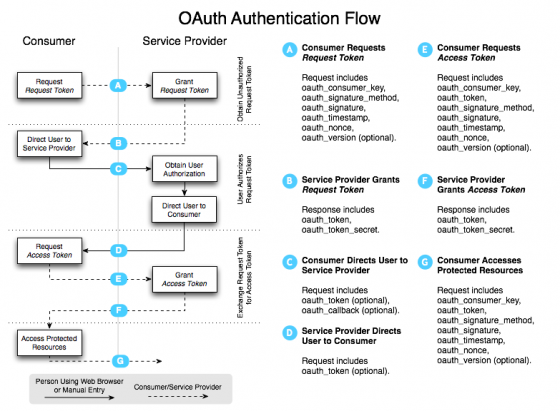
As you can see, the documentation frequently uses the terms defined above.
If that flow diagram seems a little overwhelming, don’t sweat it. I have a simplified version just for you (featuring a stoner Twitter user and a Twitter bird with a Thyroid problem), specifically with respect to the bits you need to know to set up your first Twitter application with OAuth. The other things OAuth does are important, but this is the stuff that directly impacts you, and that you need to grok to get started with your app.
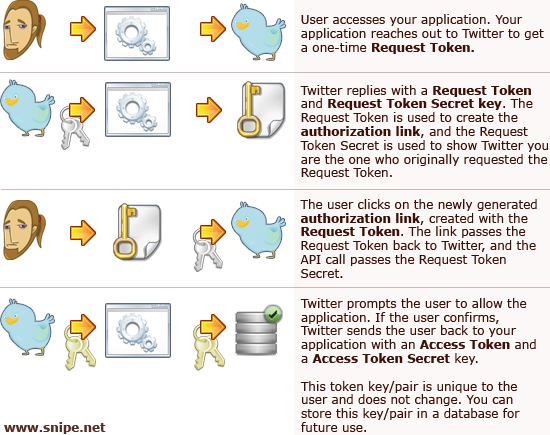
 I was absurdly and inexplicably tempted to randomly throw a Boba Fett icon into that diagram, but was afraid it might confuse people. That said, I have poor impulse control, so here’s a random Boba Fett icon, so I can sleep tonight. As my friend Jason Ramboz says, “Step 4, Boba Fett freezes the key in carbonite for transport.”
Moving on.
Now that you’ve got a good idea of how the basics of OAuth work, you’re ready to get started with Abraham’s great Twitter OAuth library. He does provide an example script in the downloadable code, but it might be confusing for people just starting out.
Getting Started – Registering Your Application with Twitter
Before you even start mucking around in any code, you have to register your new application with Twitter. You’ll need a name and url for your application in order to register it, and you’ll need to define a callback url. The callback url is the full url of the page Twitter should send the user to after it’s done authenticating. This file can be named anything you want, but make sure the one you create on your server matches the one you register with Twitter. All of these details can be changed later if you change your mind or need to update something.
Once you’ve registered your application, Twitter will issue you a Consumer Key and a Consumer Secret for your new app. You’ll need these to get your sample code from the Twitter OAuth library working. As you can probably tell by the name, your Consumer Secret should remain private and you should never give it out to anyone. It’s used in your code so that Twitter can identify your application when you’re making API calls.
By forcing you to send your consumer key and secret with your API calls, Twitter is able to determine which application is sending the API calls, and can verify that the Twitter user you are attempting to send API requests on behalf of has actually authorized your application to access their account. If the user decides they no longer want to allow your application, they can edit their allowed application preferences and your application will no longer be able to make API calls on their behalf.
You can access a list of all of the applications you have registered with Twitter – and links to edit their details or view the consumer key and consumer secret – by going to your oauth clients page on Twitter.
The Twitter OAuth PHP Library Code
You’ve got your consumer keys from Twitter, so now you’re ready to download Abraham’s Twitter OAuth library code. You can pull the code from http://github.com/abraham/twitteroauth. As I mentioned, he does provide an example script, but there’s not a lot of explanation given to it, so some people might be a little confused by it if its their first foray into Twitter applications with OAuth. We’re going to whip up something a little more straightforward and simple, so you can easily modify it to suit your needs.
Unpack/unzip the archive you downloaded from github. You’ll see the two main files, OAuth.php and twitterOAuth.php are in the top level directory, and there is a directory called ‘example’, that has the included example script.
For our example, we’re going to put the two OAuth files into a directory called ‘twitterOAuth’, which is a sub-directory of where the index.php and callback.php files live. As you may have guessed, the callback.php file is the one we’ve registered with Twitter as being our callback url. We’ll keep common configuration options such as the consumer key and consumer secret, and database credentials in a config.php file.
$consumer_key = ‘xxhjgxhjxhhjgxjhjxgjyx768678xx’;
/* Consumer Secret from twitter */
$consumer_secret = ‘jhgjdfgfgjhj76jgjgjhxxxjhxxx’;
[/php]
Now we create the index.php file, which will be used to generate the authentication link, inviting users to authorize and login using Twitter.
/* Destroy the session if the user is logging out */
if ((isset($_GET[‘logout’])) && ($_GET[‘logout’]==’true’)) {
session_destroy();
session_unset();
}
/* Include the config file */
require_once(‘config.php’);
/* include the twitter OAuth library files */
require_once(‘twitterOAuth/twitterOAuth.php’);
require_once(‘twitterOAuth/OAuth.php’);
/*
Create a new TwitterOAuth object, and then
get a request token. The request token will be used
to build the link the user will use to authorize the
application.
You should probably use a try/catch here to handle errors gracefully
*/
$to = new TwitterOAuth($consumer_key, $consumer_secret);
$tok = $to->getRequestToken();
$request_link = $to->getAuthorizeURL($tok);
/*
Save tokens for later – we need these on the callback page to ask for the
access tokens
*/
$_SESSION[‘oauth_request_token’] = $token = $tok[‘oauth_token’];
$_SESSION[‘oauth_request_token_secret’] = $tok[‘oauth_token_secret’];
echo ‘
login using twitter | ‘;
echo ‘Logout
‘;
[/sourcecode]
The callback.php file is the script that Twitter sends the user back to after authenticating. Here you’ll probably want to set some cookies, store some user data in the database, and start letting the user do whatever it is your application does.
/* Include the config file */
require_once(‘config.php’);
/* include the twitter OAuth library files */
require_once(‘twitterOAuth/twitterOAuth.php’);
require_once(‘twitterOAuth/OAuth.php’);
/* check for an auth access token. If there’s no auth token set, go ahead and fetch one from Twitter,
* using the API call. */
if ((!isset($_SESSION[‘oauth_access_token’])) || ($_SESSION[‘oauth_access_token’])==”) {
$to = new TwitterOAuth($consumer_key, $consumer_secret, $_SESSION[‘oauth_request_token’], $_SESSION[‘oauth_request_token_secret’]);
$tok = $to->getAccessToken();
/* Save tokens for later – might be wise to
* store the oauth_token and secret in a database, and
* only store the oauth_token in a cookie or session for security purposes */
$_SESSION[‘oauth_access_token’] = $token = $tok[‘oauth_token’];
$_SESSION[‘oauth_access_token_secret’] = $tok[‘oauth_token_secret’];
}
/* Connect to the Twitter API */
$to = new TwitterOAuth($consumer_key, $consumer_secret, $_SESSION[‘oauth_access_token’], $_SESSION[‘oauth_access_token_secret’]);
$content = $to->OAuthRequest(‘https://twitter.com/account/verify_credentials.xml’, array(), ‘GET’);
$user = simplexml_load_string($content);
if ($user->screen_name!=”) {
echo ‘
;
echo '</pre>
<p>‘;[/php]
<p><strong>So we’ve connected to Twitter’s API to authenticate a session on behalf of the user, and then put the XML response of the user’s information into an array called $user, using <a href=) SimpleXML. Using SimpleXML, we can call up any node values within the XML using $user->field_name, as you can see above.
SimpleXML. Using SimpleXML, we can call up any node values within the XML using $user->field_name, as you can see above.
I’ve included a print_r($user) so that you can see the full details of the array being returned, but you’ll obviously want to comment that out in your live code.
The output array will contain the following fields:
[source lang=’html’]SimpleXMLElement Object(
[id] => 14246782
[name] => snipe
[screen_name] => snipeyhead
[location] => New York
[description] => Codemonkey, designer, author, speaker, blogger, swordfighter, Warcrafter, sarcasticgeek, scuba diver, blacksmith, crimefighter, Mentat, MBTI: ENTP, Totally NSFW
[profile_image_url] => http://s3.amazonaws.com/twitter_production/profile_images/303658881/Photo_4-rcrop2_normal.jpg
[url] => http://www.snipe.net
[protected] => false
[followers_count] => 4224
[profile_background_color] => 340100
[profile_text_color] => 3C3940
[profile_link_color] => 6C2125
[profile_sidebar_fill_color] => AEA797
[profile_sidebar_border_color] => 943A39
[friends_count] => 3756
[created_at] => Fri Mar 28 20:37:35 +0000 2008
[favourites_count] => 314
[utc_offset] => 12600
[time_zone] => Tehran
[profile_background_image_url] => http://s3.amazonaws.com/twitter_production/profile_background_images/22127710/twitterback2.jpg
[profile_background_tile] => false
[statuses_count] => 20570
[notifications] => false
[verified] => false
[following] => false
[status] => SimpleXMLElement Object
(
[created_at] => Mon Jul 27 01:50:36 +0000 2009
[id] => 2862508774
[text] => @elazar In case a name gets blocked/banned – when its reinstated (by someone claiming it, not spamming), it has a new ID#
[source] => Tweetie
[truncated] => false
[in_reply_to_status_id] => 2860170987
[in_reply_to_user_id] => 9105122
[favorited] => false
[in_reply_to_screen_name] => elazar
)
)[/sourcecode]
We’re not actually doing anything magical here yet, since that information is all available publicly via a user’s RSS feed, but the key line of code you want to look at in callback.php is this one:
[source lang=’php’]$content = $to->OAuthRequest(‘https://twitter.com/account/verify_credentials.xml’, array(), ‘GET’);[/source]The OAuthRequest function is what actually sends the requests to the API, so you’ll be using this a lot. In the example above, all we were doing was getting the access tokens, but you’ll use OAuthRequest for just about everything else, too. For example, to send a Direct Message in Twitter, you’d use:
[source lang=’php’] $params = array(‘user’ => ‘username’, ‘text’ => ‘this is a test message’);$do_dm = simplexml_load_string($to->OAuthRequest(‘http://twitter.com/direct_messages/new.xml’, $params, ‘POST’));[/source]
To block a user, you’d do:
[source lang=’php’]$doblock = simplexml_load_string($to->OAuthRequest(‘http://twitter.com/blocks/create/username.xml’, array(), ‘POST’));[/source]To send a status update:
[source lang=’php’]$content = simplexml_load_string($to->OAuthRequest(‘https://twitter.com/statuses/update.xml’, array(‘status’ => ‘Test OAuth update. #testoauth’), ‘POST’));[/source]
Important! Storing user IDs
Whenever you’re storing Twitter IDs in a database, be sure to store the Twitter ID number in addition to (or instead of) the Twitter username. While it may seem obvious to use a numeric value over a mixed alphanumeric, Twitter doesn’t expose user’s ID numbers without a little digging, so it might be easy to forget that they exist.
There are two main reasons why using the numeric ID is critical:
- Users can change their Twitter usernames. If they did this, your entire database could potentially be screwed up, since username key you’re looking for won’t match any longer.
- If an account has been suspended due to spam or imposters, it can potentially be available for registration again after a grace period. If a spammer had a username before, and then a legitimate user reclaimed it, your records could potentially have old data from the previous user’s account.
The second point above became crystal clear while working on DoucheNuker.Com. If a user account was suspended due to spamming, and then a legitimate user took it over, that new, legitimate user could potentially be considered a spammer in our database if we didn’t store (and query against) the ID number, too. When a username is reissued or reclaimed, it gets a new user ID number, so as long as you store and use the Twitter user’s ID number, your database can remain agnostic to name changes and reissues.
You’ll note in the Twitter REST API documentation that almost all API requests allow the option of using the username or the user ID, and some actually require the user ID and cannot be used with just a username.
Important! Error Messages and Throttling
You do not want to authenticate against Twitter every single time you load the page, but will instead want to store the request tokens in a database or session so that you don’t keep hammering Twitter’s API each time the page loads.
Remember that the although the Request Token you used to generate the authorization link will change often, a user’s Access Token and Access Secret Token do not, so you can safely store those in a database and use those instead of re-validating every time.
As of right now, Twitter is throttling validation requests to 15 per Twitter account per hour. This was implemented to improve Twitter’s security and make it harder for bad guys to brute force their way into someone else’s Twitter account. There is discussion about rolling this change back, or only throttling to 15 failed attempts per hour, but as of this moment, if you attempt to authenticate more than 15 times in an hour, you’ll get a message that says “Too many requests in this time period. Try again later.” There is no way around this message for now, so plan your application accordingly.
This limit is entirely separate from the Twitter Rate Limit that throttles the number of times you can hit the API. Whitelisting your account and IP address with Twitter will NOT circumvent this rate limit, so make sure you design your app in a smart way that will not attempt to authenticate more than absolutely necessary.
The default rate limit for calls to the REST API is 150 requests per hour. The REST API does account- and IP-based rate limiting. Authenticated API calls are charged to the authenticating user’s limit while unauthenticated API calls are deducted from the calling IP address’ allotment.
You’ll notice in all of API requests, we’re using SimpleXML to capture the value of the XML that’s returned. We need to do this in order to make sure we’re capturing any error messages that Twitter returns to us. Without error messages, when stuff doesn’t work as expected, we’re flying completely blind. Always make sure to plan your application in a way that handles errors intelligently. Let’s take a look at the API call to send a Direct Message again:
[source lang=’php’]$params = array(‘user’ => ‘username’, ‘text’ => ‘this is a test message’);$do_dm = simplexml_load_string($to->OAuthRequest(‘http://twitter.com/direct_messages/new.xml’, $params, ‘POST’));
/* Check for an error response from Twitter */
if ($do_dm->error!=”) {
echo ‘
ERROR: ‘.$do_dm->error.’
‘;
}[/source]
Now we’re capturing the error returned from Twitter, and can handle this appropriately with our users. The error might be indicating that the user cannot send a Direct Message to someone they’re not following. Or there might be something else amiss – so you’ll want to make provisions in your script to help the user understand why something might not be working.
And that’s honestly all there is to it. Now that you’ve got the OAuthRequest function sussed, you just need to check with the Twitter API Wiki to determine the correct urls and parameters to send, based on what you’re trying to do.
I have to say, having worked with a LOT of APIs, including Facebook, Amazon, and at least a half-dozen others, Twitter’s API is actually the most well-documented and simplest to use. Surprising, really, since Facebook and Amazon have actual business models, so you’d think they’d invest just an iota of time into documenting their shit. I’ve gone into long tirades here on my blog about how miserably awful the Facebook API documentation is, and Amazon’s API is probably 10x worse. Twitter’s API is, overall, pretty accurate and up to date. If its your first foray into writing an application with an API, I think Twitter is actually a good place to start – before you graduate to Facebook and wish you were dead.
Recap – Important Links
- Register your application with Twitter
- List of all of your registered apps on Twitter
- Twitter API Documentation
- Twitter API Rate Limiting Documentation
- Download & Docs for Abraham’s OAuth PHP library
- OAuth official website
And that’s all there is to it. Please use your new powers for good and not evil. No annoying games, no “increase your followers” services, etc. If you have any questions, leave ’em in the comments.


