Snipe.Net - Geeky Stuff
Twitter
Currently: @kynapple Let me make a few calls ;) in reply to kynapple 49 secs ago

Static FBML: Not Every Facebook Fan Page Needs An Application

You don’t always need a custom application for your Facebook fan page to look amazing. Save yourself time and money by using the Static FBML application instead.

If you’ve played around with Facebook pages at all, you know that layout-wise, you don’t have a lot of options. It’s one of the reasons some people prefer MySpace, where you can have custom font colors and sizes and custom backgrounds, and one of the reasons I personally have to be paid to logon to MySpace.

A current misconception seems to be that in order to have any custom content or display elements in a Facebook page, such as a custom tab or profile box with a specific promotion or branded look and feel, you need a Facebook application.

This is not true at all, and hopefully, I can save you a lot of time, headache and money by letting you in on a little secret.

There is a Facebook application called Static FBML that could potentially save you a lot of hassle. This application was put out by Facebook, and it allows you to create custom HTML/FBML boxes and tabs on your Facebook fan page.

At its most sophisticated, the Static FBML app can allow you pull FBML elements into a profile box, boxes tab box, or an entire tab, At its most basic, you can use it to create custom HTML boxes in those same places that you can completely design and brand to your liking.

For example, I recently worked on the Facebook fan page for Sunkist Soda. While we do use a custom application to display recent Twitter posts by the Sunkist Soda Twitter account, there is an entire branded tab that is simple HTML. The “Team” tab on this page isn’t a custom application – it’s simply a Static FBML box with custom HTML.
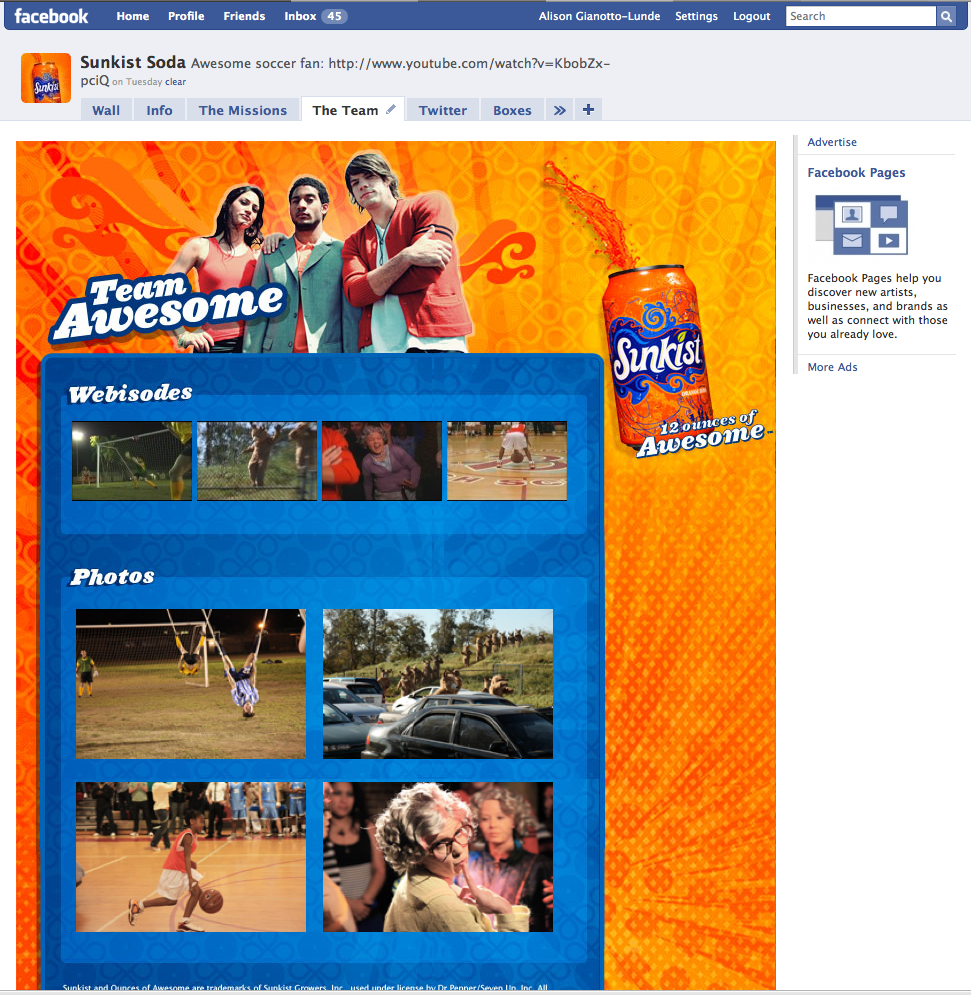
Sunkist Soda Fan Page - Static FBML Box

We also use a Static FBML box on the main page’s profile, with a small box that includes promotions for various campaigns.

The general rule of thumb is – if you don’t actually need to use any scripted languages like PHP or ASP, and you don’t need to access the API to get the user’s information for any reason, you probably don’t actually need an application. In our Sunkist Soda tab example, we’re not accessing the API, and we’re not doing anything database-related. We’re just displaying a nice background image and some thumbnails that link out.

The end result is a beautifully designed and branded tab or box that looks exactly the way you want it to look. When you need to update the content, just login to Facebook and make your changes in the Static FBML box.

Times When Static FBML is Enough

As I mentioned, if you’re not accessing the API and you’re not doing anything fancy, Static FBML will usually cut it. Also bear in mind that you can use Mock Ajax and FBJS in these boxes, so you could actually have a fairly dynamic tab/box, including expandable onclick elements, etc – without an application.

It basically behaves like a stand-alone webpage within your Facebook fan page.

Some suggestions on where beefing up your fan page with Static FBML can really help:

  • Promotional text/graphics that click through your Facebook application or website
  • HTML version of your latest newsletter in its own tab (with signup box!)
  • A shortcut to important links on your website
  • Any other place where you want a custom look and feel within your fan page

Figuring this out sooner rather than later can save you thousands of dollars if you’re considering hiring someone to help you. A contractor is going to have a vested interest in not mentioning this option to you, because it turns a specialized, several-thousand-dollar project into something any jackhole who knows basic HTML can handle themselves.

Also check out:

If you think this article kicked ass, subscribe to the RSS feed or follow me on Twitter! Share with your friends, or leave a comment below (or better still, do both!) My entire concept of self-worth is in your hands, so that makes you kind of a big deal. Srsly.

This entry was posted on Friday, June 26th, 2009 at 5:31 am and is filed under Featured, Web Development. You can follow any responses to this entry through the RSS 2.0 feed. You can leave a response, or trackback from your own site.

View Comments to “Static FBML: Not Every Facebook Fan Page Needs An Application”

  1. Tommy
    Jul 1st

    Thanks for the information. This is the one I am looking for. How long you took to create the Sunkist Soda page? How do you put the promotions and video on the left hard side? I cannot find any settings to do it.

    Thanks.

  2. Jul 1st

    I didn’t do the graphic design – no idea how long it took the designers to do it, but it has the same look and feel as many of the things we were doing, its really just a modification of existing artwork we had already developed.

    The video is not embedded – its just HTML thumbnails that link out to YouTube. If we had embedded the video, the size of rhe player would be tiny, accounting for the video controls.

    That said, the Static FBML box supports the fb:swf tags, so that would be your easiest bet:
    http://wiki.developers.facebook.com/index.php/Fb:swf

  3. Tommy
    Jul 1st

    Thanks snipe. Some more questions.
    -How come you only have one advertisement on the right hand side and my facebook page has more than that?
    -I assume The Mission tab is using graphic on the top part and some background and html on the bottom. How do you capture the submitted information? Using another web site and database to store the data?

    Thanks.

  4. Jul 1st

    Re: ads – no idea. I have ad blocker software set up, so it might be blocking other ads, or maybe the number of ads is randomized. You’d have to ask Facebook.

    Re: the Mission tab – that’s a Flash widget, so the Flash captures and writes the data to an external database.

  5. Becks
    Jul 2nd

    Great post. Regarding The “team” tab, how do you make a simple static FMBL box into its own tab? Thanks man.

  6. Jul 2nd

    Hi Becks – you just do that through your Edit Page screen in Facebook. Find the FBML box you want to make a tab, click on the pencil icon to the right, and click on Application Settings.

    http://www.flickr.com/photos/snipeyhead/3681686973/
    http://www.flickr.com/photos/snipeyhead/3682500768/

  7. Tommy
    Jul 2nd

    Snipe, I am totally new to facebook development, please bear with me.
    The flash widget that you mentioned, did you develop in house or some ‘apps’ that I can add to the page?

    Thanks

  8. Becks
    Jul 2nd

    Thanks for the help, I’m quite new facebook applications. Is it possible to keep it as a box and move it to the fan pages main screen?

  9. Jul 3rd

    @Tommy – It was developed by a third-party specifically for Sunkist

    @Becks – You can have a small profile box on the same page, but its very narrow. What you may want to do instead is make it a tab and then specify in the page preferences that the tab should be the default one that loads when someone goes to the page.

  10. Becks
    Jul 7th

    Thanks again Tommy. Where is the page preferences?


    Becks

  11. Jul 7th

    Becks – on the page itself, in the top left, just below the page profile image, you should see a link that says “Edit page” if you are a page administrator. That will take you to your page preferences options.

  12. Becks
    Jul 7th

    Hey Snipe. Sorry to keep bothering you, but does this mean that I can’t have a small FBML box on the main page next to the wall? The only option I see under preferences would be to make the default tab another section entirely.

  13. Jul 7th

    Becks – as I said, you CAN have an FBML box on your front page, below the friend preview list in that left column. When you create the FBML box, you just want to set it as a profile box instead of adding it to Boxes or making it a Tab.

  14. Becks
    Jul 7th

    The application I am using ‘Static FBML’ does not give me that as an option? Eeek

  15. Jul 7th

    I believe you add it as a box, and then on the boxes tab move it to “profile” or “wall”

  16. Becks
    Jul 7th

    Now I get it. Awesome.

  17. Jul 7th

    Great post Snipe! The comments are very handy too. Any links to getting started with FBML/HTML? Even just some samples to see how it is done.
    .-= Chris´s last blog ..070509 =-.

  18. Jul 7th

    Hi Chris – The amount of FBML needed in these types of boxes is very limited. FBML is really used more in actual applications, since it helps tie-into the API. Since you won’t be able to tie-into the API, you’d only need it for displaying stuff like flash, videos, etc – if you needed it at all. I believe all of the Sunkist stuff was done without a lick of FBML. That said, the Facebook API wiki has decent docs on FBML here: http://wiki.developers.facebook.com/index.php/FBML – but bear in mind API-related calls may not work here, since each user has to authorize information about them to be used on an app-by-app basis.

    For HTML/CSS tutorials, you can just google them – there are literally thousands of great ones out there. A good starting point is the World Wide Web Consortium tutorial tho: http://www.w3.org/Style/Examples/011/firstcss

  19. Jul 7th

    Thanks Snipe. The wiki site is perfect. I’m familiar with HTML/CSS, so I was just looking for what can be used in Facebook. I found that here http://wiki.developers.facebook.com/index.php/Allowed_FBML_and_HTML_Tags

    Thanks again for your help and keep up the great work.

  20. Matt
    Jul 8th

    Hey Snipe,
    Very helpful post.

    Question for you:

    Do you know of any other top notch Pages?
    How do you think Harley embedded the video in their “Women Riders” tab?
    http://tinyurl.com/lf8h4x

    Their main page under “Harley – Davidson” is quite good as well.

  21. Jul 8th

    Hi Matt – they embedded the video by using the fbml:swf tag in the Static FBML box: http://wiki.developers.facebook.com/index.php/Fb:swf

    It’s very easy – the wiki outlines it pretty well.

    That page is pretty to look at, but really its just just a nice HTML page with some video embedded. It’s the design that’s striking, because it was its a nice looking design that a graphic designer clearly spent lots of time working on. The meat and potatoes of making it work is just HTML and that little FBML swf tag.

    You can see what Facebook considered to be top notch pages by checking out this article about their Facebook Blue Ribbon, which they gave to Vitamin Water (another project I worked on), Starbucks and H&M. The Vitamin Water page isn’t as elaborate as it was, and it used apps (that I wrote), but they consider pages top notch if they provide lots of ways for users to interact, which is generally done through apps.
    http://www.insidefacebook.com/2009/06/11/facebook-recognizes-starbucks-hm-and-vitamin-water-for-innovative-pages/

  22. Matt
    Jul 8th

    Thanks!

  23. Jul 13th

    Hey Snipe,
    I tried the static FBML app and it didn’t work on facebook and it seems like numerous people are having the same problem. I added the app to my page and then went to edit it and it couldn’t be found nor could I find it to delete it and re-add it.

    This is what I ultimately wanted to do, I want to create an area like pazza hut did on the left side where they have long banners.
    http://www.facebook.com/PizzaHut?v=wall&viewas=794192998

    How can I do this?
    Thank you :)

  24. Facebook User
    Jul 15th

    Hi Snipe, great article.

    I’ve been trying to find out how to add a ‘suggest friends’ box in my fbml tab but can’t for the life of me figure it out.

    Like the one on this page: http://www.facebook.com/pages/Great-Hudson-River-Revival-2009/50496617538#/pages/Great-Hudson-River-Revival-2009/50496617538?v=app_10339498918&viewas=1424766892

    Any ideas?

  25. Fred
    Jul 16th

    I can’t seem to even get my background image to display in the staticFBML I can get links and images to show, but not a background…

    Any idea what I’m doing that’s so foolish?

  26. Jul 16th

    Are you using tables or CSS divs? If you’re using divs (which you should be), you have to set a height to the div as well. Other than that, I can’t think of anything off the top of my head without seeing the code.

  27. Jul 16th

    @Facebook User – how are you trying to set up the invite page? What code are you using int he FBML box, I mean?

  28. puneet
    Jul 17th

    hi,

    very informative article.

    how can i detect that a user clicking on a tab on a fan page is a fan of the page or not and display the contents of tab based on that information similar to what vh1 has done here http://www.facebook.com/s.php?init=q&q=vh1&ref=ts#/VH1.tv?ref=s

  29. Jul 17th

    First of all, Congratulations for your carrier.
    Second, this articles denotes that you are really commited to share your knowledge, great deal!
    I will try to implement it to a FaceBook proyect that a client has ordered me.
    But I preffer to contract you to develop something similar (Twitter, form and campaigns tabs) in my FB site.

  30. Jul 22nd

    @puneet – you can use the Pages.isFan API call if you’re creating an actual application:
    http://wiki.developers.facebook.com/index.php/Pages.isFan

    If you’re just using an FBML box, not your own application, you can use the FBML tag visible-to-connection:
    http://wiki.developers.facebook.com/index.php/Fb:visible-to-connection

  31. Jul 23rd

    Quick question. I have a static FBML application that I can add to a tab on the fan page, but it doesn’t have the option to add it as a box–what do I need to do to get it to work? The page is here: http://www.facebook.com/home.php?#/BestWestern?v=wall&viewas=1046181173 and the tab is the “Find a Hotel” tab.

  32. Jul 23rd

    @plaidpony – Have you set fb:wide and/or fb:narrow and then called setFBML in your code? Would look something like this, assuming $fbml is the variable you’re keeping all of your out in (also the FBML brackets are replaced by braces for this example so WordPress won’t eat them:

    $wide_fbml = ‘{fb:wide}’;
    $wide_fbml = .= ‘My wide box content’;
    $wide_fbml = ‘{/fb:wide}’;

    $narrow_fbml .= ‘{fb:narrow}’;
    $narrow_fbml = ‘My narrow box content’;
    $narrow_fbml = ‘{/fb:narrow}’;

    $all_fbml = $wide_fbml.$narrow_fbml;

    $facebook->api_client->profile_setFBML(NULL, $Page_ID, $all_fbml, NULL, NULL, $narrow_fbml);

    For reference:
    http://wiki.developers.facebook.com/index.php/Fb:wide
    http://wiki.developers.facebook.com/index.php/Fb:narrow
    http://wiki.developers.facebook.com/index.php/Profile.setFBML

  33. Jul 23rd

    plaidpony,
    I just came across the same problem but I managed to figure it out.

    Make sure you have “add to MY page” in Static FBML
    Go to the profile page for your application
    And Edit Application (top left, right below go to application)
    FBML – FBML (the little pen)
    application setting
    and you will find the setting for box and tab

  34. Jul 23rd

    @plaidpony – I’m so sorry – I misread your original comment, and thought you were NOT using Static FBML, but were instead using a custom built application. Ignore my comment – that will only work in a custom application. My apologies.

    tksham is correct on where to find the settings for box and tab.

  35. Jul 23rd

    When I go to the application profile page and click “Edit Application”, my only options are “Application Information”, “Application Settings”, “Wall Settings”, “Mobile”, “Discussion Boards, “Reviews”, and “More Applications”–there is nothing that is titled “FBML” on the page.

  36. Jul 23rd

    And what do you see when you click on Application Settings?

  37. Jul 23rd

    plaidpony,
    that’s strange, have you add the pages to your app in the FBML app?
    http://www.facebook.com/apps/application.php?id=4949752878
    there is “add to My page” near the app logo

    snipe,
    I would like to know how to create a custom application for embedding into company’s page, would you please share any ideas /post / tutorials with us?
    .-= tksham´s last blog ..How innovation … =-.

  38. Jul 23rd

    @tksham – I have a few articles on writing facebook apps, but haven’t had time to put up a tutorial on writing one from scratch, start to finish yet:

    http://www.snipe.net/2008/09/planning-a-facebook-application/
    http://www.snipe.net/2008/12/planning-a-facebook-application-part-two/

    There are several good tutorials out there already though – just check Google:
    http://tinyurl.com/kqm2r4

  39. Jul 23rd

    @snipe,

    I am sorry to bother you. (I know you are spending your own time to share with us, it is very kind of you.)

    Thanks to your posts, I figure it out that I missed typing the URL in the tab URL…that’s why I cannot choose to add the tab in my page.

    But the problem now is that I cannot set the Tab URL correctly

    my app is stored in xxx.com/facebook_dev
    and if I set the Tab URL to tab
    it will return

    Errors while loading page from application
    Runtime errors:

    fb:redirect: redirect forbidden by flavor TabFBMLFlavor

    and if I set the Tab URL to index.php

    Errors while loading page from application

    The URL http://xxx.com/facebook_devindex.php returned a 404 Not Found error.

    Any ideas?
    .-= tksham´s last blog ..How innovation … =-.

  40. Jul 23rd

    Hi tksham – I actually wrote about this issue here:
    http://www.snipe.net/2009/04/facebook-application-tabs/

  41. Jul 24th

    I feel like such a dork–another developer already had some Static FBML boxes on the page–they were labeled as [box name] – FBML and I didn’t realize that those were the Static FBML application boxes–I was specifically looking for FBML – FBML. I was able to add another box successfully. Thanks for the help!

  42. Becks
    Jul 29th

    Do you know if FBML boxes support image maps? The map in my html does not work when I use it on facebook. Thanks.

  43. Jul 29th

    @Becks – I believe so, but I usually CSS to make imagemaps, not HTML. Can you use pastebin.com or something similar to show me the code you’re using?

  44. Becks
    Jul 29th

    For some reason pastebin is labeling my code as spam?

  45. Becks
    Jul 29th

  46. Jul 29th

    @Becks – okay, well two things off the top of my head:

    1) Skip the html/body tags
    2) Your imagemap image is a link itself:

    {a href=”http://s722.photobucket.com/albums/ww221/beckssphotobucket/?action=view&current=FinalFBTabSmall.jpg” target=”_blank”}
    {img src=”http://i722.photobucket.com/albums/ww221/beckssphotobucket/FinalFBTabSmall.jpg” border=”0″ alt=”LTM” width=”575″ height=”615″
    usemap=”#map”}{/a}

    If the image is an imagemap, it shouldn’t have a link surrounding it, since the href locations are defined by the map coords.

  47. Becks
    Jul 29th

    Hmmm. It is still now working. Thanks for the try.

  48. Jul 29th

    I’ll try to take a stab tonight when I get home from work, and see if I can get it working. Otherwise you might try a CSS imagemap instead. I don’t remember having any issues with FBML boxes and imagemaps, but it’s been a while since I used an imagemap in an FBML box.

  49. cocopop
    Jul 29th

    Hi there,

    Really good article. Just a quick question. Is it possible to add static FBML boxes inside a static FBML tab?

    If yes, how?

    Thanks.

  50. Jul 29th

    @cocpop – well, no – but you wouldn’t need to. If you want the appearance of separate boxes within a static FBML tab, you would just design your HTML/FBML within that static FBML box that you’re using as a tab to give the appearance of being multiple boxes. You can’t put an app inside an app, and the static FBML box is an app.

Pingbacks

  1. [...] Not Every Facebook Fan Page Needs an Application – A great article on creating a custom facebook fan page with the FBML application. [...]

  2. [...] with some step by step instructions 20bits gives you an introduction to FBML Snipe tells you when FBML is all you need Duct Tape Marketing shows you who small business can use Facebook Pages and FBML Inside Propeller [...]

  3. [...] Static FBML: Not Every Facebook Fan Page Needs An Application by Snipe.Net [...]

  4. [...] http://www.snipe.net/2009/06/fb-fanpages-fbml-box/ Possibly related posts: (automatically generated)5 Tips To Improve Your Facebook Business Page500 facebook fans tofanpage glitch confirms facebook does keep all your stuff foreveriTunes has a fan page on Facebook [...]

  5. [...] within the “Discussions”  box of the FBML Page if you get stuck.  Sunkist has a great example of a customized FBML Page for their “Sunkist Team” if you are looking for a few creative [...]

  6. [...] Static FBML: Not Every Facebook Fan Page Needs and Application [...]

  7. [...] article at http://www.snipe.net/2009/06/fb-fanpages-fbml-box/ – Static FBML: Not every face book fan page needs an application! Possibly related posts: [...]

  8. [...] Static FBML – Not every Fan Page needs an Application [...]

  9. [...] has also utilized Facebook’s Static FBML application to create a very nice welcome page. The page currently has a special “Facebook [...]

  10. [...] use FBML if you wanna build pages within the Facebook platform, such as a Fan Page. We found an interesting article which explains we don’t always have to use the full FBML language to build our pages. If [...]

  11. [...] application development, displaying fan-only content and creating an interface for a Facebook page.Static FBML: Not Every Facebook Fan Page Needs an Application In this tutorial the well-known blogger Alison Gianotto walks you through what a Static FBML is and [...]

  12. [...] Static FBML: Not Every Facebook Fan Page Needs an Application In this tutorial the well-known blogger Alison Gianotto walks you through what a Static FBML is and why it’s sometimes quite enough to create an attractive and efficient Facebook fan page. [...]

  13. [...] Static FBML: Not Every Facebook Fan Page Needs an Application In this tutorial the well-known blogger Alison Gianotto walks you through what a Static FBML is and why it’s sometimes quite enough to create an attractive and efficient Facebook fan page. [...]

  14. [...] Static FBML: Not Every Facebook Fan Page Needs an Application In this tutorial the well-known blogger Alison Gianotto walks you through what a Static FBML is and why it’s sometimes quite enough to create an attractive and efficient Facebook fan page. [...]

  15. [...] Static FBML: Not Every Facebook Fan Page Needs an Application In this tutorial the well-known blogger Alison Gianotto walks you through what a Static FBML is and why it’s sometimes quite enough to create an attractive and efficient Facebook fan page. [...]

  16. [...] Static FBML: Not Every Facebook Fan Page Needs an Application In this tutorial the well-known blogger Alison Gianotto walks you through what a Static FBML is and why it’s sometimes quite enough to create an attractive and efficient Facebook fan page. [...]

  17. [...] Static FBML: Not Every Facebook Fan Page Needs an Application In this tutorial the well-known blogger Alison Gianotto walks you through what a Static FBML is and why it’s sometimes quite enough to create an attractive and efficient Facebook fan page. [...]

  18. [...] Static FBML: Non chaque page Fan Facebook besoin d’une application Dans ce tutoriel, le célèbre blogueur Alison Gianotto vous guide à travers ce qu’est un FBML statique est et pourquoi il est parfois assez pour créer un attrayant et efficace fan page Facebook. [...]

Leave a Reply

Like this site? Buy me a beer!
blog comments powered by Disqus